Table of Contents
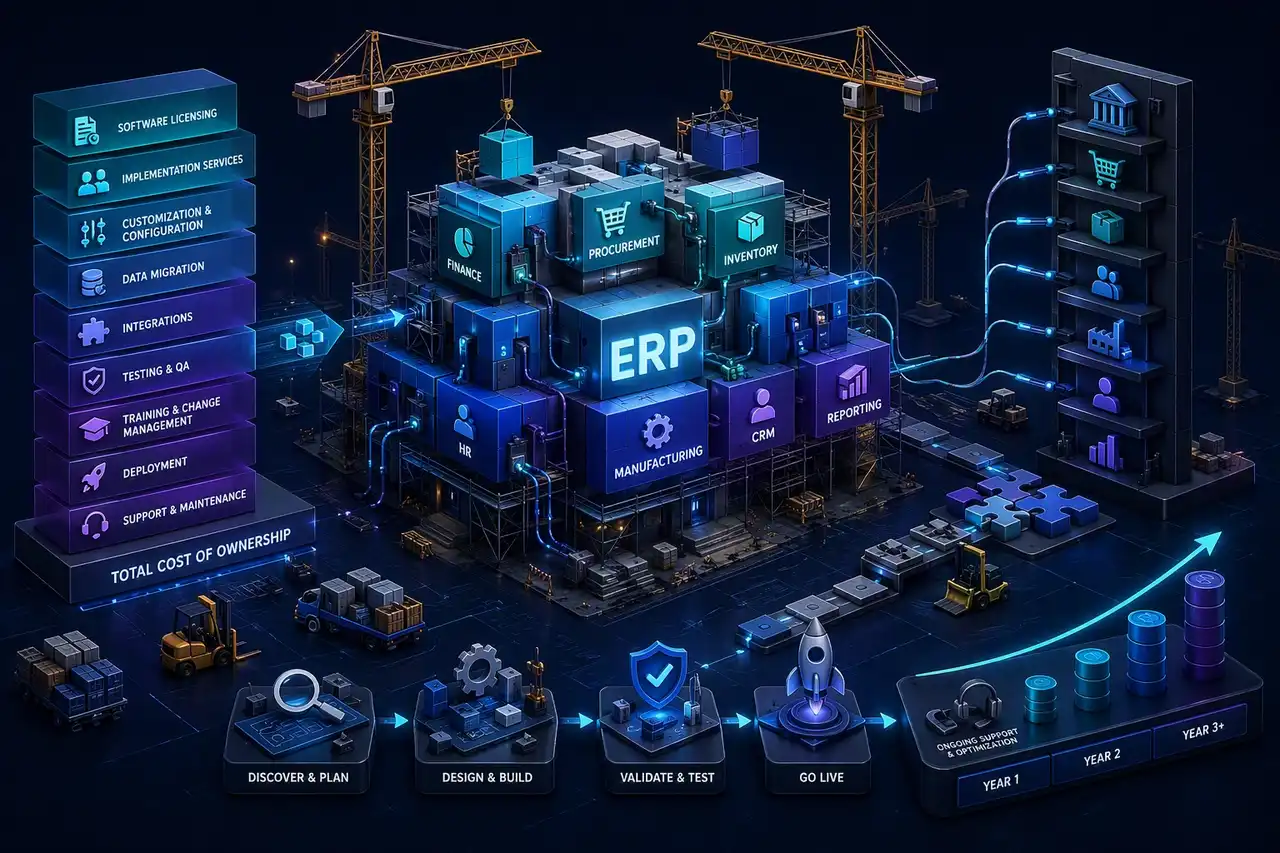
ERP implementation costs can vary widely because the software license is only one part of the budget. A realistic ERP budget must separate software subscription or licensing from the services required to configure the system, migrate data, integrate business tools, train users, manage change, and support the system after launch.
This guide breaks down ERP system implementation costs by company size, deployment model, modules, users, customization, integrations, data migration, and support. It also includes first-year and three-year TCO models to help teams plan beyond the initial go-live.
Key Takeaways
- ERP implementation costs should be separated into software licensing or subscription fees, implementation services, internal labor, support, and ongoing optimization.
- Implementation services often become the largest part of the ERP budget because they include process analysis, configuration, customization, migration, integrations, testing, training, and change management.
- Cloud ERP usually lowers infrastructure ownership, while on-premises ERP can increase hardware, IT administration, upgrade, and maintenance costs.
- Configured commercial ERP can be faster to launch, but custom ERP software may be better when workflows, permissions, integrations, or industry processes do not fit standard systems.
- A realistic ERP budget should include first-year implementation cost and a three-year TCO model covering software, services, support, enhancements, and internal resources.
ERP Implementation Cost at a Glance
| Company / Project Type | Typical First-Year ERP Implementation Cost | Common Scope |
|---|---|---|
| Small business / simple ERP | $25,000–$150,000 | Core finance, inventory, CRM, or simple operations workflows with limited customization. |
| Growing SMB / multi-department ERP | $150,000–$500,000 | Finance, inventory, procurement, sales, reporting, basic integrations, moderate migration. |
| Mid-market ERP implementation | $500,000–$2 million | Multiple departments, custom workflows, integrations, data migration, training, and change management. |
| Enterprise ERP implementation | $2 million–$10 million+ | Multi-entity, multi-region, complex integrations, advanced governance, compliance, and heavy change management. |
| Custom ERP software development | $250,000–$2 million+ | Custom workflows, dashboards, permissions, integrations, reporting, and business-specific modules. |
These ranges are directional planning estimates. ERP implementation costs can be lower or higher depending on users, modules, process complexity, integration needs, data quality, deployment model, compliance requirements, and internal team involvement.
ERP Software Costs vs. ERP Implementation Services
ERP budgets divide into software licensing and professional services. Licensing covers the platform access, while services turn that software into a functional business tool. Organizations often hire a dedicated development team to handle these complex service phases.
| Cost Category | What It Includes | Why It Matters |
|---|---|---|
| Software licensing or subscription | ERP user licenses, modules, cloud subscription, vendor plans. | This is the platform access cost, not the full project cost. |
| Implementation services | Discovery, process mapping, configuration, project management, deployment. | Often one of the largest budget items. |
| Data cleansing and migration | Cleaning, mapping, importing, validating, and reconciling legacy data. | Poor data quality can delay the project and increase cost. |
| Integrations | Connecting ERP with CRM, ecommerce, payroll, WMS, BI, accounting, or legacy systems. | Integration complexity can significantly increase implementation effort. |
| Customization | Custom workflows, fields, dashboards, automations, reports, or approval logic. | Customization improves fit but increases cost and maintenance. |
| Testing and QA | Functional testing, integration testing, UAT, performance testing, regression testing. | Reduces go-live risk and prevents operational disruption. |
| Training and change management | User training, documentation, stakeholder communication, adoption support. | ERP success depends on adoption, not only technical deployment. |
| Post-launch support | Bug fixes, optimization, enhancements, admin support, vendor support. | ERP costs continue after go-live. |
What Drives ERP Implementation Costs?
Several factors shape ERP implementation costs, including the number of users, module scope, process complexity, data migration effort, integration needs, customization, testing, training, and go-live support. Tracking ERP system implementation costs across each phase helps teams avoid budget gaps.
Number of Users
More users typically mean more licenses, more training, more support, and more adoption work. Large user groups can also increase testing needs and role setup effort.
ERP Modules
| Module | Typical Cost Impact | Why |
|---|---|---|
| Finance/accounting | Baseline to moderate | Core ERP module, often required in most implementations. |
| Inventory and warehouse | Moderate to high | Requires stock logic, barcode workflows, locations, and real-time updates. |
| Manufacturing/MRP | High | Requires production planning, BOMs, shop-floor workflows, scheduling, and costing. |
| Procurement | Moderate | Approval workflows, vendor data, purchase orders, and spend controls. |
| CRM/sales | Moderate | Customer records, pipeline, quotes, and sales workflows. |
| HR/payroll | Moderate to high | Sensitive employee data, compliance, payroll rules, and integrations. |
| BI/reporting | Moderate to high | Data modeling, dashboarding, KPIs, and executive reporting. |
| Ecommerce/customer portal | High | Requires external user flows, payments, inventory sync, and security. |
Process Complexity
The more unusual the workflows, approvals, permissions, or business rules, the more effort ERP implementation usually requires. Complex processes often need more analysis, testing, and customization.
Data Cleansing and Migration
Messy legacy data can create delays and add cost. Teams often need to clean, map, validate, and reconcile records before migration.
Integrations
ERP integrations with CRM, ecommerce, payroll, WMS, BI, accounting, or legacy systems can be straightforward or highly complex depending on APIs, middleware, and sync logic.
Customization
Custom workflows, fields, automations, dashboards, and reports improve fit, but they also add build, test, and maintenance effort.
Testing and QA
Testing includes functional testing, integration testing, UAT, performance testing, and regression testing. Strong QA reduces go-live risk.
Training and Change Management
User adoption depends on training, documentation, stakeholder communication, and support. These activities often affect project success as much as the technical work.
Deployment and Go-Live Support
Go-live support, hypercare, troubleshooting, and temporary parallel systems can raise first-year costs, especially when the rollout is phased or complex.
ERP Implementation Cost by Company Size
| Company Size | Typical Scope | First-Year ERP Implementation Cost | Main Cost Drivers |
|---|---|---|---|
| Small business | 10–50 users, 1–3 modules, simple workflows | $25,000–$150,000 | Basic configuration, limited migration, simple reporting. |
| Growing SMB | 50–200 users, 3–6 modules, moderate workflows | $150,000–$500,000 | More users, integrations, data migration, training. |
| Mid-market company | 200–1,000 users, multi-department ERP | $500,000–$2 million | Complex processes, permissions, customization, multiple integrations. |
| Enterprise | 1,000+ users, multi-entity or multi-region | $2 million–$10 million+ | Global rollout, compliance, governance, data migration, change management. |
| Custom ERP build | Varies by product and workflow complexity | $250,000–$2 million+ | Custom modules, architecture, integrations, UX, reporting, support. |
Organization scale affects the deployment complexity. Larger operations often require more governance, data work, integrations, and change management, while smaller teams can usually move with simpler configurations.
Cloud ERP vs. On-Premises ERP vs. Custom ERP Cost
Selecting a deployment model shapes your long-term financial commitments. Teams comparing cloud ERP, on-premises ERP, configured commercial ERP, and custom ERP software should model both first-year cost and ongoing support.
| ERP Approach | Cost Profile | Best For | Cost Risks |
|---|---|---|---|
| Cloud ERP | Subscription-based, lower infrastructure ownership, faster updates. | Teams that want managed infrastructure, faster deployment, and vendor-managed upgrades. | Subscription growth, module add-ons, integration costs, limited customization. |
| On-premises ERP | Higher upfront infrastructure and IT ownership. | Organizations with strict control, legacy environments, or specific regulatory needs. | Hardware, IT staffing, upgrades, security, disaster recovery. |
| Configured commercial ERP | Lower risk than building from scratch, faster if processes fit. | Companies that can adapt to standard workflows. | Customization, integrations, user adoption, vendor lock-in. |
| Custom ERP software | Higher upfront development, more workflow control. | Companies with unique processes, complex permissions, or product-specific workflows. | Scope creep, ongoing maintenance, architecture planning, long-term support. |
First-Year ERP Cost Breakdown
| Cost Item | Typical Share of First-Year Budget | Notes |
|---|---|---|
| Software licensing/subscription | 15–35% | Depends on vendor, users, modules, and contract structure. |
| Implementation services | 25–45% | Discovery, configuration, project management, deployment. |
| Data migration | 5–15% | Higher when legacy data is messy or historical data is migrated. |
| Integrations | 10–25% | Depends on number of systems, APIs, middleware, and sync complexity. |
| Customization | 10–30% | Depends on workflows, automations, reports, permissions, and UX changes. |
| Testing and QA | 5–15% | Includes UAT, integration testing, regression testing, and go-live validation. |
| Training/change management | 5–15% | Documentation, training sessions, super users, adoption support. |
| Post-launch support | 5–15% | Hypercare, bug fixes, optimization, admin support. |
First-year ERP cost = software licensing/subscription + implementation services + data migration + integrations + customization + testing + training + change management + deployment + post-launch support + internal team time.
Three-Year ERP TCO Model
Evaluating long-term viability requires looking beyond initial deployment. According to the ERP Research ERP TCO calculator, ongoing costs continue after go-live.
| Company Size | Year 1 Cost | Year 2 Cost | Year 3 Cost | Estimated 3-Year TCO |
|---|---|---|---|---|
| Small business | $25,000–$150,000 | $15,000–$60,000 | $15,000–$60,000 | $55,000–$270,000 |
| Growing SMB | $150,000–$500,000 | $50,000–$200,000 | $50,000–$200,000 | $250,000–$900,000 |
| Mid-market company | $500,000–$2 million | $150,000–$700,000 | $150,000–$700,000 | $800,000–$3.4 million |
| Enterprise | $2 million–$10 million+ | $750,000–$3 million+ | $750,000–$3 million+ | $3.5 million–$16 million+ |
| Custom ERP software | $250,000–$2 million+ | $75,000–$500,000+ | $75,000–$500,000+ | $400,000–$3 million+ |
Three-year TCO should include subscription/licensing, infrastructure, support, enhancements, integrations, internal admin, retraining, vendor support, and optimization.
Hidden ERP Implementation Costs
Hidden ERP costs can include:
- Internal team time and productivity loss.
- Process redesign workshops.
- Data cleansing before migration.
- Historical data migration.
- Custom reports and dashboards.
- Integration troubleshooting.
- Middleware or API usage fees.
- User acceptance testing.
- Training materials and super-user programs.
- Change management and adoption support.
- Temporary parallel systems during rollout.
- Post-go-live hypercare.
- Vendor support tiers.
- Upgrade and maintenance costs.
- Security, compliance, and audit requirements.
- Additional modules added after initial scope.
- Failed or delayed implementation recovery.
ERP Implementation Cost Calculator
Step 1: Choose deployment approach
- Cloud ERP
- On-premises ERP
- Configured commercial ERP
- Custom ERP software
Step 2: Define scope
- Number of users
- Number of modules
- Number of departments
- Number of locations/entities
Step 3: Score complexity
- Simple: standard workflows, limited integrations, clean data.
- Moderate: multiple departments, several integrations, some customization.
- Complex: multi-entity, regulated workflows, heavy customization, legacy systems.
Step 4: Estimate one-time implementation
Implementation services + migration + integrations + customization + testing + training + deployment.
Step 5: Estimate recurring costs
Software subscription/licensing + support + internal admin + enhancements + infrastructure + vendor support.
Step 6: Add contingency
Add 10–25% contingency depending on data quality, integration complexity, customization, and change management risk.
Use formula: ERP implementation budget = platform cost + services cost + migration cost + integration cost + customization cost + training cost + support cost + internal labor + contingency.
Configured ERP vs. Custom ERP Software Development Cost
When evaluating your options, comparing a configured commercial platform with custom software development cost involves analyzing specific operational needs. Configured commercial ERP is usually faster and lower risk when standard workflows fit. Custom ERP software development may be more appropriate when workflows are unique, external users need custom portals, permissions are complex, standard ERP UX is unsuitable, or licensing becomes too restrictive for large or external user groups. Custom ERP has higher upfront development costs, but it can provide more control and workflow fit in the right scenario.
| Scenario | Configured Commercial ERP | Custom ERP Software |
|---|---|---|
| Standard finance, inventory, procurement | Usually better fit | Usually unnecessary unless workflows are unique. |
| Highly unique workflows | May require heavy customization | Often a better long-term fit. |
| Complex external portals | May require add-ons or embedded tools | Can be designed around external user needs. |
| Industry-specific process logic | Depends on ERP vendor and modules | Strong option when workflows are proprietary. |
| Large external user base | Licensing may become expensive | Custom access model may be more flexible. |
| Strict UX or product workflow needs | May be limited by vendor UI | Can be designed around exact workflows. |
| Long-term ownership | Vendor-controlled | More ownership but more maintenance responsibility. |
When Custom ERP Software Is More Appropriate
Custom ERP may be better when:
- Existing ERP tools do not support the required workflow.
- Integrations with legacy systems are complex.
- The business needs role-specific portals or dashboards.
- The company needs custom approval flows, pricing logic, billing, scheduling, inventory, or reporting.
- External users, customers, vendors, or partners need access.
- The company wants more control over UX, data model, security, or deployment.
- Standard ERP licensing becomes too restrictive or expensive.
- ERP functionality needs to be part of a broader software product.
Scopic can help teams evaluate whether a configured ERP platform, ERP customization, systems integration, or custom ERP software development approach is the right fit based on business workflows, data architecture, user roles, integrations, security requirements, reporting needs, and long-term roadmap.
How to Reduce ERP Implementation Costs Without Increasing Risk
To control expenses, organizations should adopt these strategic practices:
- Define requirements early: Establish clear project scopes before development.
- Clean data: Purge legacy databases prior to migration.
- Limit customization: Stick to standard workflows where possible.
- Phased rollout: Deploy in manageable stages.
- Internal process owners: Assign dedicated staff to guide workflows.
- Early integration testing: Identify technical friction early.
- Training plan: Prepare users to prevent operational delays.
- Post-launch support budget: Fund ongoing assistance.
- Contingency: Maintain a financial buffer for unexpected needs.
ERP Implementation Timeline and Cost Impact
Project duration directly influences overall deployment expenses. Longer timelines increase resource drain and consulting fees, while compressed schedules risk costly integration errors.
| Project Type | Typical Timeline | Cost Risk |
|---|---|---|
| Simple cloud ERP | 2–4 months | Scope creep, limited training, data cleanup delays. |
| SMB ERP rollout | 4–8 months | Integration issues, module complexity, user adoption. |
| Mid-market ERP | 8–14 months | Custom workflows, migration complexity, testing delays. |
| Enterprise ERP | 12–24+ months | Multi-region rollout, governance, compliance, change management. |
| Custom ERP software | 6–18+ months | Scope control, architecture, phased feature delivery, long-term support. |
ERP Implementation Cost: Practical Budgeting Recommendation
The safest way to budget ERP implementation costs is to separate platform cost from implementation services and then model both first-year spend and three-year TCO. Software subscription may look manageable at first, but migration, integrations, customization, training, and post-launch support often determine the true project cost.
Need help estimating ERP implementation costs?
Scopic can help evaluate your workflows, integrations, data migration needs, user roles, and long-term roadmap to determine whether a configured ERP platform, ERP customization, or custom ERP software solution is the best fit. Discuss your ERP project with Scopic team.
Conclusion
ERP implementation costs depend on more than software licensing. A realistic budget should include implementation services, modules, users, process complexity, data cleansing and migration, integrations, customization, testing, training, change management, deployment, support, internal labor, and contingency.
Cloud ERP, on-premises ERP, configured commercial ERP, and custom ERP software each have different cost profiles. The right choice depends on business workflows, data complexity, security needs, integration requirements, user adoption, and long-term ownership.
If your team is planning an ERP implementation or evaluating custom ERP software development, Scopic can help assess the right approach based on your business processes, technical requirements, and product roadmap.
FAQ
How much does ERP implementation cost?
ERP implementation costs can range from $25,000–$150,000 for simple small-business implementations to $500,000–$2 million for mid-market projects and $2 million–$10 million+ for complex enterprise rollouts. The final cost depends on users, modules, integrations, data migration, customization, training, deployment, support, and internal team involvement.
What is included in ERP implementation costs?
ERP implementation costs usually include software licensing or subscription, implementation services, discovery, process mapping, configuration, data cleansing and migration, integrations, customization, testing, training, change management, deployment, and post-go-live support. Internal team time and ongoing optimization should also be included in the budget.
Are ERP software licensing costs the same as implementation costs?
No. ERP software licensing or subscription gives the company access to the platform. ERP implementation costs cover the work required to configure, migrate, integrate, test, deploy, train users, and support the system. In many projects, implementation services and related work can cost as much as or more than the software subscription.
What affects ERP system implementation costs the most?
The biggest cost drivers are number of users, number of modules, process complexity, data quality, migration scope, integrations, customization, testing, training, change management, deployment approach, and post-launch support. Multi-location, multi-entity, regulated, or heavily customized ERP projects usually cost more.
Is cloud ERP cheaper than on-premises ERP?
Cloud ERP can reduce infrastructure ownership, and vendor-managed upgrades may simplify maintenance. However, cloud ERP is not always cheaper over time. Subscription fees, module add-ons, integrations, customization, user growth, and support can increase long-term cost. Buyers should compare first-year cost and three-year TCO.
How much does custom ERP software development cost?
Custom ERP software development cost can range from $250,000–$2 million+ depending on modules, user roles, workflow complexity, integrations, reporting, security, and support needs. A focused custom ERP tool may cost less, while a full enterprise-grade ERP platform can cost significantly more.
What hidden costs should companies expect during ERP implementation?
Hidden ERP costs can include internal team time, data cleanup, historical data migration, integration troubleshooting, custom reports, change management, training materials, user adoption support, vendor support tiers, parallel system operation, post-go-live fixes, and additional modules added after initial scope.
How can companies reduce ERP implementation costs?
Companies can reduce ERP implementation costs by defining requirements early, cleaning data before migration, limiting unnecessary customization, using phased rollout, assigning internal process owners, testing integrations early, training users properly, and budgeting for post-launch support. Reducing cost should not mean cutting QA, migration validation, or change management.
This guide was written by Scopic Team
Scopic provides quality and informative content, powered by our deep-rooted expertise in software development. Our team of content writers and experts have great knowledge in the latest software technologies, allowing them to break down even the most complex topics in the field. They also know how to tackle topics from a wide range of industries, capture their essence, and deliver valuable content across all digital platforms.