Table of Contents
Listen to article
Whether shopping for the latest fashion trends, managing your finances, or simply catching up on the latest news, you’re likely doing it through a web app.
But have you ever wondered what goes on behind the scenes to make these apps run seamlessly?
That’s where web application architecture comes into play. It’s the invisible force that powers everything you see and do on the web.
Let’s explore the various types of web app architecture, delve into their essential components, and uncover the best practices that ensure top-notch performance and user experiences.
What is Web Application Architecture?
Web application architecture is a structural framework that defines how the components (user interface, data storage, APIs, and infrastructure) of a web-based application are organized and connected to each other.
It establishes the means by which data is exchanged over HTTP. More precisely, it governs three things:
- Communication patterns: How data moves between the client (browser), server, and database over HTTP/HTTPS, WebSockets, or message queues
- Responsibility boundaries: What each layer of the system is accountable for, and what it delegates elsewhere
- Operational characteristics: How the application behaves under load, how it recovers from failure, and how easily it can be changed or extended
Web app architecture also helps with:
- Maintaining data integrity across distributed components
- Enforcing permission-based access and authentication flows
- Facilitating authentication processes within web applications
Key Components of Web Application Architecture
When you interact with web application software, you’re navigating a digital ecosystem built upon a carefully orchestrated architecture. This structure is composed of various components that work harmoniously to deliver seamless user experiences.
Here is a breakdown of the main web application components:
Client-side (Frontend)
The frontend is everything the user directly sees and interacts with. The core web application components on the client side include:
- HTML, CSS, JavaScript: The foundational trio: HTML provides structure, CSS handles styling, and JavaScript powers interactivity and dynamic content
- Front-end frameworks and libraries: React, Angular, Vue.js. and Svelte streamline the development process and enhance functionality. These tools offer pre-built components and code reusability that help facilitate the management of complex UIs, contributing to a smoother, more efficient development workflow.
- Build tooling and bundlers: Vite, Webpack, and similar tools optimize assets for production delivery, reducing bundle size and improving load performance
- State management: Tools like Redux, Zustand, or Pinia manage complex application state on the client, essential for SPAs with dynamic, data-heavy interfaces
Server-side (Backend)
While frontend components ensure the user interface runs smoothly, the server-side components (often referred to as the backend) are the powerhouse behind the scenes. They manage data, process requests, and perform the heavy lifting to deliver content to users.
- Hosting platform: Modern web applications typically run on cloud platforms (AWS, GCP, Azure) rather than dedicated physical servers, enabling on-demand scaling, managed services, and global availability.
- Server languages: Developers can opt for languages like Node.js, known for its speed and scalability, Python, prized for its readability and versatility, Ruby, valued for its simplicity, or PHP, renowned for web development, and many more. These languages allow developers to write server-side logic, handle data, and manage requests from clients.
- Backend frameworks: Express.js for Node.js, Django for Python, and Rails for Ruby offer pre-built modules, routing capabilities, and libraries that expedite the development process. They are the scaffolding that supports the structure of the backend, ensuring robust and organized code.
Persistence Layer (Database)
Persistence layer is a term used to describe both databases and data stores. For example, consider a web application that stores user-uploaded photos. These photos aren’t typically stored directly in a traditional database but rather in a data store like AWS S3, which specializes in efficiently handling large binary objects like images.
Here are the main components of such databases and data stores:
SQL vs.NoSQL
SQL (Structured Query Language) databases, such as MySQL, are relational databases that use tables to organize data. They excel at handling structured data, making them a solid choice for applications that require complex queries or data relationships.
NoSQL (Not Only SQL) databases like MongoDB are non-relational and are ideal for applications dealing with large volumes of unstructured or semi-structured data, making them a favorite for content-driven platforms or real-time applications.
In traditional web-based application architecture, one of the fundamental steps is deciding between SQL and NoSQL databases. However, modern web app architectures are designed for greater flexibility and decoupling, making the choice of database type less critical.
Modern applications can reuse server-side components, allowing for seamless use with various client types, including web UIs, mobile apps, desktop apps, and more. Additionally, modern applications can employ different storage types simultaneously for different purposes.
Database Management Systems
Database systems enable you to interact with and manage your databases.
MySQL is a popular open-source relational DBMS known for its stability and widely used for traditional applications. It excels in managing structured data, making it a preferred choice for e-commerce platforms, content management systems, and financial applications.
On the other hand, MongoDB, a NoSQL DBMS, is designed for scalability and flexibility. It’s suitable for applications like social media platforms, data analytics, and content repositories, where data structures may evolve over time. These systems are the trusted guardians of your data, ensuring it’s stored securely, retrieved efficiently, and managed effectively.
Web Application Architecture Models: Types Explained
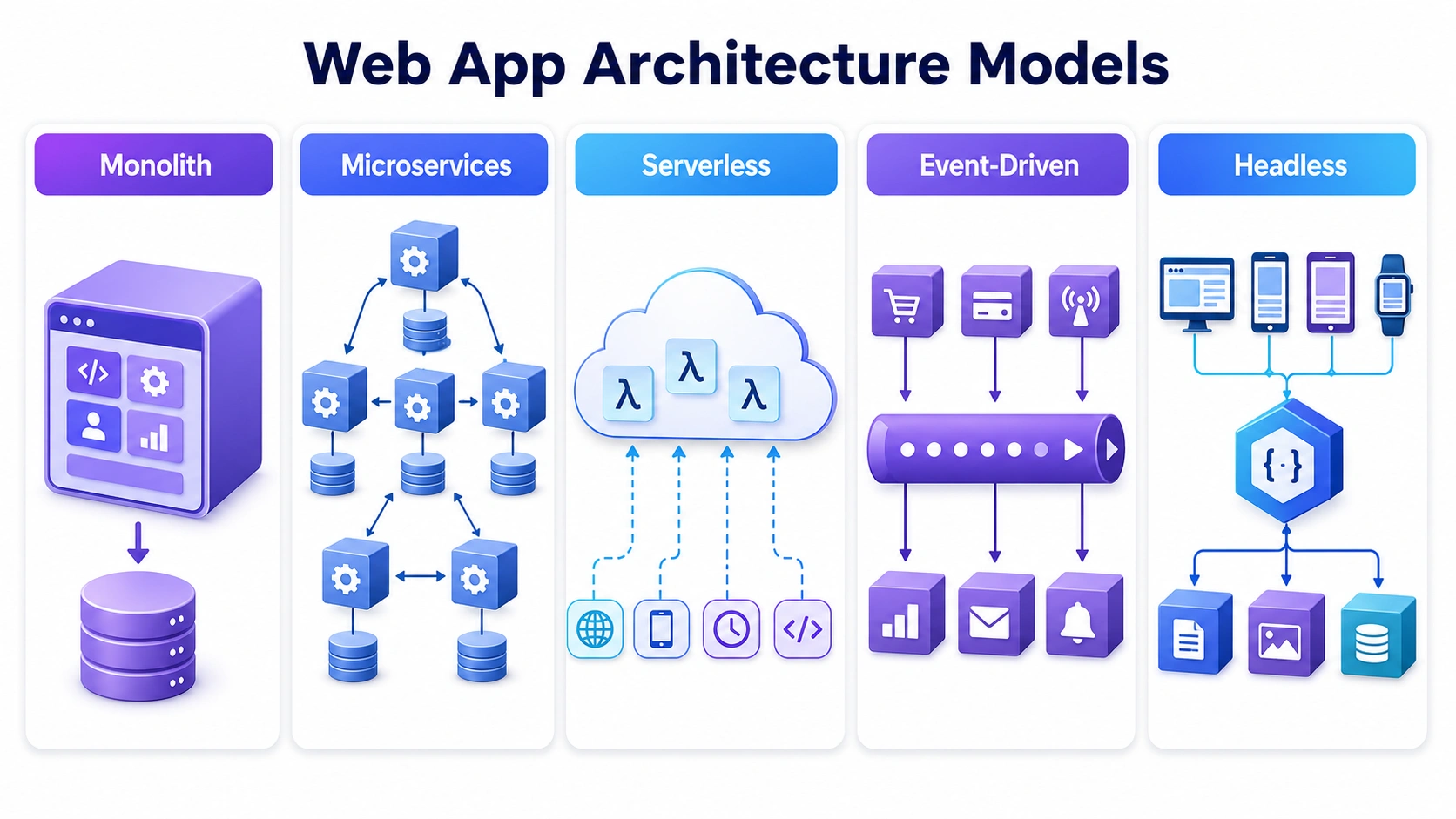
The architectural model defines how the components of web application systems are organized at the system level. This is the highest-impact design decision in any web project. Here are the most important models in use today.
Monolithic Architecture
In a monolithic architecture, all application components (frontend, backend logic, database access, and business rules) live within a single codebase and are deployed as one unit. This is the traditional starting point for most applications.
Pros: Simple to develop initially; easy to test end-to-end; low operational overhead; strong for small teams
Cons: Increasingly difficult to scale and change as the codebase grows; a bug or failure in one module can affect the entire system; deployments require the full application to be rebuilt and redeployed
Best for: Early-stage products, MVPs, internal tools, applications with limited complexity or traffic
Microservices Architecture
In this model, applications are broken down into smaller, independent services that communicate with each other through APIs. These microservices are easy to develop and implement as each of them has its own database and business logic.
Pros: Independent scalability per service; teams can develop and deploy services independently; fault isolation limits blast radius of failures; technology flexibility (different services can use different stacks)
Cons: Significant operational complexity; network latency between services; distributed tracing and debugging requires mature tooling; overkill for small or early-stage products
Best for: Large-scale platforms, SaaS products with distinct functional domains, teams large enough to own separate services independently
Serverless Architecture
In serverless architectures, the cloud provider manages infrastructure entirely. Developers write functions triggered by events (HTTP requests, database changes, message queue entries), and the platform handles provisioning, scaling, and execution. AWS Lambda, Google Cloud Functions, and Azure Functions are the most common platforms.
Pros: Zero infrastructure management; automatic scaling to zero (no cost when idle); pay-per-execution pricing; extremely fast to deploy
Cons: Cold start latency can affect user-facing performance; vendor lock-in risk; stateless by nature (requires external state management); difficult to debug and test locally
Best for: Event-driven background tasks, infrequent or bursty workloads, APIs with highly variable traffic, data pipelines
Event-Driven Architecture
In event-driven architecture (EDA) application components communicate by producing and consuming events — discrete records that something happened (e.g., “order placed”, “payment processed”, “user registered”). Rather than services calling each other directly, they publish events to a message broker (Apache Kafka, AWS EventBridge, RabbitMQ), and interested services subscribe and react asynchronously.
Pros:
- Decoupling: Services don’t need to know about each other. This reduces dependencies and makes individual services easier to change.
- Scalability: Asynchronous processing means services can handle bursts of work independently without blocking each other.
- Resilience: If a consuming service is temporarily down, events queue up and are processed when it recovers — no data loss, no cascade failure.
- Auditability: The event log provides a complete history of everything that happened in the system.
Cons: EDA introduces eventual consistency — consumers may process events at slightly different times, meaning the system isn’t always immediately consistent. Debugging asynchronous flows requires distributed tracing tooling. And not every application benefits from this complexity — simple request-response patterns are often still the right choice for straightforward CRUD applications.
Best for: E-commerce platforms, financial systems, IoT applications, real-time collaboration tools, any system where multiple services need to react to the same business events.
Headless / Decoupled Architecture
Headless architecture decouples the frontend presentation layer from the backend content and data layer.
API-first design is the underlying principle: every capability is exposed as an API endpoint before any presentation layer is built. This inverts the traditional approach (build the UI, then build the API) and produces backends that are genuinely reusable across channels.
Pros:
- Multi-channel delivery: When the same content or functionality needs to serve a website, a mobile app, a partner integration, and a third-party platform simultaneously
- Frontend flexibility: When you want to use a modern JavaScript framework (React, Vue, Next.js) without the constraints of a traditional CMS theme system
- Performance requirements: Static or edge-rendered frontends consuming headless APIs can deliver significantly faster initial load times than server-rendered monolithic platforms
- Content velocity: Marketing teams need to publish independently of engineering deployments
Cons: Headless adds architectural complexity and requires API governance. The content creation experience can also be less intuitive without careful tooling selection. For simple websites with a single channel, the overhead rarely justifies the flexibility gains.
Best for: E-commerce platforms (using headless commerce platforms like Shopify Headless or Commercetools), digital publishing and media, large-scale marketing sites, multi-brand or multi-region deployments, and any product where the same data needs to power different interfaces.
Architecture Comparison & Selection Table
|
Architecture |
Best For |
Flexibility |
Operational Complexity |
Scalability |
Typical Use Cases |
|
Monolithic |
Small teams, MVPs, internal tools |
Low |
Low |
Limited |
Early-stage SaaS, admin portals |
|
Microservices |
Large platforms, enterprise products |
High |
High |
Excellent |
E-commerce, fintech platforms, large SaaS |
|
Serverless |
Event-driven, bursty workloads |
Medium |
Low–Medium |
Auto-scales |
APIs, background jobs, data pipelines |
|
Event-Driven |
Async workflows, real-time systems |
High |
Medium–High |
Excellent |
IoT, financial events, notification systems |
|
Headless / API-first |
Multi-channel content delivery |
High |
Medium |
Good |
E-commerce, content platforms, multi-app systems |
|
Three-Tier |
General web applications |
Medium |
Medium |
Good |
Most standard web applications |
|
JAMstack |
Content-heavy, performance-critical sites |
Medium |
Low |
Excellent |
Marketing sites, blogs, documentation |
Frontend Architecture Patterns
The frontend is the part of the app that users see and interact with, making it a crucial element of web application architecture.
There are three main approaches to designing the frontend architecture:
- Single Page Applications: These are like a digital one-stop-shop. SPAs load a single HTML page and dynamically update the content as the user interacts with the app. They excel in providing a fluid, app-like experience. This makes them ideal for complex applications like Gmail, where constant updates and interactivity are key.
- Multi-Page Applications: MPAs are more like a series of interconnected rooms. Each user interaction triggers a request to the server, which returns an entirely new HTML page. MPAs are excellent for content-heavy websites or situations where SEO is a priority, as each page can be individually optimized.
- Server-side Rendered Applications: SSRs aim for the best of both worlds. They initially render a basic HTML page on the server and then enhance it with client-side interactivity. This approach combines SEO-friendliness with a dynamic user experience. SSRs are often chosen for e-commerce sites, news portals, and blogs.
Web Application Infrastructure
Infrastructure decisions sit beneath the web app architecture and determine how reliably, securely, and cost-effectively the system runs in production.
Physical Servers vs. Cloud Computing
Physical servers are tangible hardware devices that host web applications. These machines can be located either on premises within your organization’s infrastructure or within remote data centers provided by hosting providers. They require manual maintenance, updates, and scaling.
Cloud computing, on the other hand, is a paradigm shift in web application infrastructure. It involves the use of virtual servers hosted on remote data centers, often referred to as the “cloud.” Prominent cloud providers like AWS, Google Cloud, and Azure offer this contemporary approach.
Within the cloud computing umbrella, there’s an even more modern paradigm known as serverless computing. This approach eliminates the need for managing servers altogether. Instead, it allows developers to focus solely on their code, with cloud providers handling the underlying infrastructure.
Networking Equipment
Networking equipment manages data traffic between servers, ensuring optimal performance and reliability. It includes components like:
- Routers that direct data between networks
- Switches that manage local data flow within a network
- Load balancers that distribute traffic evenly among servers to prevent overload
Networking equipment enhances efficiency and application speed, and ensures fault tolerance, which is crucial for high-traffic web apps.
Web Application Architecture on AWS
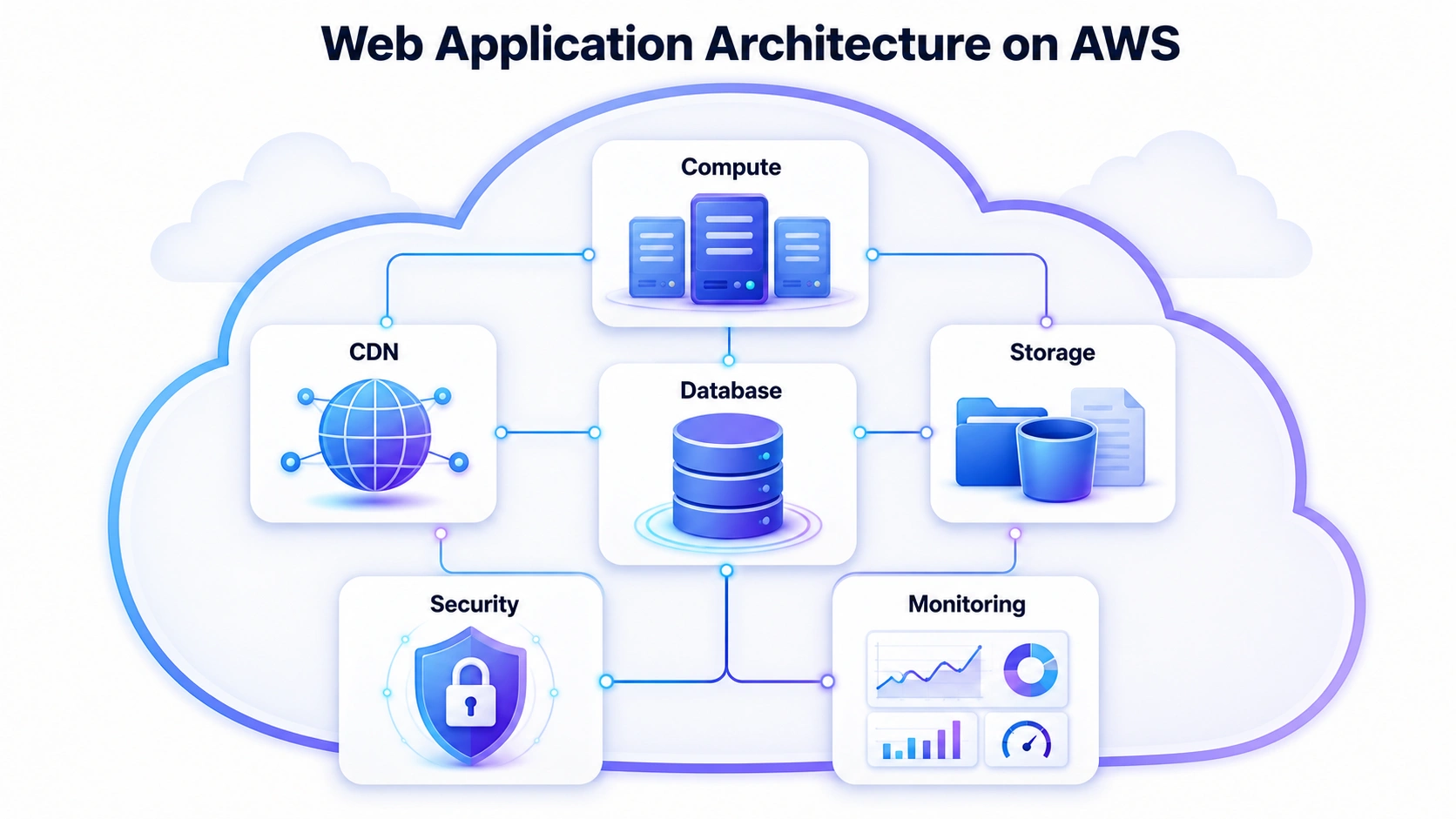
AWS is the most widely used cloud platform for web application architecture, offering a comprehensive ecosystem of services that map directly to architectural needs:
- Compute: EC2 (virtual machines), ECS/EKS (containers), Lambda (serverless functions)
- Storage: S3 (object storage), EFS (file system), Glacier (archival)
- Database: RDS (managed SQL), DynamoDB (NoSQL), ElastiCache (caching)
- Networking: CloudFront (CDN), Route 53 (DNS), API Gateway, VPC (network isolation)
- Observability: CloudWatch, X-Ray (distributed tracing)
- Security: IAM (identity and access), WAF (web application firewall), Shield (DDoS protection), KMS (key management)
A well-designed web application architecture on AWS typically combines these services into managed, auto-scaling infrastructure where teams focus on application code rather than infrastructure management.
Data Centers and Content Delivery Networks
Data centers are centralized facilities housing servers and networking equipment. They provide secure, controlled environments for server storage, offering reliability and security.
Content Delivery Networks consist of distributed servers globally, serving cached content to users from the nearest location. Content delivery networks optimize content delivery by reducing latency and enhancing web app performance and global accessibility.
Security Components
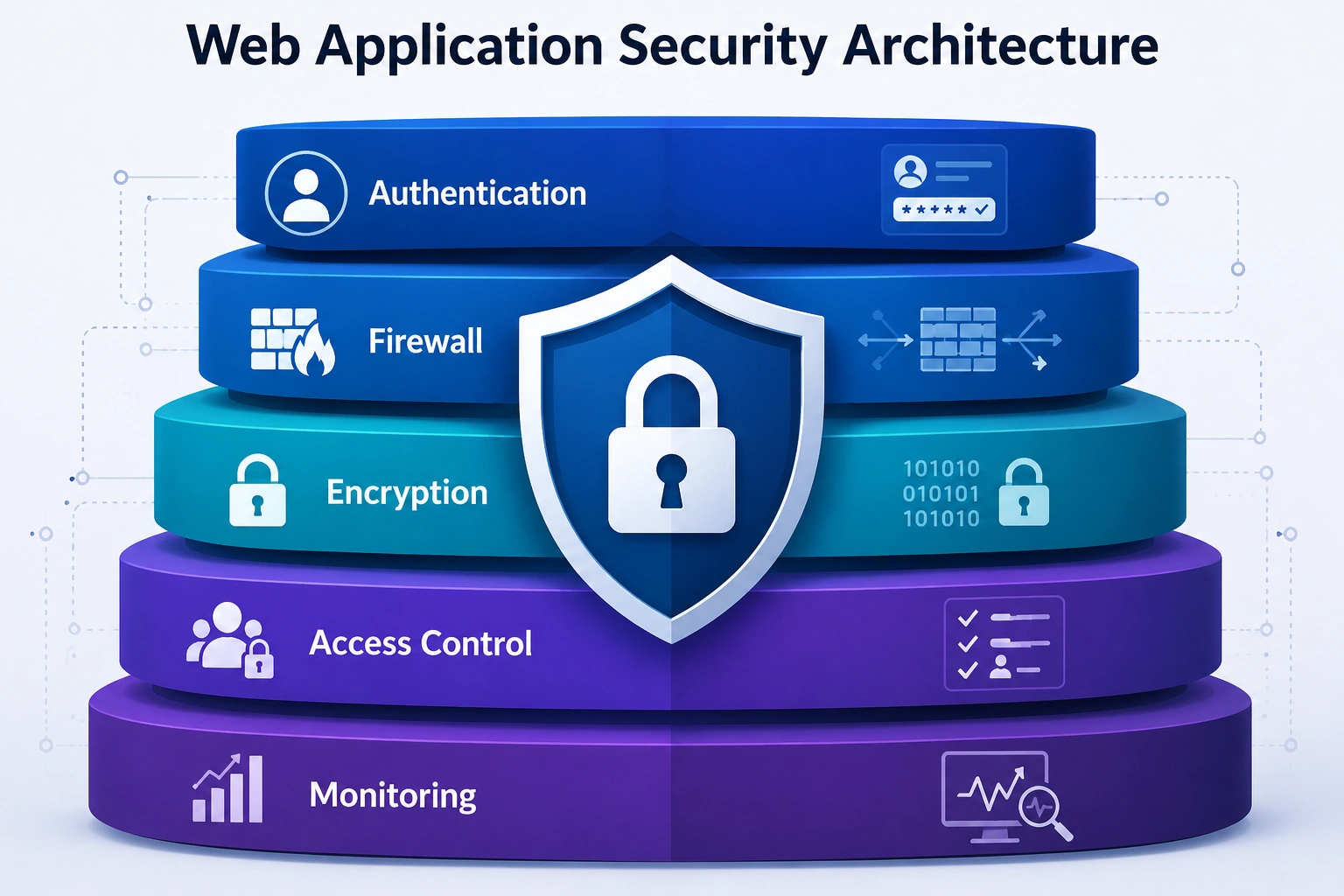
Web application security architecture components include:
- Firewalls that monitor and filter incoming and outgoing network traffic and safeguard against unauthorized access
- Intrusion Detection Systems (IDS) and Intrusion Prevention Systems (IPS) identify and respond to suspicious activities or attacks, ensuring a secure web application architecture. Beyond WAF and IDS/IPS, many modern web application stacks also implement bot detection to mitigate automated abuse like credential stuffing, scraping, and fake account creation.
These security components protect web apps from cyber threats, ensuring data integrity and user trust.
Edge Computing
Edge computing moves compute and data processing closer to the user — to servers at the geographic “edge” of the network rather than centralized cloud regions. For web application architecture, this has two main applications:
- Edge delivery (CDN and static assets): Serving static files (JavaScript bundles, images, CSS) from edge servers has been standard practice for years. Modern platforms like Cloudflare and Fastly extend this to include edge caching of dynamic responses, dramatically reducing origin server load for cacheable content.
- Edge functions (compute at the edge): Platforms like Cloudflare Workers, Vercel Edge Functions, and AWS Lambda@Edge allow application logic to run at the CDN edge layer.
As user bases become more globally distributed and performance expectations continue to rise, edge delivery is increasingly a standard component of modern web application architecture — not an advanced optimization. Core Web Vitals metrics directly reward the kinds of latency improvements that edge delivery enables.
Most teams should begin with CDN-delivered static assets (standard), progress to edge caching for semi-dynamic content, and consider edge functions only when latency or personalization requirements genuinely justify the added complexity.
Architecture of Modern Web Applications
Modern web application architecture has evolved to harness the power of cloud computing and microservices, ushering in a new era of software design. At the forefront of this transformation is the 3-tier architecture model, a contemporary approach to crafting web applications.
Three-Tier Architecture: A Modern Foundation
Three-tier architecture divides a web based application into three distinct layers:
- Presentation tier: the client-side UI (browser, mobile app)
- Logic tier: the application server handling business rules, API calls, and data processing
- Data tier: the database and persistence layer
This separation is the foundation of virtually all scalable web application architecture — each tier can be scaled, updated, and optimized independently.
Key Characteristics of Modern Web Application Architecture
Modern web application architecture comprises several key components that empower developers and businesses to create robust and scalable applications:
- Cloud-native by default: designed for containerized deployment (Docker, Kubernetes) rather than fixed infrastructure
- API-first: internal and external capabilities exposed via well-documented APIs, enabling flexible integration
- Stateless application servers: state stored in external data stores (Redis, databases), not in server memory, enabling horizontal scaling
- Separation of concerns: frontend, backend, and data layers independently deployable
- Observability built in: structured logging, distributed tracing (OpenTelemetry), and metrics instrumentation from day one
- Security by design: authentication, authorization, and data encryption treated as architectural concerns, not post-launch additions
- Asynchronous communication: message queues (Kafka, SQS, RabbitMQ) decouple time-sensitive operations from request/response cycles
DevOps, Observability, and Operational Readiness
Architecture doesn’t end at the application boundary — it extends into how the application is deployed, monitored, and maintained in production. The strongest modern web application architecture decisions account for operational readiness from the start.
CI/CD and Deployment Architecture
Continuous Integration and Continuous Delivery (CI/CD) pipelines are now a standard architectural assumption for any serious web application. They enable:
- Automated testing on every code change
- Deployment to staging environments identical to production
- Controlled rollouts (blue/green deployment, canary releases) that reduce release risk
- Rapid rollback when issues are detected
Architecture choices affect CI/CD directly. For example, microservices require independent pipelines per service while monoliths deploy as a single unit. Containerized applications can be deployed identically across environments, and serverless functions integrate naturally with event-driven CI/CD.
Observability
Observability is the ability to understand what’s happening inside a system from its external outputs. For web app architecture, three pillars define observability:
- Logs: Structured, searchable records of application events (errors, requests, state changes). Tools: ELK Stack, Datadog Logs, AWS CloudWatch Logs
- Metrics: Quantitative measurements of system performance (request rate, error rate, latency, resource utilization). Tools: Prometheus, Grafana, CloudWatch Metrics
- Traces: Distributed request tracing that follows a single request through multiple services. Critical for debugging microservices. Tools: OpenTelemetry, Jaeger, AWS X-Ray, Datadog APM
Well-designed web application architecture incorporates observability instrumentation from the start — it’s significantly harder to add retrospectively. The payoff: faster incident response, data-driven performance optimization, and clear accountability when something breaks.
Best Practices to Build Scalable and Advanced Web Application Architecture
Creating a robust and scalable web application architecture involves adhering to best practices that enable flexibility, enhance performance, and streamline development.
Let’s explore some key principles that top web development companies employ:
Prioritize Scalability from the Start
Design your custom web application architecture to handle growth before it’s needed. This means choosing stateless application servers, externalizing session state, using horizontal scaling rather than vertical, and selecting databases that support read replicas and sharding.
Use Caching Strategically
Caching is one of the highest-ROI performance improvements available. Layer your caching: CDN for static assets and edge-cacheable responses, Redis/Memcached for database query results and session data, in-memory caching within services for frequently accessed reference data. Each layer reduces load on the layers below it.
Design for Failure
In distributed systems, failures are inevitable. Design your web app architecture to tolerate component failures gracefully: implement circuit breakers to prevent cascade failures, retry logic with exponential backoff for transient errors, graceful degradation (show partial functionality rather than complete failure), and health checks that enable load balancers to route around unhealthy instances.
Apply the Twelve-Factor App Methodology
The Twelve-Factor App methodology defines best practices for building scalable, maintainable web based applications software that run reliably in cloud environments. Key factors include: storing config in environment variables, treating backing services as attached resources, keeping development and production environments identical, and building stateless processes.
Implement Comprehensive Monitoring and Alerting
Connect your architecture to observability infrastructure from day one. Define SLOs (Service Level Objectives) that codify what “working” means, then alert when those objectives are at risk — not just when they’re already breached.
Keep Security Architectural, Not Cosmetic
Apply the principles from the web application security architecture section above: defense in depth, least privilege, zero trust. Run dependency vulnerability scanning in your CI pipeline. Conduct regular security reviews and penetration tests. Treat security as a systemic property of the architecture, not a checklist.
Document Architecture Decisions
Use Architecture Decision Records (ADRs) — short, structured documents that capture what was decided, why, what alternatives were considered, and what trade-offs were made. This dramatically reduces the cost of onboarding new team members and revisiting past decisions. Tools like Structurizr or simple markdown documents in version control work well.
Plan for API Versioning
If you’re building an API-first or headless architecture, version your APIs from day one. Breaking changes to public APIs are one of the most common sources of downstream system failures. Use semantic versioning (/v1/, /v2/) and maintain backward compatibility for at least one major version behind.
Keep Security Architectural, Not Cosmetic
Apply the principles from the web application security architecture section above: defense in depth, least privilege, zero trust. Run dependency vulnerability scanning in your CI pipeline. Conduct regular security reviews and penetration tests. Treat security as a systemic property of the architecture, not a checklist.
Document Architecture Decisions
Use Architecture Decision Records (ADRs) — short, structured documents that capture what was decided, why, what alternatives were considered, and what trade-offs were made. This dramatically reduces the cost of onboarding new team members and revisiting past decisions. Tools like Structurizr or simple markdown documents in version control work well.
Plan for API Versioning
If you’re building an API-first or headless architecture, version your APIs from day one. Breaking changes to public APIs are one of the most common sources of downstream system failures. Use semantic versioning (/v1/, /v2/) and maintain backward compatibility for at least one major version behind.
How to Choose the Right Web Application Architecture
Architecture selection should be driven by your product’s actual constraints — not by what’s fashionable or what worked for a different team at a different scale. Here’s a practical decision framework:
|
Decision Factor |
Lean Simpler (Monolith / Three-Tier) |
Lean Distributed (Microservices / EDA) |
|
Expected traffic |
Low to medium, predictable |
High, bursty, or unpredictable |
|
Team size |
Small (1–5 engineers) |
Large (multiple independent teams) |
|
Requirements clarity |
Well-defined upfront |
Likely to evolve significantly |
|
Speed to market |
Priority — need to ship fast |
Can invest in foundation |
|
Operational maturity |
Limited DevOps capability |
Strong CI/CD and observability practice |
|
Integration complexity |
Few external integrations |
Many services and third-party systems |
|
Scalability requirements |
Moderate |
Extreme, or highly uneven across components |
|
Budget |
Constrained |
Larger investment justified |
Web Application Case Studies from Scopic
Now, let’s explore the power of effective web application architecture by taking a look at these successful web app projects:

Rehab Bookings
Rehab Bookings had a mission to streamline the rehab booking process in the USA.
To create a seamless and user-friendly experience, they turned to Scopic’s web app development experts for assistance.
The result? A solution that marries simplicity with functionality.
The platform Scopic developed allows individuals to effortlessly find rehab facilities and make bookings.
The intuitive user interface guides visitors through a few easy steps: selecting a location, preferred dates, submitting an inquiry, and confirming the booking. This seamless experience ensures that individuals in need can access the information they require with ease.

Mediphany
Mediphany, a cutting-edge radiology imaging platform, brings the expertise of medical professionals to your fingertips.
Scopic’s HIPAA-compliant web app developers collaborated with Mediphany to create a user-friendly solution for reading MRI and CT scans.
This powerful software uses high-quality 3D models and scan comparisons, allowing users to understand their medical conditions better. The personalized video reports also make complex medical information accessible.
With features like a desktop video recorder implemented through tailored desktop app development services, self-service tools, and a built-in DICOM viewer, Mediphany empowers users to take control of their health, all from the comfort of their homes.

RXWeb
The end of Flash support posed a challenge for companies relying on this technology. RxWeb, an extensive pharmacy management solution initially written in ActionScript and Cold Fusion, faced the need for a modernized approach.
Scopic stepped in to revamp RxWeb, creating an all-in-one pharmacy software accessible via the web. This comprehensive platform covers clinical services, stock management, patient communications, and much more.
To meet modern web standards, Scopic recommended Angular and TypeScript for the frontend, while Jhipster, Spring Boot, and Java were chosen for the backend. Technologies like Bloc pattern, WebSocket with Stomp, and RabbitMQ were implemented, enhancing scalability and authentication support.
Conclusion
Web applications are the beating heart of our online world, and how we design them can spell the difference between a forgettable visit and a captivating, user-friendly experience.
Are you ready to embark on your web app journey?
Scopic offers end-to-end web application services and is here to guide you through the maze of possibilities, from conceptualization to execution. Let’s build the future of the web, one innovative app at a time.
FAQs
What is the difference between monolithic and microservices architecture?
A monolithic web application architecture packages all components — UI, business logic, data access — into a single codebase deployed as one unit. Microservices break those components into independent services that communicate via APIs, each deployable separately. Monoliths are simpler to start with; microservices scale better for large teams and large systems. The right choice depends on team size, operational maturity, and whether independent scalability of components genuinely justifies the complexity.
When should you use serverless architecture?
Serverless is most appropriate for event-driven workloads, background processing tasks, APIs with highly variable or unpredictable traffic, and situations where teams want to minimize infrastructure management overhead. It’s less suited for latency-sensitive user-facing applications (cold starts), workloads that run continuously (always-on compute is cheaper on VMs), or applications requiring complex local state management.
What is event-driven architecture in web applications?
Event-driven architecture is a web app architecture pattern in which components communicate by publishing and consuming events through a message broker, rather than calling each other directly. When something happens (order placed, user registered, payment received), a service publishes an event. Other services that care about that event subscribe and process it asynchronously. This decouples services, improves resilience, and enables real-time workflows — but introduces eventual consistency and requires distributed tracing to debug effectively.
What is the benefit of headless architecture?
Headless architecture decouples the frontend presentation layer from the backend content and data APIs. The main benefits: content and functionality can be delivered to any channel (web, mobile, kiosk, third-party platform) without rebuilding the backend; frontend teams can use modern frameworks without CMS theme constraints; and edge-rendered frontends deliver significantly faster performance. The trade-off is additional complexity and the need for API governance.
How do you choose the right web application architecture?
Start with your constraints: expected traffic and scale, team size, operational maturity, speed-to-market requirements, integration complexity, and regulatory obligations. Simpler architectures (monolith, three-tier) are the right starting point for most early-stage products — add complexity only when you’ve validated the need. Also, consider engaging software architecture consulting to validate the choice before committing.
What is web application architecture on AWS?
Web application architecture on AWS refers to systems built using AWS’s managed service ecosystem: EC2 or ECS for compute, RDS or DynamoDB for data, S3 for object storage, CloudFront for CDN delivery, Lambda for serverless functions, API Gateway for managed API endpoints, and IAM, WAF, and Shield for security. AWS provides purpose-built services for nearly every architectural layer, enabling teams to build modern web application architecture without managing the underlying infrastructure.

About Creating Web Application Architecture Guide
This guide was authored by Vesselina Lezginov, and reviewed by Vyacheslav Korchagin, Principal Engineer and Senior Developer at Scopic.
Scopic provides quality and informative content powered by our deep-rooted expertise in software development. Our team of content writers and experts have great knowledge of the latest software technologies, allowing them to break down even the most complex topics in the field. They also know how to tackle topics from a wide range of industries, capture their essence, and deliver valuable content across all digital platforms.