Table of Contents
Listen to article
Top Software Development Models Explained: How to Choose the Right Approach
Software development life cycle (SDLC) models define the flow of software building projects.
SDLC methodologies give you a specific structure to follow while executing each step of the process including planning, analysis, designing, developing, coding, testing, deploying, and maintenance.
That’s why choosing the right SDLC type for your unique needs can make or break your software project, affecting its quality, timeframe, and budget.
But with so many various SDLC methods, you need to have a deeper understanding of their characteristics and use cases.
To help you understand which models you can adopt to launch your projects to success, we’ll cover 13 of the best software development models, their pros, cons, and practical uses.
SDLC vs. Software Development Methodology: What’s the Difference?
These terms are often used interchangeably — but they describe different things, and the distinction matters when you’re making planning decisions.
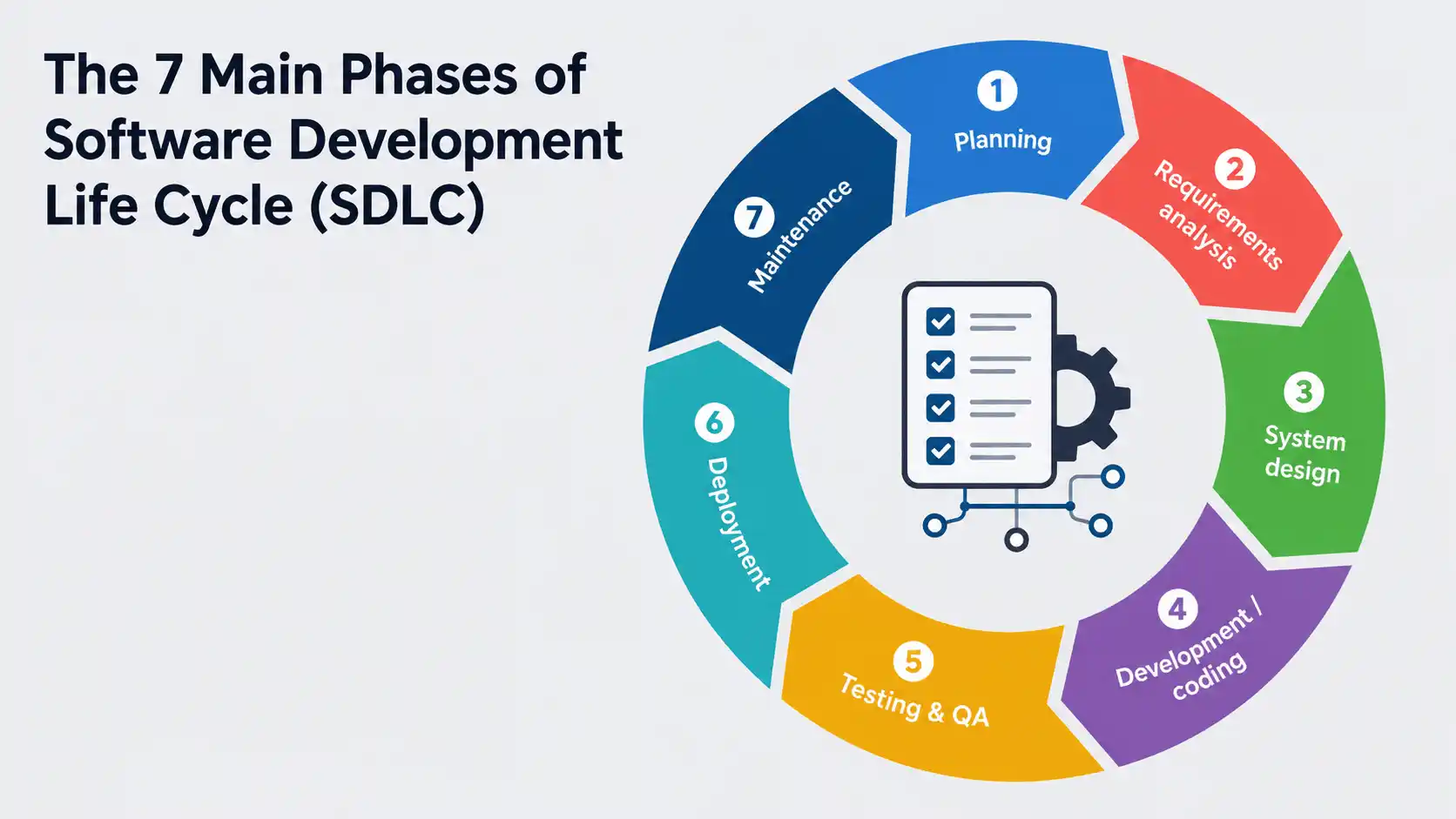
The Software Development Life Cycle (SDLC) is the overall process a software project moves through from inception to retirement. It usually includes the following phases of development:
- Planning — Define scope, goals, constraints, and feasibility
- Requirements analysis — Document what the system must do
- System design — Architecture, technology stack, infrastructure
- Development / coding — Building the software
- Testing & QA — Validation against requirements
- Deployment — Release to production
- Maintenance — Ongoing support, updates, optimization
Software development methodologies (or models) is the framework used to execute and sequence those phases. It answers: In what order do we do these things? How iteratively? How much documentation is required? How do we handle changes?
In short: The SDLC defines what happens. The methodology defines how it happens.
Quick Comparison: All 16 Software Development Models
Here’s a quick look at all models you should consider when choosing the right development approach for you and your team:
| Model | Flexibility | Documentation | Risk Control | Speed to Market | Best For |
| Waterfall | Low | High | Medium | Slow | Fixed-scope, stable requirements |
| Iterative | Medium | Medium | Medium | Medium | Evolving requirements, phased delivery |
| Agile | High | Low–Medium | Medium | Fast | Fast-moving, feedback-driven projects |
| Scrum | High | Low | Medium | Fast | Cross-functional product teams |
| Kanban | High | Low | Low | Continuous | Maintenance, support, ops teams |
| DevOps | High | Low | Medium–High | Continuous | CI/CD, infrastructure, platform teams |
| SAFe | Medium | Medium–High | High | Medium | Large enterprise Agile at scale |
| Hybrid Agile–Waterfall | Medium | Medium | Medium–High | Medium | Mixed-constraint projects |
| Spiral | Medium | High | Very High | Slow | High-risk, safety-critical systems |
| V-Model | Low | Very High | High | Slow | Safety-critical, regulated industries |
| RUP | Medium | High | High | Medium | Large, architecture-heavy systems |
| Prototype | High | Low | Low–Medium | Fast (early) | UX-heavy, unclear requirements |
| XP | Very High | Low | Medium | Fast | Small teams, high-change environments |
| Lean | High | Low | Low | Fast | Waste-reduction focused teams |
| Dynamic Systems (DSDM) | High | Medium | Medium | Fast | Time-boxed, business-led delivery |
| Feature-Driven (FDD) | Medium | Medium | Medium | Medium | Large teams, feature-rich systems |
| Joint Application Dev (JAD) | Medium | Medium | Medium | Medium | Stakeholder-heavy requirements phases |
The Core Software Development Methodologies
At Scopic, our client projects range in size, budget, and requirements. Yet for 90% of the projects, we work on, these four types of software development life cycle models shine through as the best fit for our clients’ needs.
Waterfall Model
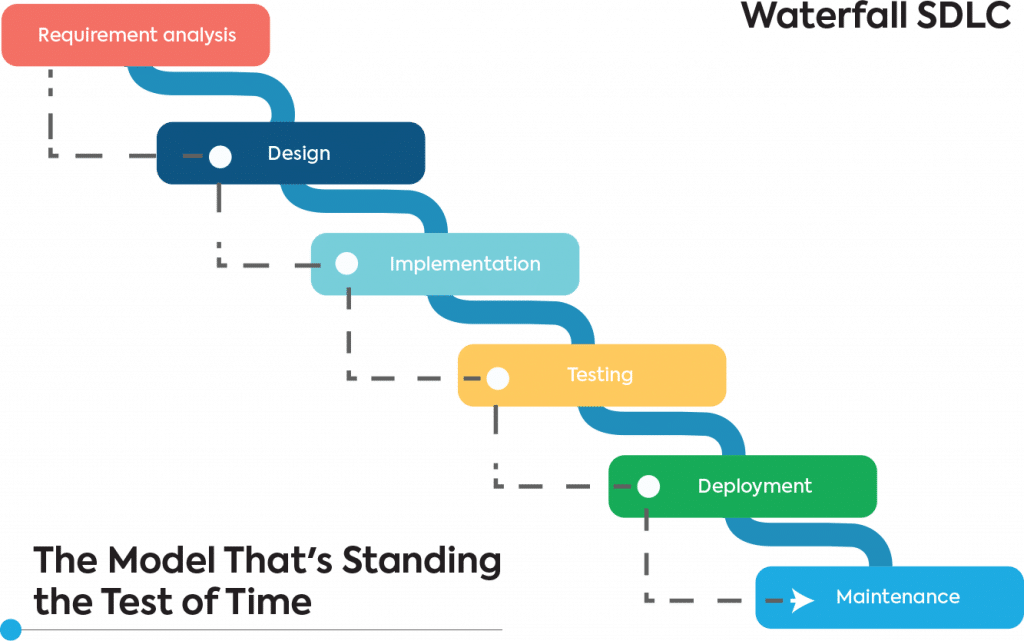
Developed in the 70s, the Waterfall software development model is the oldest and most linear of all methodologies. Development flows in one direction through a fixed sequence of phases:
requirements → design → implementation → testing → deployment → maintenance
Each phase must be completed and signed off before the next begins. This rigid framework has made it subject to heavy criticism in recent years, however, the model still offers some benefits.
Pros
- Simple to understand and manage
- Clear milestones and deliverables at each stage
- Extensive documentation makes handoffs and audits straightforward
- Well-suited to projects where requirements are stable and unlikely to change
Cons
- Inflexible to change once a phase is complete
- Testing happens late — defects found post-build are expensive to fix
- Limited customer involvement after requirements sign-off
- Poor fit for complex or exploratory projects
Best for: Government contracts, infrastructure projects, compliance-heavy systems, or any engagement where the full scope can be defined before work begins
Incremental and Iterative Model
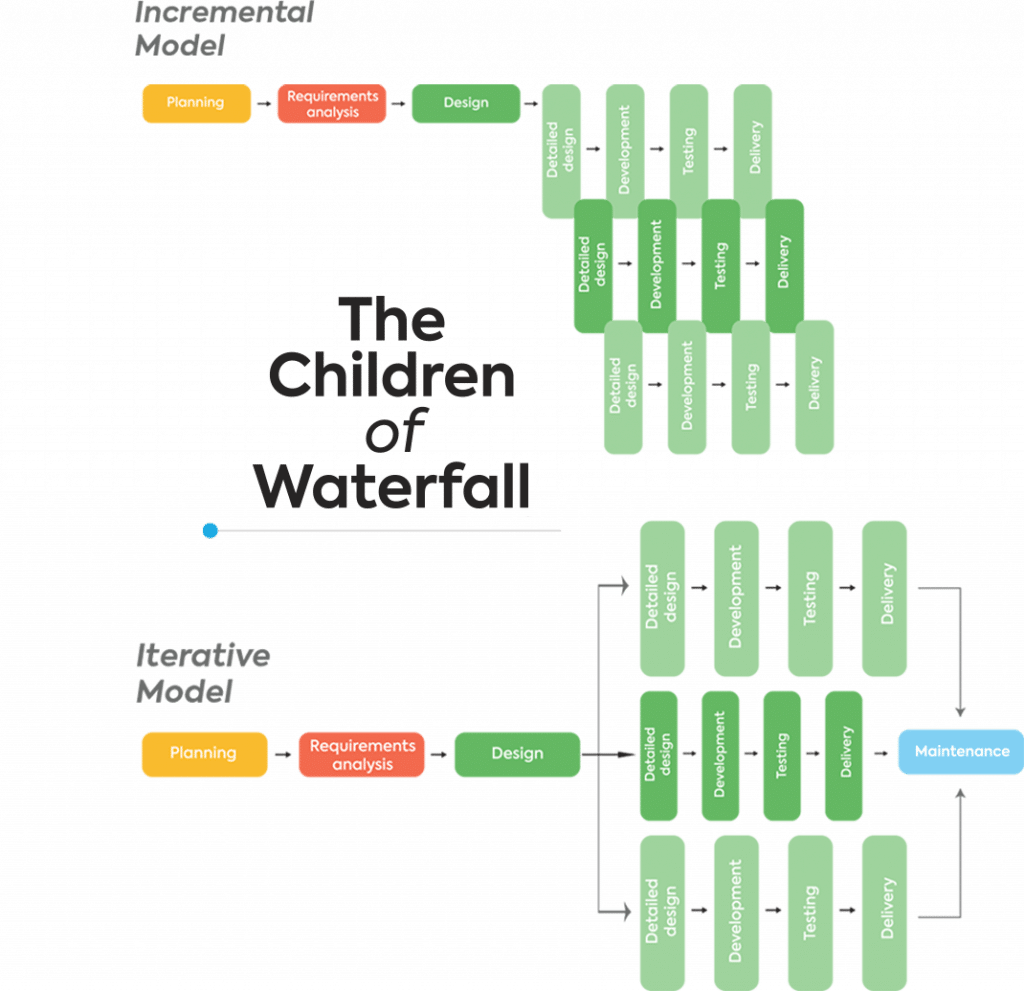
The Incremental model delivers software in functional pieces — each increment adds new capability to the existing working product. The Iterative model refines and improves the same features across repeated development cycles.
In practice, most modern implementations combine both approaches. This allows more room for iterations and testing and does not require planning of the whole project management upfront.
Pros
- Working software available early in the project
- Requirements can evolve between increments
- Easier to test and integrate smaller chunks than a full system at once
- Early increments can inform later ones based on real feedback
Cons
- Requires careful upfront architecture to support later additions
- Total cost and scope can be harder to predict
- Can lead to integration issues if increments aren’t carefully coordinated
Best for: Projects with high-level goals but evolving detailed requirements; systems that can be usefully deployed in phases
Agile Model
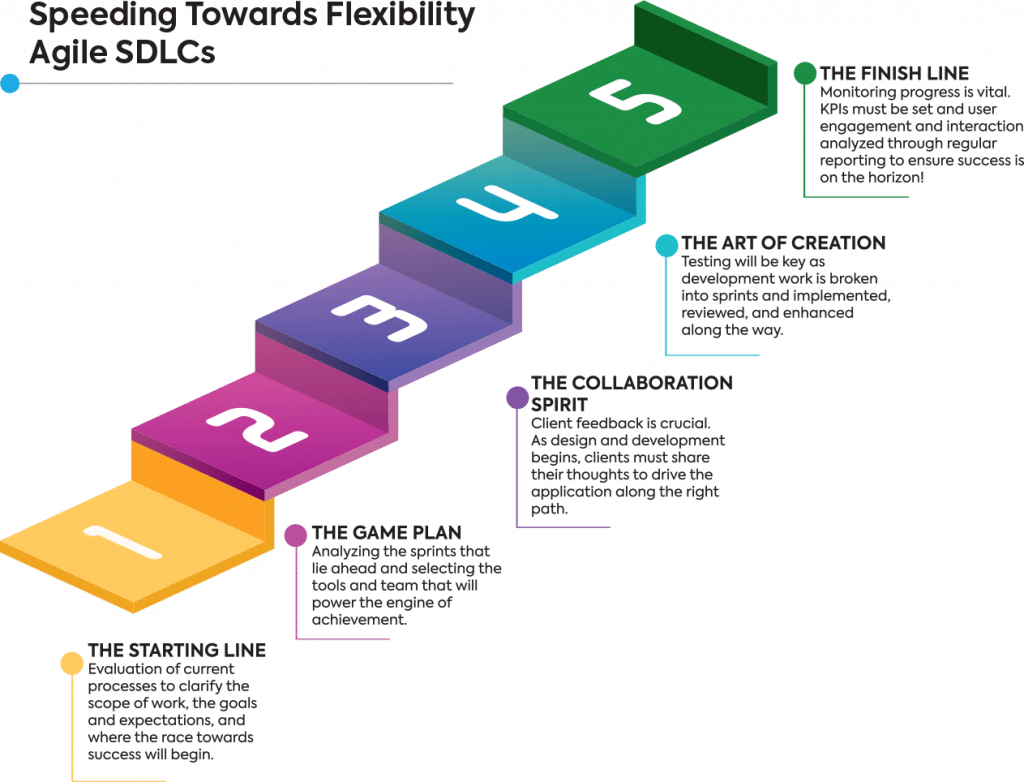
The Agile software development model is a go-to option in modern product and engineering teams. Rather than a single framework, Agile is a set of values and principles — formalized in the 2001 Agile Manifesto — that prioritize people over processes, working software over documentation, customer collaboration over contract negotiation, and responding to change over following a plan.
According to the 17th Annual State of Agile Report, 71% of organizations use Agile approaches as their primary delivery framework, a figure that has remained stable even as hybrid models grow in popularity.
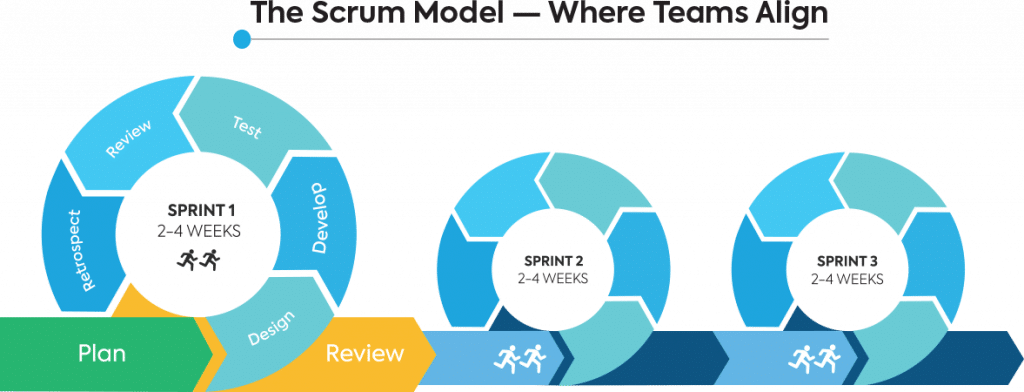
The Agile lifecycle runs in short, time-boxed iterations called sprints (typically 1–4 weeks). Each sprint produces working, potentially shippable software. Requirements are maintained in a prioritized backlog and re-evaluated continuously.
Pros
- Highly adaptable to changing requirements
- Frequent delivery keeps stakeholders engaged and informed
- Encourages team collaboration and ownership
- Defects are caught and fixed within the sprint, not months later
Cons
- Harder to predict total cost and timeline upfront
- Requires active customer involvement throughout
- Without discipline, “Agile” can become an excuse for no planning
- Less suitable for fixed-scope contracts or regulatory environments requiring extensive documentation
Best for: Consumer products, SaaS platforms, digital products, or any project where requirements will evolve in response to user feedback
Agile Scrum Model
Scrum is the most widely adopted implementation of Agile. With daily meetings and an experienced Scrum Master overseeing and reporting on the project’s progress, this branch of Agile is ideal if you want to take a more collaborative, hands-on approach.
Key Scrum roles:
- Product Owner — prioritizes the backlog and represents stakeholder interests
- Scrum Master — facilitates the process and removes team blockers
- Development Team — self-organizing group responsible for sprint delivery
Key Scrum ceremonies: Sprint Planning, Daily Standup, Sprint Review, Sprint Retrospective
Additionally, Scrum is used by approximately 87% of Agile teams — making it the single most common software development framework in use today.
Pros
- Provides clear accountability and visibility
- Retrospectives drive continuous process improvement
- Works well across distributed and co-located teams
- Strong community of practice and tooling support
Cons
- Scope and sprint commitment can create pressure for teams to cut corners
- Requires experienced Scrum Masters to work well
- Can be misapplied — “Scrumfall” (using Scrum ceremonies with Waterfall thinking) is a common failure mode
Best for: Cross-functional product teams building consumer or enterprise software with regular stakeholder involvement
Modern Methodologies: Kanban, DevOps, and SAFe
Modern software teams often go beyond basic Agile frameworks to adopt more specialized approaches that optimize flow, scalability, and delivery speed. Let’s take a closer look:
Kanban
Kanban is a visual workflow management method that originated in Toyota’s manufacturing system and was adapted for software development by David Anderson in 2007.
Unlike Scrum, Kanban has no sprints, no defined roles, and no fixed iterations. Work tasks move through a visual board (typically: To Do → In Progress → Done), and the core discipline is limiting work in progress (WIP) to reduce context-switching and increase throughput.
Pros
- Extremely flexible — no sprints or roles required
- Excellent visibility into workflow bottlenecks
- Easy to adopt incrementally alongside existing processes
- Reduces multitasking and improves focus through WIP limits
Cons
- Lacks the time-boxing structure that helps some teams with prioritization
- Without WIP discipline, boards can become cluttered and misleading
- Harder to measure velocity and predict delivery dates
Best for: Operations teams, support teams, maintenance-mode products, marketing workflows, and teams transitioning to Agile who need a lighter-weight starting point
DevOps
DevOps isn’t a project management methodology in the traditional sense — it’s a cultural and engineering philosophy that breaks down the wall between development and operations teams.
The core goals: faster, more reliable software delivery through automation, continuous integration (CI), continuous delivery (CD), and shared responsibility for production environments.
DevOps practices include infrastructure as code (IaC), automated testing pipelines, containerization (Docker, Kubernetes), continuous monitoring, and incident response automation.
According to DORA’s Accelerate State of DevOps Report, elite DevOps performers deploy code 973x more frequently than low performers and recover from incidents 6,570x faster.
Pros
- Dramatically reduces release cycle time
- Improves system reliability and incident recovery speed
- Creates shared ownership of quality between dev and ops
- Enables rapid feedback loops from production to development
Cons
- Significant upfront investment in tooling and cultural change
- Requires strong automation engineering capabilities
- Not a substitute for a project delivery methodology — must be combined with Agile, Scrum, or similar
Best for: Cloud-native platforms, SaaS products, API-driven services, or any team that ships frequently and needs to maintain high reliability at speed
SAFe (Scaled Agile Framework)
SAFe is a framework for applying Agile principles at enterprise scale — across multiple teams, programs, and portfolios. It was designed to answer a common problem: Agile works well for a single team, but how do you coordinate 50 teams working on the same platform.
SAFe layers Agile and Scrum practices into a structured hierarchy: Team Level (Scrum/Kanban), Program Level (Agile Release Trains), Large Solution Level, and Portfolio Level. It introduces concepts like Program Increments (PIs) — quarterly planning cycles that align multiple teams around shared objectives.
Pros
- Aligns development work with business strategy at scale
- Provides governance and predictability for large programs
- Strong community and certification ecosystem
Cons
- Heavyweight — implementation requires significant organizational change
- Can feel bureaucratic to smaller teams
- Poorly implemented SAFe often produces the worst of both worlds: Agile ceremonies with Waterfall decision-making
Best for: Large enterprises coordinating multiple development teams on complex, long-running programs — particularly those in financial services, healthcare, and government
Hybrid Agile–Waterfall
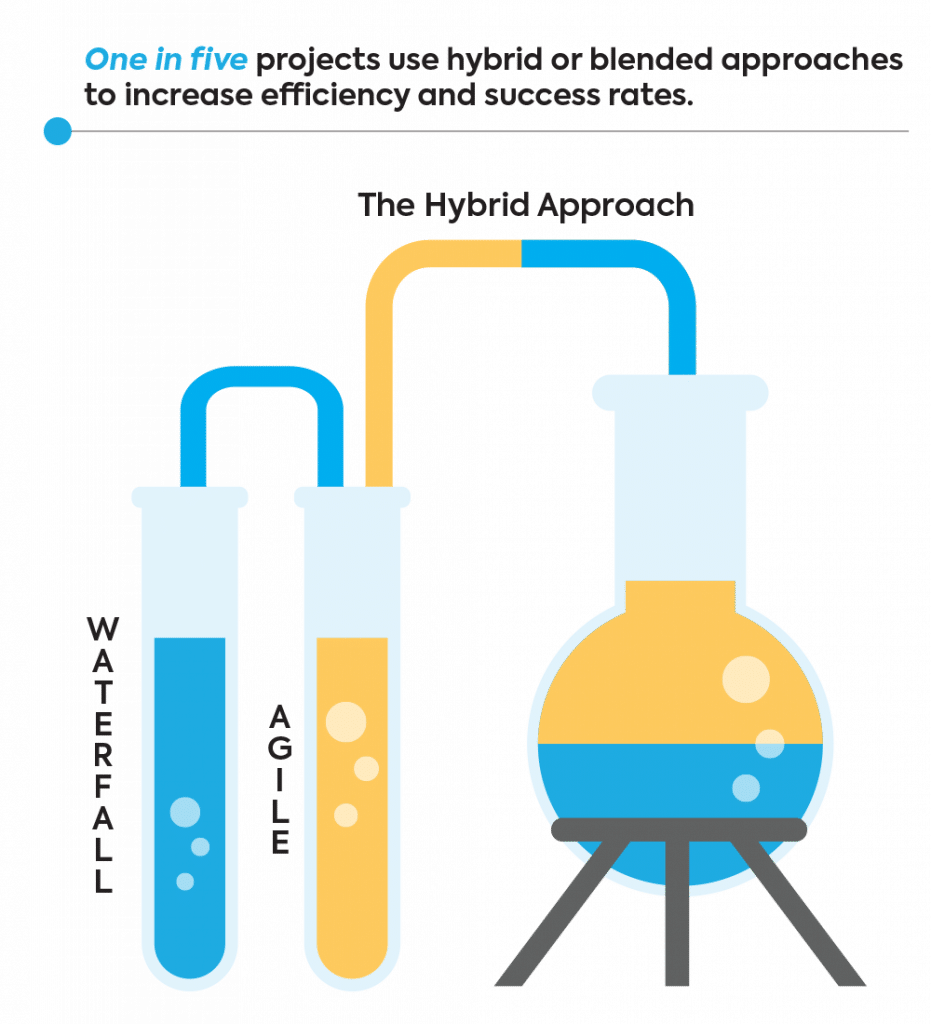
The Hybrid Agile–Waterfall approach — sometimes called “Water-Scrum-Fall” — combines the structured planning and documentation of Waterfall with the iterative delivery and flexibility of Agile. In practice, this typically means: Waterfall-style upfront requirements and architecture, followed by Agile sprints for development, with a more formal sign-off and release process at the end.
When it works well:
- Regulated industries where documentation and sign-off are mandatory, but flexibility is still needed during development
- Projects that have a fixed outer scope (contract, budget, deadline) but require flexibility in how features are sequenced and refined
- Organizations transitioning from Waterfall who aren’t ready to fully commit to Agile
- Projects that integrate new development with legacy system constraints that can’t be changed iteratively
Trade-offs:
- Can inherit the worst of both models if not managed carefully — rigid planning that still needs to respond to change, but lacks the agility to do so gracefully
- Requires clear boundaries: which decisions are fixed upfront, and which can evolve?
- Documentation and sprint velocity need to be balanced explicitly
Who it suits: Enterprise IT teams, government contractors, regulated-industry developers (healthcare, finance, defense), and product teams working within legacy ecosystems
How it differs from pure Agile: Agile treats requirements as continuously evolving. Hybrid treats the outer envelope of requirements as fixed, but the inner implementation details as iterative.
How it differs from pure Waterfall: Waterfall sequences all phases end-to-end with no iteration. Hybrid breaks the middle phases (design, development, testing) into iterative cycles while keeping planning and release more structured.
Additional Models Worth Knowing
Here are a few other software development models you can consider adopting:
Spiral Model
The spiral software design model pays special attention to risk assessment, and it is repetitive by nature. Each spiral is made up of four key phases — planning, risk assessment, development, and evaluation. When one full cycle is complete, the spiral continues, building on from the previous outcomes.
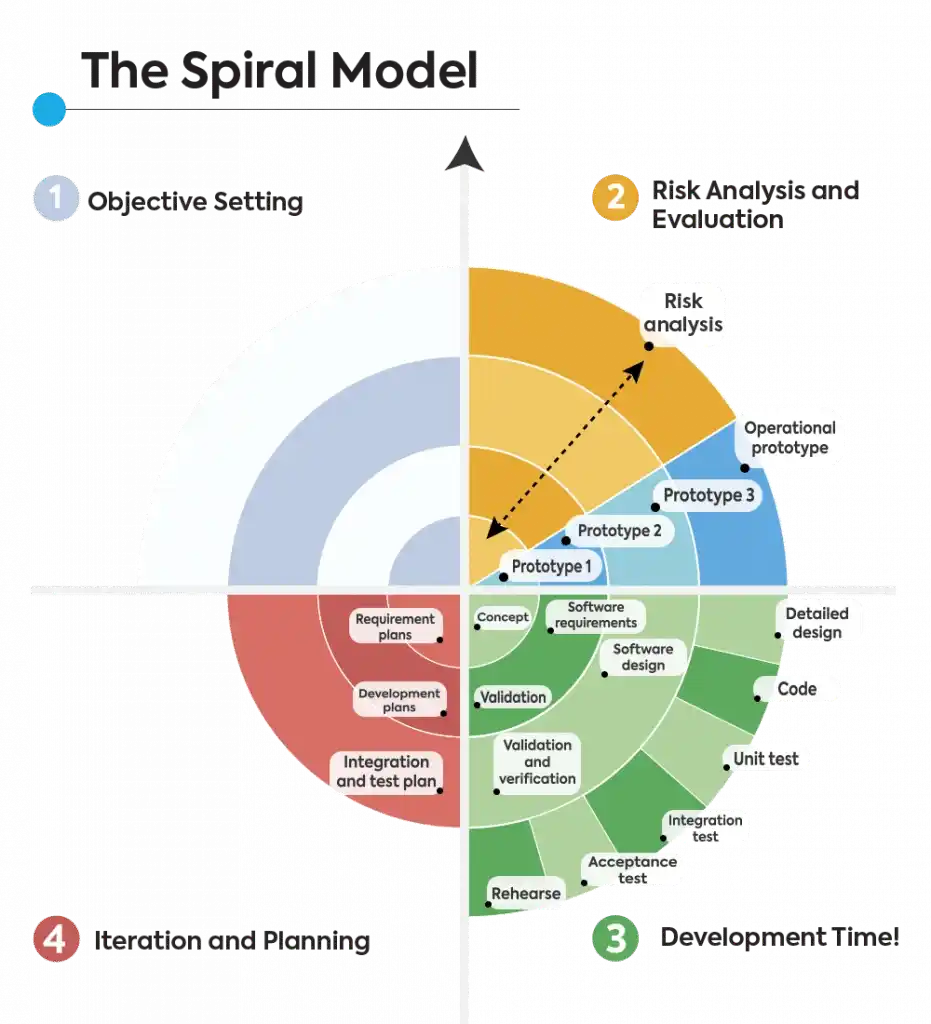
Pros: Excellent risk visibility; well-suited to large, complex projects; builds in stakeholder review at each cycle
Cons: Expensive; requires risk assessment expertise; overkill for smaller projects
Best for: High-risk projects like defense systems, aerospace software, safety-critical medical devices, and large-scale government programs
V-Model
The V Model of software development (also known as the Verification and Validation model) extends Waterfall by pairing each development phase with a corresponding testing phase.
Development flows down the left side of the “V” (requirements → design → coding), and testing flows back up the right side (unit testing → integration testing → acceptance testing). The key principle: testing is planned alongside development, not after.
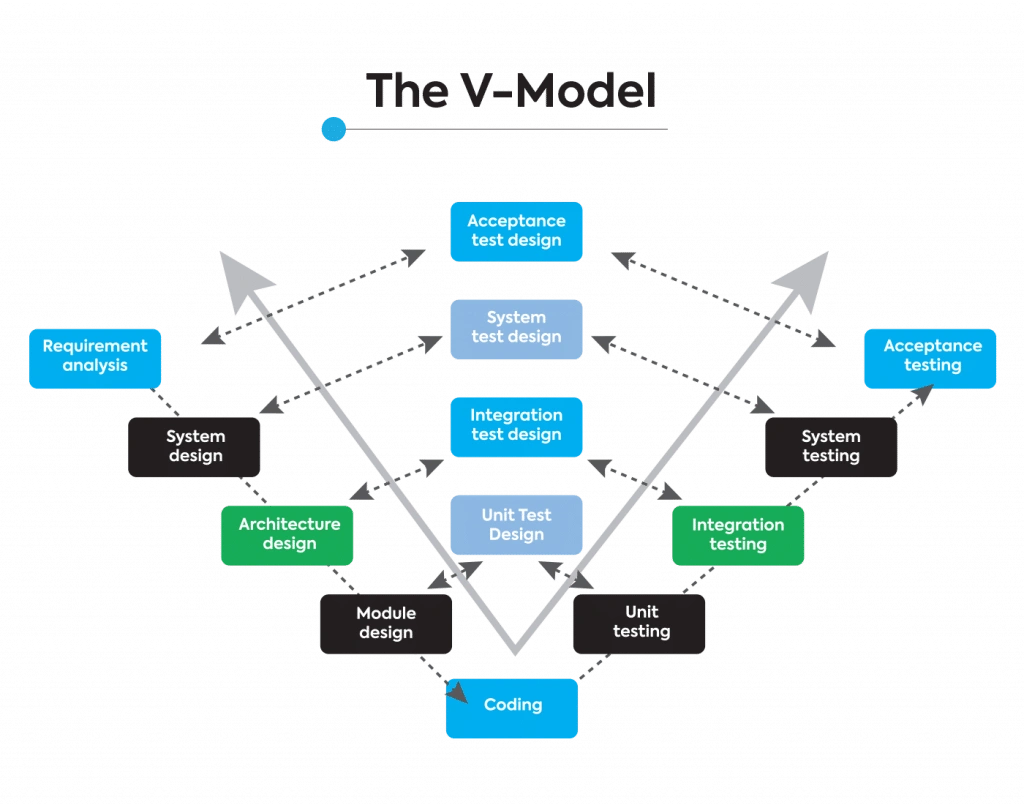
Pros: Rigorous traceability; defects caught close to their origin; strong audit trail
Cons: Extremely rigid; no mechanism for mid-project changes; heavy documentation burden
Best for: Medical device software, aviation systems, any domain governed by safety standards (IEC 62304, DO-178C, ISO 26262)
Rational Unified Process (RUP) Model
RUP is an iterative software development framework developed by Rational Software (later IBM).
This model is primarily focused on producing high-quality, efficient solutions that stay within the set budget and timeframe. The project is split into four stages: Inception, Elaboration, Construction, and Transition
Each of the project steps is present at every phase.
Depending on the project timeline, the degree of focus on a particular step will vary. Within the elaboration, construction, and transition phases, it is common to work on more than one iteration.
RUP is highly configurable: teams adopt the practices most relevant to their context.
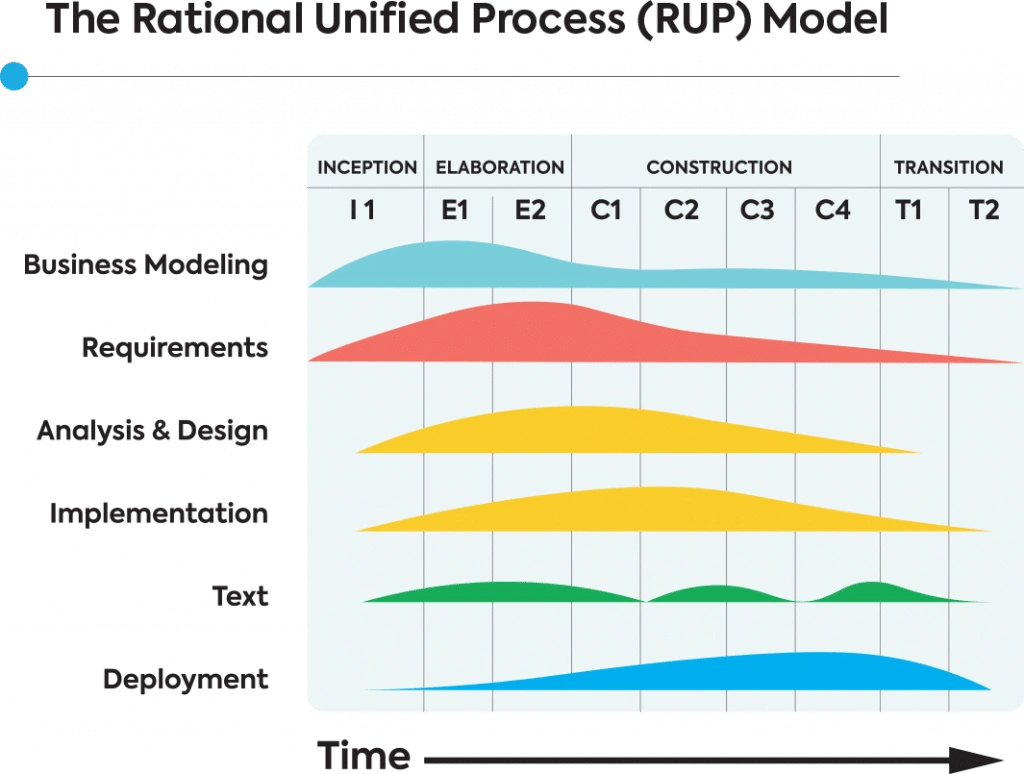
Pros: Strong architecture focus; highly adaptable; well-documented
Cons: Complex to implement; requires experienced practitioners; can become heavyweight
Best for: Large organizations building complex, architecture-heavy systems; teams that need structure but flexibility across a multi-year program
Prototype Model
As the name indicates, the Prototyping model is all about researching, testing, evaluating, and enhancing. It is a hybrid of the Waterfall model that pays close attention to client and user feedback.
First, the requirements are set and developers will work on a prototype—this phase often involves a focused software development service to ensure early alignment with user needs. Users then test the samples and provide feedback. After revisiting the initial requirements, developers will start programming the product.
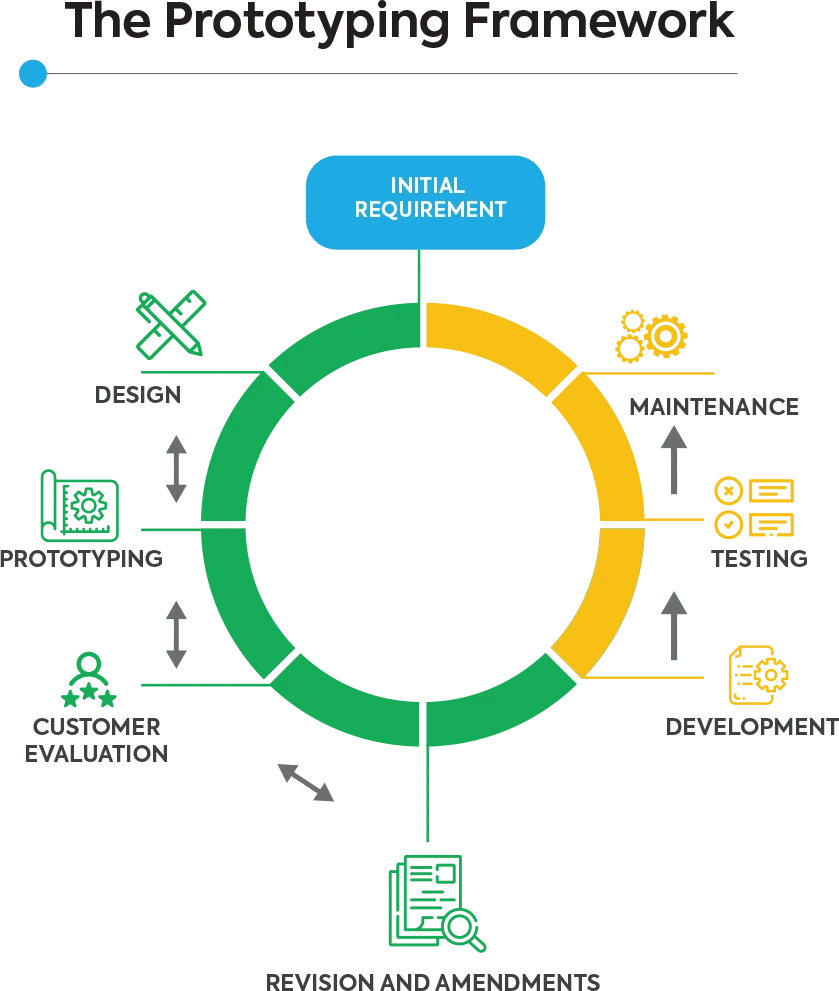
Pros: Reduces requirements ambiguity; stakeholders can react to something tangible; catches UX problems early
Cons: Stakeholders may confuse the prototype with the final product; prototype code is often not production-quality and should be discarded
Best for: UX-heavy applications, consumer products with complex user journeys, or projects where key requirements are uncertain
Extreme Programming (XP)
XP is an Agile-family methodology that is extremely flexible. Because of this, amendments can be made at numerous stages. Iterations generally occur in 1-2 week stints.
Your involvement in the project is key to its success so that developers can implement your feedback almost instantly. Like with most Agile frameworks, extreme flexibility can be both a gift and a curse. Although handy for larger projects with unclear requirements, it can also complicate the sequential flow and prevent you from sticking to your initial timeline.
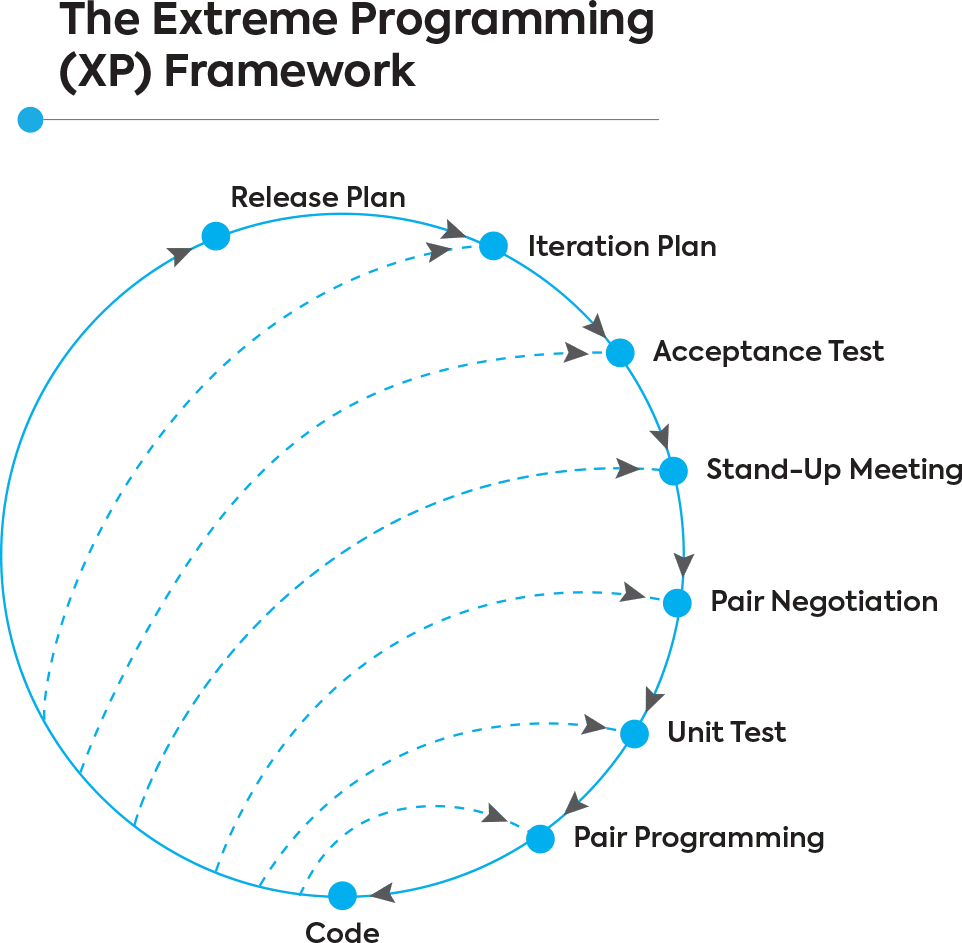
Pros: Produces very high code quality; continuous testing reduces defect escape rate; tight feedback loops
Cons: Requires high team discipline; pair programming can feel inefficient to teams unfamiliar with it; difficult to apply in distributed or large-team contexts
Best for: Small, experienced teams working in high-change environments where code quality is critical
Lean Model
Lean is another Agile framework.
The methodology (also known as the Minimum Viable Product) behind this approach is centered around feedback and optimization.
In Lean models, developers analyze and plan the project thoroughly first to guarantee efficiency. After that, you can create a very simple version of the software to get the ball rolling.
User feedback and client input are of great importance in this model. Only choose this approach if you have the time needed to communicate regularly and be highly involved in feedback and decision making.
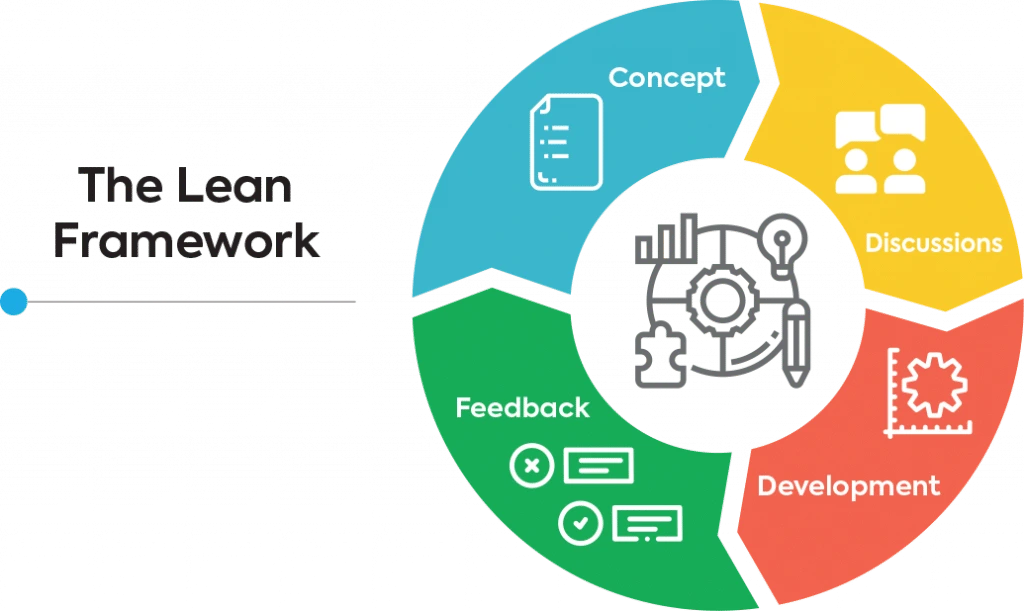
Pros: Strong emphasis on value delivery; reduces waste and over-engineering; works well in combination with Agile and Kanban
Cons: Abstract — requires team maturity to apply without a prescriptive structure; can be difficult to measure progress against
Best for: Teams focused on operational efficiency, continuous improvement, or reducing technical debt
Dynamic Systems Development Model (DSDM)
DSDM is a structured Agile framework built around a fixed-budget, fixed-time philosophy.
Rather than fixing scope and letting time and cost float (the traditional approach), DSDM fixes time and cost and makes scope the variable. It uses timeboxes and MoSCoW prioritization (Must have, Should have, Could have, Won’t have) to manage trade-offs.
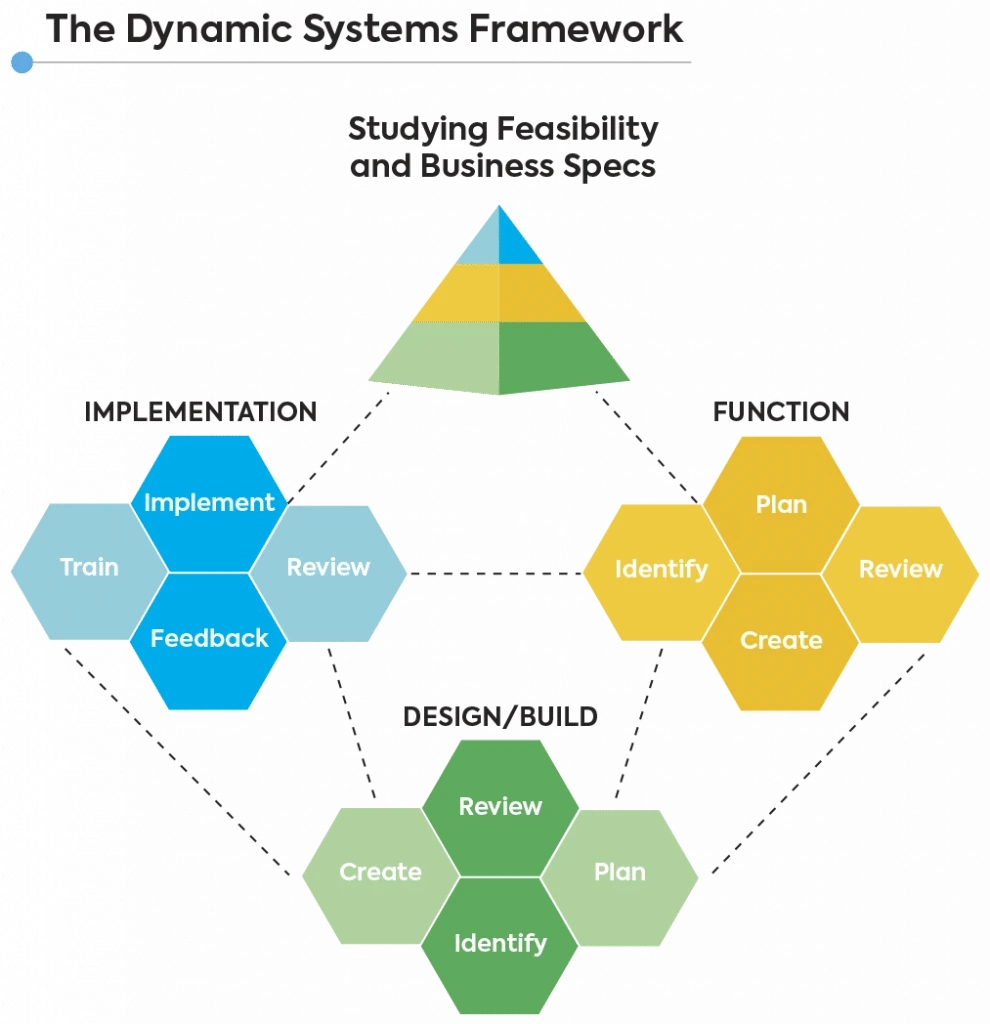
Pros: Good fit for business-led, time-constrained projects; strong governance; predictable delivery
Cons: Can be costly; requires thorough training to implement well
Best for: Business transformation projects, marketing technology builds, or any project where the delivery date is non-negotiable
Feature-Driven Development Model
FDD is a model-driven, iterative methodology. It focuses on delivering working software through a repeating sequence of short design-and-build cycles centered on individual features.
It emphasizes object modeling, feature lists, and individual code ownership — making it particularly well-suited to larger teams that need structured parallelism.
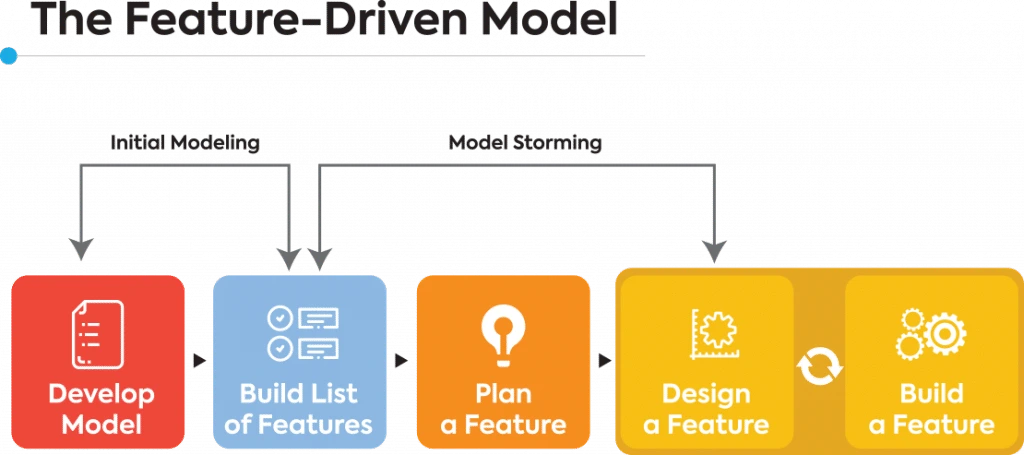
Pros: Scales well to large teams; good traceability between features and deliverables; regular visible progress
Cons: Less flexible than Scrum; can feel prescriptive; requires experienced architects
Best for: Large development teams building feature-rich enterprise or commercial software
Joint Application Development Model
JAD is less a full delivery methodology and more a structured collaborative requirements process.
Through it, clients and developers interact frequently to ensure the end results exceed expectations. One of the characteristic traits of JAD is collaborative sessions. In these workshops, stakeholders, users, and experts meet to discuss the software development project in detail, identify errors early on, and resolve them before the mistakes become too costly to fix.
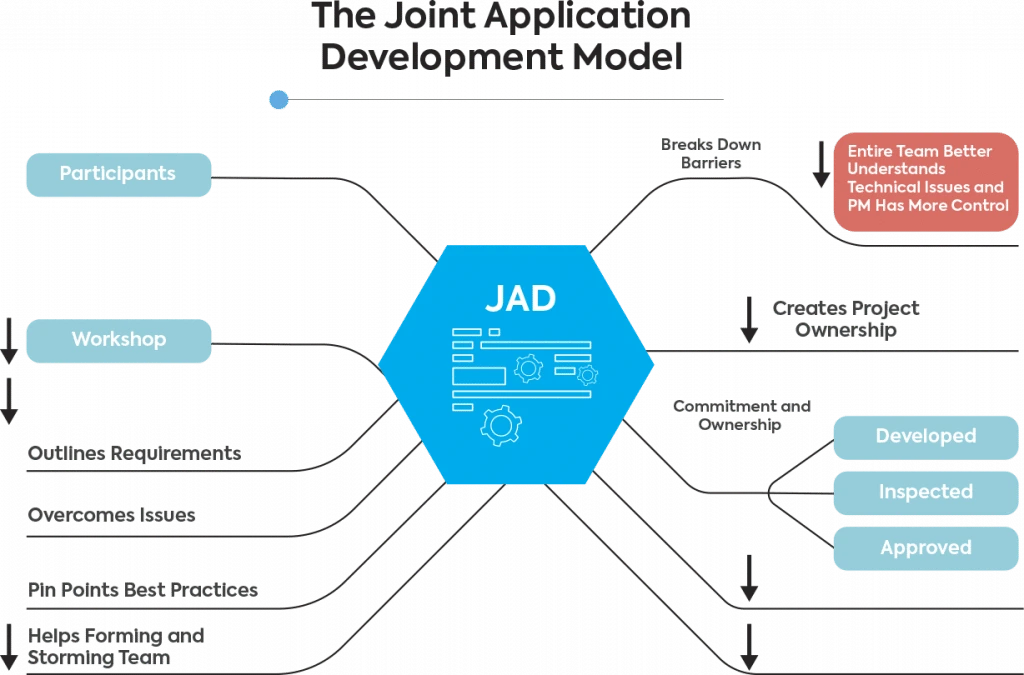
Pros: Dramatically reduces requirements misunderstanding; builds stakeholder ownership early; faster consensus than traditional requirements gathering
Cons: Requires skilled facilitation; intensive in terms of time; may not suit stakeholders with limited availability
Best for: Complex systems with diverse stakeholder groups; enterprise software where conflicting requirements are a risk; projects where end-user adoption is critical
How to Choose the Right Software Development Model
No model is objectively better than another. If you’re still not sure what’s the right choice for your project, you can reach out to a software strategy consulting expert.
Meanwhile, here’s a clear breakdown of the models by project type:
By Project Type
|
Scenario |
Recommended Model(s) |
Why |
|
Startup building an MVP |
Agile / Scrum |
Speed, flexibility, frequent stakeholder feedback |
|
Enterprise platform transformation |
SAFe / Hybrid Agile–Waterfall |
Scale, governance, legacy integration |
|
Regulated / safety-critical software |
V-Model / Spiral |
Traceability, compliance, risk management |
|
Continuous delivery / platform team |
DevOps + Kanban |
Release cadence, reliability, flow efficiency |
|
Unclear requirements, UX-heavy product |
Prototype + Agile |
Validate before committing to full build |
|
Fixed-budget, fixed-deadline project |
DSDM / Hybrid |
Manage scope as the variable, not time/cost |
|
Maintenance and support team |
Kanban |
Continuous flow, no need for sprints |
|
Large team, feature-rich enterprise app |
FDD / SAFe |
Parallel delivery, structured feature ownership |
Key Questions to Ask Before Choosing
- How well-defined are the requirements? If they’re vague or likely to change, lean toward Agile. If they’re fixed and documented, Waterfall or V-Model may be appropriate.
- What are the consequences of failure? High-risk domains (medical, aviation, finance) need models with strong risk management and documentation — Spiral, V-Model, or RUP.
- How frequently do stakeholders need to see progress? Frequent visibility → Agile/Scrum. Milestone-based → Waterfall or Iterative.
- How large is the team? Single team → Scrum or Kanban. Multiple teams → SAFe or scaled Agile. Small experienced team → XP.
- Is there a fixed deadline or budget? Fixed constraints → DSDM, Hybrid, or Fixed-price Agile with scope trade-offs built in.
- Are there regulatory or compliance requirements? If yes → V-Model, Spiral, or a documented Hybrid approach.
Final Thoughts
Software development models aren’t one-size-fits-all tools — they’re decision frameworks. The right one accelerates delivery, aligns your team, and reduces expensive surprises. The wrong one creates friction, generates unnecessary documentation, or leaves your team without the flexibility to respond when requirements change — which they always do.
At Scopic, we help teams navigate these decisions as part of our custom software development services. If you’re planning a new project and want expert guidance on the right approach, contact us to discuss your options.

About Creating Software Development Models Guide
This guide was authored by Mladen Lazic, Chief Technology Officer at Scopic, Inc.
Scopic provides quality and informative content, powered by our deep-rooted expertise in software development. Our team of content writers and experts have great knowledge in the latest software technologies, allowing them to break down even the most complex topics in the field. They also know how to tackle topics from a wide range of industries, capture their essence, and deliver valuable content across all digital platforms.