

Table of Contents
Intro paragraphs only, no H2
Choosing between a web app vs native app is a foundational product decision. This choice shapes your development budget, launch timeline, and user experience. For non-technical founders, selecting the wrong architecture can lead to high maintenance costs or a sluggish product that fails to engage users.
Your decision directly impacts how you capture your share of a massive market. According to Statista, consumer spending on mobile apps reached $36.2 billion in the second quarter of 2024 alone. To position your product for success, you must weigh the performance of native development against the reach of web and hybrid alternatives.
Key Takeaways
- Native for Performance: Choose native apps for maximum speed, complex graphics, and deep device integration.
- PWA for Reach: Opt for progressive web apps to achieve instant updates, search engine visibility, and lower upfront development costs.
- Hybrid for Speed: Select hybrid or cross-platform builds to launch quickly on multiple platforms using a single, shared codebase.
- Requirements Dictate Cost: Your budget depends on feature complexity, not just the development path you choose.
When deciding between a web app vs native app, align your choice with your product requirements, target audience, and long-term maintenance capabilities.
What Is a Native App?
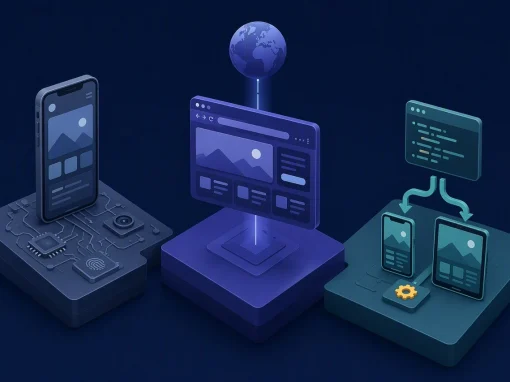
A native app is built specifically for one operating system: iOS apps for Apple’s ecosystem and Android apps for Google’s. This approach allows developers to use public APIs and platform-specific tools, as outlined in the Apple App Store Review Guidelines. Because they run directly on the device, native apps deliver the best performance for hardware-intensive features, complex animations, and augmented reality. For your product decision, this means choosing native when user experience and speed are your highest priorities.
- Works well for: High-performance UX, AR, offline functionality, and deep hardware integration.
- Not ideal for: Simple content platforms with tight budgets.
What Is a Web App or PWA?
A progressive web app (PWA) is a website built to look and feel like a mobile application. In the web app vs native app debate, PWAs run directly in browsers but can be installed on a user’s home screen. According to Google web.dev, service workers enable these apps to load instantly and support offline capabilities. Additionally, WebKit documented that iOS and iPadOS 16.4 added Web Push support for home screen web apps. While PWAs offer instant updates and lower app-store dependency, they have weaker native platform integration compared to dedicated mobile builds.
- Works well for: E-commerce, content platforms, rapid cross-platform deployment.
- Not ideal for: High-performance 3D gaming, deep hardware integration.
What Is a Hybrid or Cross-Platform App?
A hybrid or cross-platform app uses a single, shared codebase to run on both iOS and Android, distributed directly through official app stores. While some teams use “hybrid” loosely, we use it to cover practical cross-platform paths. Popular frameworks like Flutter and React Native development dominate this space. In fact, the 2024 Stack Overflow Developer Survey found that 9% of professional developers used React Native, while 9.4% utilized Flutter. For your product decision, this approach offers a faster launch by avoiding separate platform builds.
- Works well for: Multi-platform launches with shared code and app store distribution.
- Not ideal for: High-performance 3D games or immediate access to brand-new OS hardware features.
Performance Comparison
Performance depends entirely on your workload when evaluating a web app vs native app or hybrid alternative. Native apps deliver the strongest performance and lowest platform friction for graphics, animations, and hardware-intensive tasks. Hybrid options work well for most business applications when built on a strong architecture. Meanwhile, PWAs excel at content delivery, dashboards, forms, and lighter interactions.
| Requirement | Native | Hybrid/Cross-Platform | Web App/PWA |
|---|---|---|---|
| Graphics & Animation | Optimized/High | Moderate | Light |
| Hardware Integration | Deep/Seamless | Strong (with plugins) | Limited |
| Business Logic | Excellent | High | Moderate |
| Content & Forms | High | High | Optimized/Efficient |
| Offline Capability | Native Support | Strong Support | Service Worker Dependent |
Select your architecture based on these specific functional needs to avoid over-engineering. If your product relies on real-time 3D rendering or complex sensor fusion, native development is essential. For standard business workflows and CRUD operations, hybrid frameworks deliver reliable performance. If your primary goal is content distribution with minimal device integration, a PWA provides the most efficient path.
Cost and Time-to-Market
Your budget and launch timeline shift dramatically depending on whether you build a native app, hybrid solution, or PWA. Building native apps for both iOS and Android usually demands the highest upfront investment due to separate codebases. Conversely, a hybrid approach speeds up MVP development by sharing code, while a PWA offers the lowest initial launch cost.
Cost goes up when:
- Offline Needs: Syncing data offline increases backend complexity.
- Compliance: Meeting strict security standards adds audit costs.
- Device Integrations: Accessing advanced hardware requires custom native wrappers.
According to the Apple App Store Review Guidelines, apps must offer unique utility, meaning simple web wrappers face rejection. This requirement can force you to invest in native features even if you initially planned a hybrid or web-based approach. Additionally, if your product requires real-time data synchronization across devices, expect backend infrastructure costs to rise regardless of your front-end architecture.
Device Features and Platform API Access
Your choice between a web app vs native app determines how deeply your software interacts with user hardware. Native development offers unrestricted access to advanced camera controls, sensors, and background tasks. Hybrid apps achieve broad hardware access through plugins, though niche features might require custom native modules.
Meanwhile, progressive web apps (PWAs) have expanded their capabilities. According to Google web.dev, PWAs can utilize APIs for geolocation, biometrics via WebAuthn, and offline storage. However, PWA hardware access remains browser-dependent and may vary across different platforms and browser versions.
| Feature | Native | Hybrid | PWA |
|---|---|---|---|
| Hardware & Sensors | Full | Broad | Good |
| Biometrics | System | Plugin | WebAuthn |
| Offline Mode | Full | Full | Service Workers |
| Background Tasks | Unrestricted | Plugin-Dependent | Limited |
| Push Notifications | Native APIs | Plugin Support | Web Push (iOS 16.4+) |
Select native for deep hardware integration, hybrid for standard device access, and PWAs for lighter, web-based experiences. If your product roadmap includes features like Bluetooth Low Energy communication, NFC payments, or advanced camera controls, native or hybrid with custom modules will be necessary. For standard location tracking, file uploads, and user authentication, PWAs now offer sufficient capability on modern browsers.
Distribution and Discoverability
Distribution channels differ significantly in the native vs hybrid app and web app vs native app comparison. Native and hybrid apps rely on app stores, which build user trust through curation. However, they must comply with the strict Apple App Store Review Guidelines, meaning your product faces review delays and potential rejection if it lacks unique utility.
Conversely, progressive web apps bypass these gatekeepers entirely. Users discover them instantly through search engines and install them directly from the browser, eliminating download friction. If your startup requires rapid deployment and frictionless onboarding, browser-based access is ideal. However, if your business model relies on store-driven credibility and editorial featuring, the traditional app store route remains essential.
App store distribution also provides built-in payment processing, user reviews, and discovery algorithms that can drive organic installs. PWAs sacrifice these benefits but gain SEO advantages and the ability to update instantly without waiting for store approval. Consider your target audience: enterprise users may prefer app store credibility, while consumer-facing products benefit from the lower friction of web-based installation.
Maintenance and Long-Term Cost
Your choice between a web app vs native app, or a hybrid alternative, heavily shapes your long-term operational budget. Native development requires maintaining separate codebases for iOS and Android, which doubles your update efforts unless you invest in a highly unified architecture. Hybrid apps simplify this by sharing core business logic, but they still demand platform-specific QA and regular plugin updates to prevent breaking changes. Meanwhile, PWAs update instantly via your server, though they remain vulnerable to sudden browser engine updates.
Maintenance Risk Checklist:
- Platform Parity: Do updates perform consistently across all target devices?
- Dependency Health: Are your plugins compatible with the latest OS versions?
- Browser Consistency: Do browser updates disrupt your PWA service workers?
- Team Expertise: Can your developers troubleshoot platform-specific issues quickly?
Long-term costs also include monitoring tools, crash reporting services, and continuous integration pipelines. Native apps require separate build systems for each platform, while hybrid and PWA projects benefit from unified deployment workflows. If your team lacks deep mobile expertise, hybrid frameworks with strong community support can reduce troubleshooting time. For products with frequent feature updates, PWAs eliminate app store review delays entirely, allowing you to iterate faster based on user feedback.
Decision Matrix: Native vs Web vs Hybrid App
The hybrid mobile app vs native app and progressive web apps vs native comparison depends on your specific product goals. Use this matrix to guide your development path.
| Project Requirement | Choose Native When | Choose Hybrid/Cross-Platform When | Choose Web App/PWA When | Best Fit |
|---|---|---|---|---|
| MVP Validation | UX is the core product | Fast multi-platform launch | Quickest market test | Web App / Hybrid |
| Hardware & AR/VR | Deep device integration | Standard plugin access | Basic camera/location | Native |
| Budget & Scaling | High budget available | Shared codebase savings | Lowest upfront cost | Web App / Hybrid |
| SEO & Discovery | App store featuring | App store + web presence | Organic search traffic | Web App |
| Offline-First | Complex sync required | Moderate offline needs | Content caching only | Native / Hybrid |
For early-stage planning, aligning your technical path with your business model ensures you avoid costly rebuilds during MVP development. If your product requires frequent iteration based on user feedback, prioritize architectures that allow rapid deployment. If your competitive advantage depends on performance or exclusive platform features, invest in native development from the start.
FAQ: Native vs Web vs Hybrid App
What is the difference between a web app vs native app?
Native apps are built for specific operating systems using platform-specific languages and tools, while web apps run in browsers using standard web technologies. According to Google web.dev, modern progressive web apps (PWAs) now access advanced features like biometrics, narrowing the capability gap.
Is a hybrid mobile app vs native app better?
Neither is universally superior. Hybrid apps share one codebase across platforms, reducing development time and cost. Native apps offer maximum performance and unrestricted hardware access. Your choice depends on your product requirements, budget, and timeline.
Are progressive web apps vs native apps better for discoverability?
PWAs offer frictionless access and SEO benefits, allowing users to discover your product through search engines. Since 2023, WebKit has supported Web Push on iOS, narrowing the capability gap. However, native apps benefit from app store curation, editorial featuring, and built-in discovery algorithms.
Which is cheapest to build and maintain?
PWAs are generally the most cost-effective to build and maintain because they use a single codebase and update instantly without app store approval. However, total cost depends on your feature requirements, offline needs, and compliance obligations.
Can PWAs use push notifications on iOS?
Yes. According to WebKit, iOS and iPadOS 16.4 added Web Push support for home screen web apps, allowing PWAs to send notifications on Apple devices.
Conclusion
Evaluating a web app vs native app, or a hybrid alternative, requires balancing your budget, timeline, and user experience goals. No single approach fits every project. For instance, when Scopic developed Talking Anya, a highly interactive children’s game requiring complex 3D animations and device-sensor integration, a dedicated mobile development path was essential to deliver the necessary performance.
Scopic’s mobile development team works across native iOS and Android and cross-platform frameworks. If you’re deciding which path fits your product, budget, and launch timeline, we can help you map your requirements to the right development approach. Contact us to discuss your project.
About Native vs Web vs Hybrid App: Which Is the Better Choice?
This guide was written by Scopic Team
Scopic provides quality and informative content, powered by our deep-rooted expertise in software development. Our team of content writers and experts have great knowledge in the latest software technologies, allowing them to break down even the most complex topics in the field. They also know how to tackle topics from a wide range of industries, capture their essence, and deliver valuable content across all digital platforms.

 Message Scopio