

Table of Contents
Listen to article
AI adoption is accelerating, with 88% of businesses reporting regular AI use in at least one business function.
And as new AI-powered systems become increasingly celebrated for their role in driving greater automation, personalization, and data-driven decision-making, companies must know how to give AI access to the right tools and data without sacrificing control or security.
The secret?
MCP servers. Think of them as the bridge that allows AI to connect to tools, data, and systems through purpose-built integrations.
If you’re already using AI or planning to, understanding MCP servers is key to making it work safely at scale. Keep reading to explore why MCP servers matter for businesses, how they work, and how to build one securely.
Key Takeaways
- An MCP server is a secure intermediary that manages how AI accesses tools, data, and systems. It uses the Model Context Protocol (MCP) to define how information and capabilities are shared, while the server itself controls permissions and safeguards.
- For AI to deliver real value, it must be properly integrated into business systems and workflows, with MCP servers providing a secure way to connect AI to the tools and data it needs through defined integrations.
- Custom MCP servers let teams securely connect AI models to internal databases and ERP systems, meaning they can ask questions in plain language instead of relying on complex queries or fixed dashboards.
- Teams with the right expertise may build an MCP server in-house, but many organizations work with a development partner to meet security requirements and implementation challenges.
What Is an MCP Server?
An MCP server is a secure intermediary that manages how AI accesses tools, data, and systems. It uses the Model Context Protocol (MCP) to define how information and capabilities are shared, while the server itself controls permissions and safeguards.
Originally created by Anthropic and now governed as an open standard under the Linux Foundation, MCP is often described as the “USB for AI” because it provides a standard way for AI systems to connect to tools and data sources. This enables AI clients (such as ChatGPT, Claude, Gemini, etc.) to safely interact with external services instead of operating in isolation. MCP servers are also the backbone of ChatGPT Apps which Open AI introduced recently.
How MCP Servers Work
The following example shows how MCP servers typically operate in practice, though the exact flow depends on the implementation.
Step 1: A user asks a question
A user interacts with an AI model using natural language, such as asking for data, insights, or actions.
Step 2: The request is sent to the MCP server
The AI forwards the request to the MCP server instead of accessing systems directly.
Step 3: The MCP validates permissions
The MCP checks authentication rules, access permissions, and security policies before taking any action.
Step 4: The MCP connects to approved systems
The server retrieves data or performs actions in connected tools, databases, or internal systems.
Step 5: Results are returned safely
The MCP sends structured, approved results back to the AI model.
Step 6: The AI delivers a clear response
The AI presents the information to the user in a clear, conversational format.
In practice, MCP servers must also handle authentication, audit logging, rate limiting, and privacy controls to safely expose business data.
Depending on the use case, MCP implementations may include additional steps such as schema negotiation, monitoring, and other operational safeguards.
Why MCP Servers Matter for Business
AI assistant software is evolving from rule-based solutions to systems powered by large language models, with advanced assistants managing complex, open-ended business interactions with greater accuracy and flexibility.
However, having an AI assistant isn’t always enough.
For AI to deliver real value, it must be properly integrated into your business systems and workflows, with access to the tools and data it needs to do its job. This is where MCP servers come into the picture.
Think of it like this: If a visitor comes to your office, you wouldn’t let them wander freely in search of documents. Instead, they would ask a receptionist for what they need. The receptionist determines whether they’re allowed to access that information and handles the request accordingly.
In this case, the MCP server is the receptionist. It makes sure the AI only sees and does what it’s supposed to do. By keeping access to information organized and secure and enforcing clear access rules and monitoring, MCP servers help AI use business data safely and effectively to support greater productivity.
With MCP servers in place, AI tools can complete complex workflows across multiple applications and take meaningful actions, not just answer questions.
MCP Connectors & Early Implementations for Popular Business Apps
Leading companies are beginning to explore MCP servers in their workflows through early, platform-specific implementations. Here are a few examples from major organizations:
*The availability and maturity of these implementations vary by platform, with some offered as official services and others emerging through early or developer-focused releases.
Slack
Slack is a popular collaboration and messaging platform that centralizes team communication. It uses AI to summarize missed conversations, take notes, look up customer data, and support everyday workflows.
With the Slack MCP server, AI can securely interact with a team’s data, enabling MCP-compatible clients to search channels, send messages, and perform other Slack actions while respecting access controls.
Salesforce & HubSpot
Salesforce and HubSpot are widely used CRM platforms that help businesses manage customer relationships, sales pipelines, and marketing activities.
Salesforce’s hosted MCP servers allow AI assistants to securely access Salesforce data and support everyday tasks such as querying records, updating information, and generating reports.
HubSpot offers two MCP server options: a remote server that securely connects MCP-compatible AI clients to HubSpot CRM data, and a local server designed for developers to interact with the HubSpot Developer Platform through the CLI.
Google Workspace
Google Workspace is a productivity suite that includes tools like Gmail, Google Drive, and Calendar, widely used for collaboration and daily business operations.
With Google Workspace’s MCP server, AI assistants can securely connect to Google services through a standardized endpoint, allowing MCP-compatible clients to access emails, files, and schedules while respecting enterprise security controls.
Project Management
Project management tools like Asana, Jira, and Linear help teams plan work, track progress, and manage tasks across projects.
With MCP servers, AI assistants can coordinate work across teams when the server is designed to support actions like prioritizing tasks, flagging blockers, and updating timelines. This helps leaders make faster, better-informed decisions.
Custom MCPs for Internal Systems
While some large organizations offer pre-built MCP connectors, many companies still need custom MCP servers to securely connect AI to their internal systems.
Here are some practical ways companies use custom MCP servers today.
Internal Databases & ERPs
Custom MCP servers let teams securely connect AI models to internal databases, ERP systems, and analytics platforms through integrations such as Google Analytics MCP, meaning they can ask questions in plain language instead of relying on complex queries or fixed dashboards.
Custom MCP servers define exactly what data can be accessed, which actions are allowed, and how requests are authenticated and logged.
For instance, a user may ask, “How did inventory levels change after the last supply run?”
Behind the scenes, the MCP translates these requests into approved queries, retrieves the relevant data, and returns structured, accurate responses, without exposing raw databases or business logic to the model itself.
Time Tracking & HR Systems
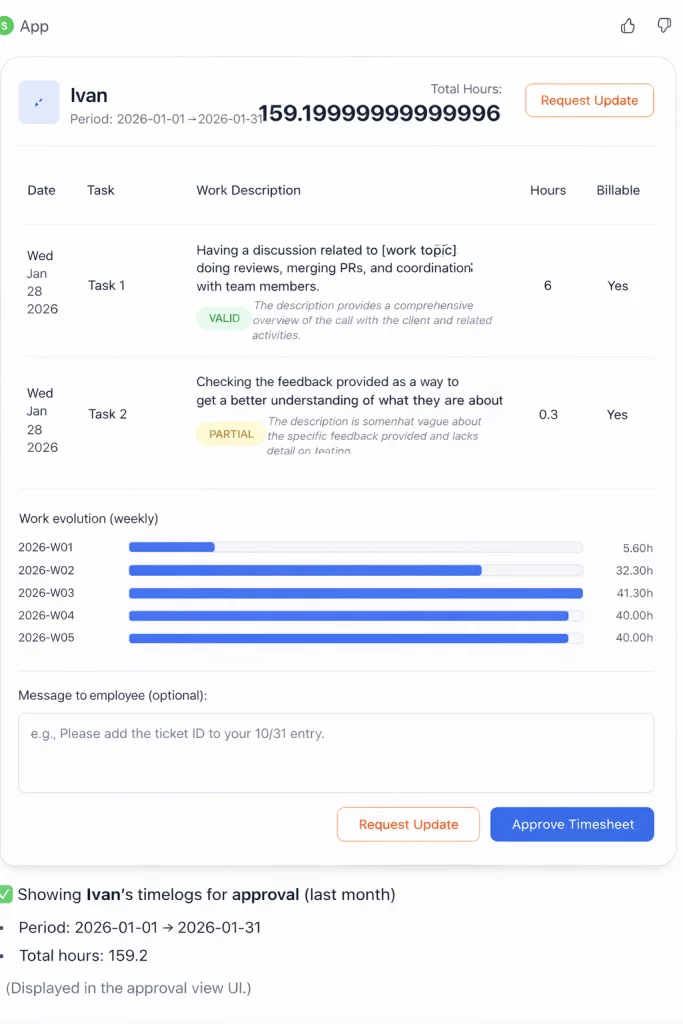
Custom MCPs have also proven valuable for HR and time-tracking systems. At Scopic, we have firsthand experience using a custom MCP connected to our internal time-tracking platform, where work hours are logged by person and project.
With an MCP in place, team leads and HR can ask simple questions like, “Who logged the most hours in November?” or “How many hours were spent on this project?” and receive immediate, accurate answers.
This system supports multiple HR and time-tracking use cases, including timesheet approval assistance with LLM guidance and trend visualization across individuals and projects. For example, team leads can request time-based reports in plain language, such as “Show me the trend report for this person over the last four months” or “Display the trend of total logged hours for a department this quarter.”
The system then pulls the relevant time-series data, generates an interactive chart, and provides an AI summary highlighting patterns like workload shifts, anomalies, or changes in productivity over time.
Here’s how it looks:
Legacy Systems
Legacy systems offer a level of familiarity that many companies value. However, their limited flexibility and lack of modern features often slow down day-to-day operations. This causes many organizations to combine these systems with modern AI tools to improve efficiency without replacing the systems entirely.
With a custom MCP, legacy platforms can be connected to AI-driven interfaces that allow users to retrieve information, generate reports, or trigger predefined actions through natural language, extending the lifespan of existing infrastructure while introducing modern capabilities.
Wondering how a custom MCP could benefit your company? At Scopic, we work closely with organizations to create custom solutions that streamline internal operations, keep information secure, and make proprietary systems easier to access and manage. Contact our team to get started.
MCP Development: DIY vs. Hiring a Development Partner
Building an MCP server can be complex. It involves setting up a development environment, writing and testing server code, and securely connecting the server to external tools and systems.
Beyond basic connectivity, MCP implementations require careful attention to authentication, logging, privacy, and ongoing maintenance.
So, can you build an MCP server yourself?
That depends on who you ask. For teams with the right technical expertise and relatively straightforward requirements, building an MCP server in-house may be a realistic option.
However, many organizations choose to work with a development partner, as MCP projects must meet strict security standards and navigate common implementation challenges to deliver real, long-term business value.
Here’s a quick guideline to help you decide whether to build in-house or hire a development partner:
When to Build an MCP Server In-House
- You have an experienced internal team familiar with backend development, APIs, and security best practices.
- The MCP use case is limited in scope and doesn’t involve highly complex workflows.
- You’re connecting to a small number of internal tools or systems.
- Security, compliance, and access rules are straightforward and well-defined.
- You have the time and resources to build, test, and maintain the server long-term.
When to Hire a Development Partner
- The MCP needs to integrate with multiple systems, databases, or legacy platforms.
- You know security and compliance matter but aren’t sure how to implement them correctly.
- You want to move quickly without overloading internal teams.
- The project requires long-term scalability, monitoring, and ongoing optimization.
- You need strategic guidance to ensure the MCP delivers measurable business value.
Get Started with MCP Server Development
As AI increasingly becomes integrated into business processes, MCP servers will play a critical role in securely connecting AI models to real-world systems.
At Scopic, our team is dedicated to creating AI-powered solutions for companies across industries. From AI consulting services to AI development services and MCP server implementation, we create tailored solutions that help you make the most of your internal systems.
Ready to see how MCP servers can work with your existing systems?
FAQs About MCP Servers
What does MCP stand for?
MCP stands for Model Context Protocol, an open-source standard for connecting AI applications to external systems.
Can MCP execute actions instead of just providing data?
Yes, it can. MCP can define tools that execute certain actions in your system. For example, timesheet approval. You can tell the AI to approve a person’s timesheets for last week, and MCP can provide a tool for the AI to do that.
Which apps have MCP connectors?
MCP connectors are emerging for many popular business apps and are primarily used within ChatGPT to securely connect AI models with tools and internal systems.
How long does it take to build?
The time it takes to build an MCP server depends on the complexity of the project, integrations required, and security requirements. For a tailored estimate, reach out to our team.
MCP vs API?
In AI app development, MCP doesn’t replace traditional APIs. Instead, it provides a standardized layer on top of existing APIs, allowing AI applications to interact with many different systems in a consistent and controlled way.
Can MCP connect to my internal database?
Yes. MCP can connect to internal databases through a custom MCP server that controls access, permissions, and security.

About MCP Server Guide
This guide was authored by Baily Ramsey, and reviewed by Mladen Lazic, Chief Technology Officer at Scopic.
Scopic provides quality and informative content, powered by our deep-rooted expertise in software development. Our team of content writers and experts have great knowledge in the latest software technologies, allowing them to break down even the most complex topics in the field. They also know how to tackle topics from a wide range of industries, capture their essence, and deliver valuable content across all digital platforms.



 Message Scopio