Table of Contents
70% of digital transformation programs in manufacturing fall short of their objectives and ERP implementation failure rates hit 75%.
If those numbers don’t land, consider that the operation you’re running right now is probably in both statistics — spreadsheets on the floor, manual handoffs between systems, and an ERP that still doesn’t talk to shop floor equipment.
The question was never whether you need better software. It’s whether your next investment ends up in the 30% that works — or the 70% that doesn’t.
This guide on manufacturing software development is a practical playbook for getting to the right answer before a line of code is written.
What Manufacturing Software Development Actually Means
Manufacturing software development is the work of designing, building, and deploying software built specifically for production environments — shop floor execution, supply chain, quality control, and everything in between.
The alternative — SAP, Oracle, Epicor, Infor, Plex — hands you a platform and asks your operation to conform to it. Software development for manufacturing does the opposite: the software conforms to you. For operations running proprietary processes or legacy equipment no vendor has prioritized, that’s not a subtle distinction. It’s the whole project.
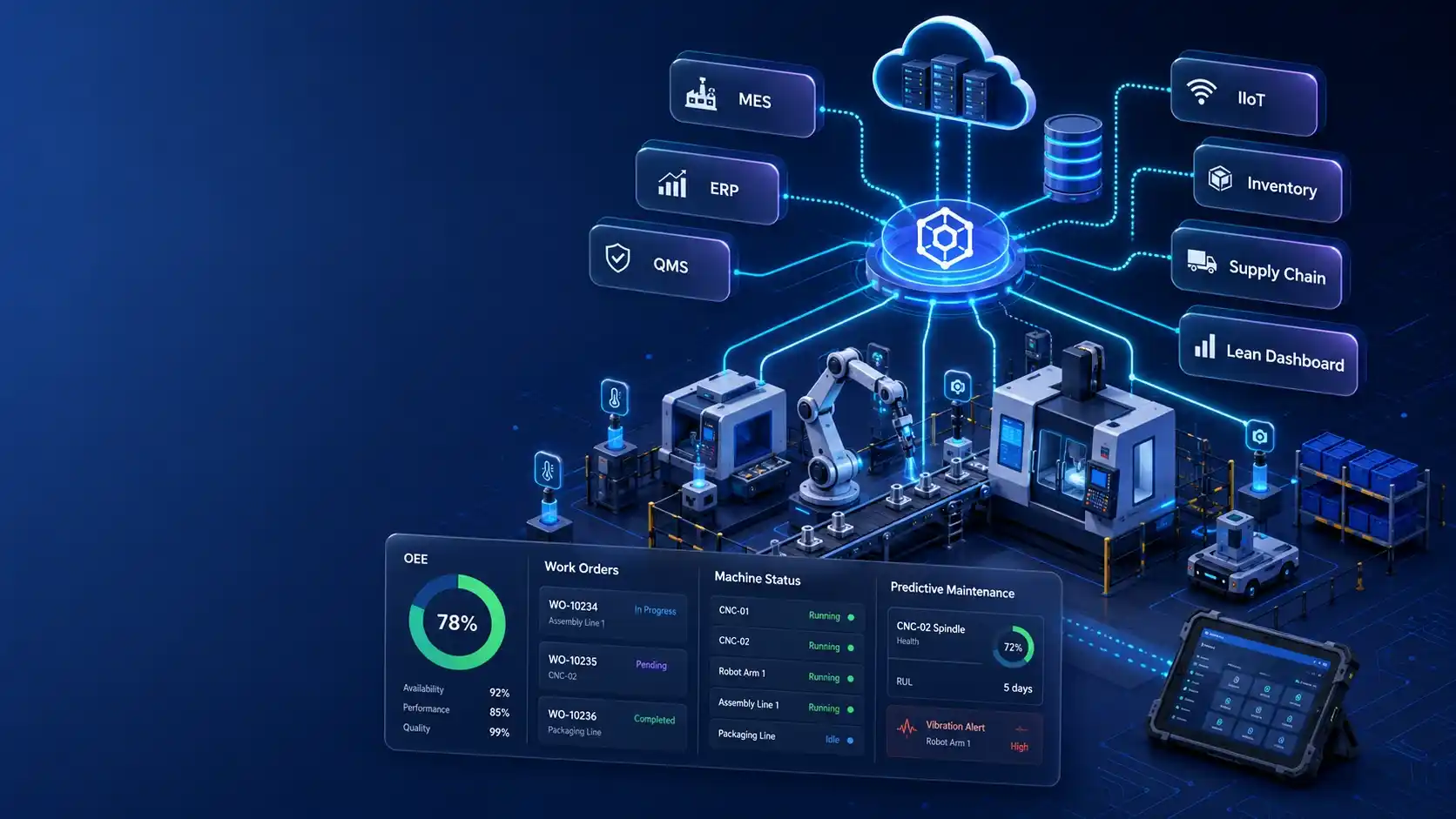
Software development for manufacturing typically covers six main categories:
- Manufacturing Execution Systems (MES)
- ERP modules and extensions
- Quality Management Systems (QMS)
- Predictive maintenance and IIoT applications
- Supply chain and inventory management
- Lean manufacturing tooling
The hard part is not figuring out which category your needs fall into, but whether your operation actually needs something custom. And that’s what most teams get wrong from the start.
When Does Your Manufacturing Operation Actually Need Custom Software?
Custom manufacturing software development makes sense if:
- Your manufacturing process is a competitive differentiator that no vendor has productized
- Your shop floor and ERP can’t communicate without a purpose-built integration layer
- Your current tools work at one plant’s scale but visibly break at five.
These are real problems worth real investment.
Everything else? Buy a platform and configure it.
Standard scheduling, inventory management, quality inspection, and financial reporting have been solved by SAP, Oracle, Epicor, and Infor — with decades of iteration behind them. Building from scratch to replicate that is expensive self-sabotage.
The same logic applies to operations still refining their processes: custom software locks in decisions you haven’t finished making yet.
The test is simple. If how you manufacture is what sets you apart, then custom manufacturing software development is the way to go. If it isn’t, a platform and a good implementation partner will get you there faster and cheaper.
The Core Categories of Manufacturing Software (And What Each Actually Does)
Here’s what manufacturing software development actually delivers in practice.
1. Manufacturing Execution Systems (MES)
MES run the shop floor in real time — scheduling, work orders, WIP, machine status, labor. Standard platforms (Siemens Opcenter, Rockwell FactoryTalk, GE Digital Proficy) handle common flows while custom work typically fills the integration and process-specific gaps they leave behind.
2. ERP Modules and Extensions
Most manufacturers already have an ERP. The custom development case is usually the missing module — the shop-floor-to-ERP connection every vendor promises is straightforward and never is.
3. Quality Management Systems (QMS)
This includes inspection workflows, non-conformance tracking, CAPA, supplier quality, and compliance documentation. In pharma, medical devices, and aerospace, the regulatory requirements are specific enough that generic platforms routinely fall short — and the cost of getting it wrong is too high to find out the hard way.
4. Predictive Maintenance and IIoT Applications
This is where AI development services meet the production floor — sensor data, anomaly detection, downtime forecasting. When the equipment data exists, this is usually the easiest ROI to quantify.
5. Supply Chain and Inventory Management
This involves processes like demand forecasting, supplier workflows, inbound logistics, and inventory optimization. Custom work makes sense when supplier relationships or inventory strategies are complex enough that no platform handles them without real compromise.
6. Lean Manufacturing Tooling
OEE dashboards, digital kanban, andon systems, waste tracking are part of lean manufacturing software development that connects directly to floor-level results.
How to Build Manufacturing Software: A Step-by-Step Guide
The process can be broken down in six steps. Each one has a clear owner and a decision point — because digital transformation in manufacturing cannot thrive on vague deliverables.
Step 1: Map the Workflow Before You Touch the Tech
The majority of manufacturing software failures are decided before anyone opens a laptop. A stakeholder says “we need a system for X,” and the team jumps straight to wireframes — skipping the part where they figure out what X actually looks like on the floor today.
Go observe before you document. Walk the line. Find every handoff that lives on a clipboard, every supervisor call that has no system record, every whiteboard message that evaporates at shift change. Then put numbers on the gap: not “faster batch records” but “from 45 minutes to under 5.” If the problem can’t be quantified, the solution can’t be evaluated.
Deliverable: Current-state process map, gap analysis, and a one-page problem statement with measurable success criteria.
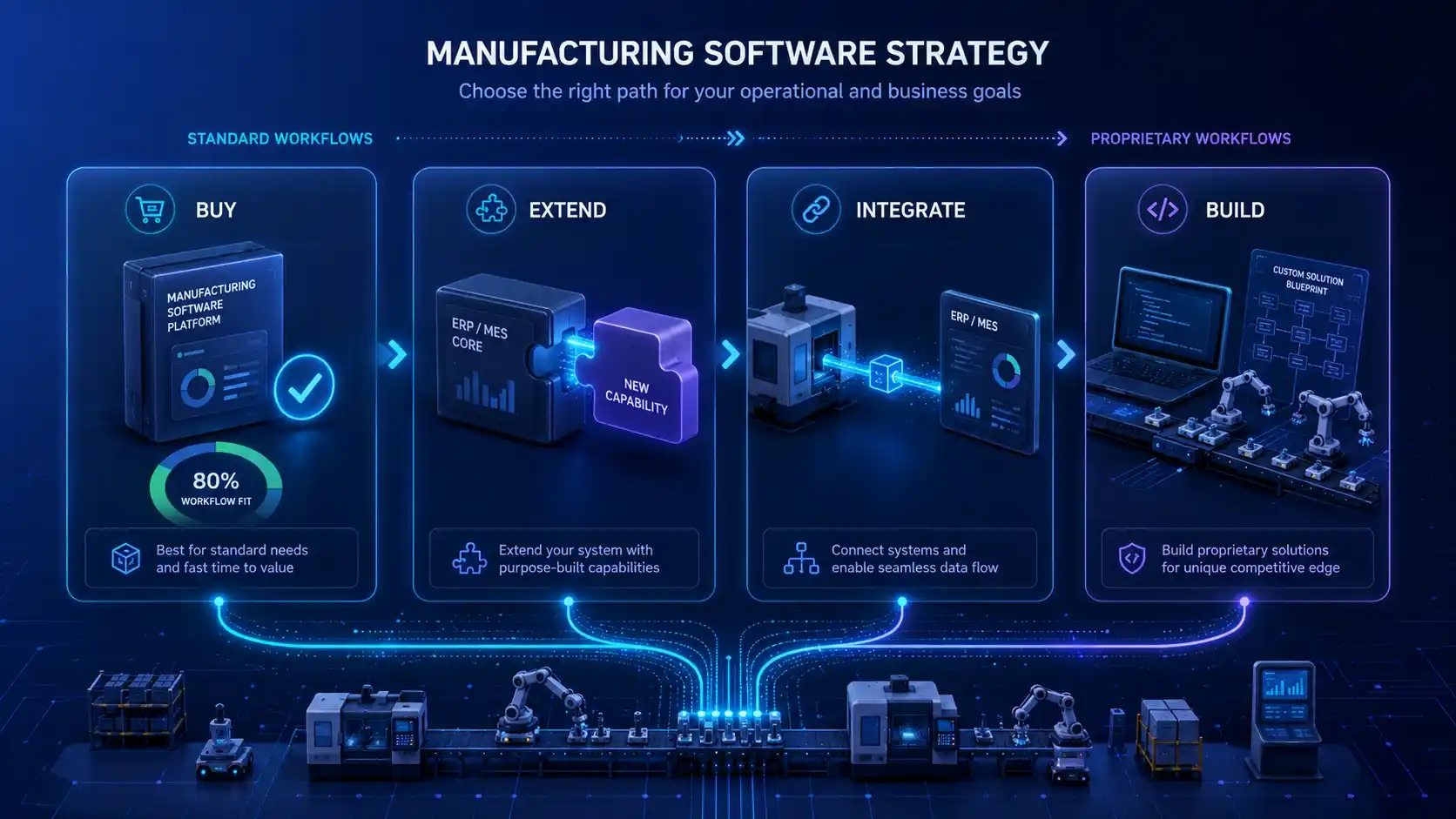
Step 2: Decide — Build, Buy, Extend, or Integrate
Every downstream decision — team composition, timeline, cost, maintenance burden — follows from this one. Get it wrong here, and no amount of good engineering recovers it.
- Buy when an existing platform covers 80%+ of the workflow. Configure it; handle the remainder with minor extensions or a thin integration layer.
- Extend when you’re adding capability to an ERP or MES that’s already embedded — the most common path, and usually the fastest to value.
- Integrate when the real problem is that existing systems don’t talk to each other; a well-built integration layer often outperforms a brand-new system.
- Build only when the process is genuinely proprietary, and the competitive advantage justifies the highest cost and highest maintenance.
This is where software product consulting pays for itself: getting the architecture decision right before any code is written.
Deliverable: Architecture decision record with chosen path, rationale, and documented reasons for rejected alternatives.
Step 3: Define the Integration Architecture Up Front
Manufacturing software touches more systems than almost any other enterprise application — PLCs, SCADA, ERP, QMS, WMS, supplier EDI feeds, sometimes customer demand platforms. Each connection is a project risk. Map them all before design begins.
Lock in data standards early: OPC-UA for machine connectivity, REST for modern business systems, EDI for supply chain, MQTT for IoT streams. Legacy equipment with proprietary protocols will take longer and cost more than estimated — budget for that honestly.
Separate real-time requirements from batch processes; conflating the two is how integration layers become expensive and brittle. And document what happens when a connection fails — a production line going down because an ERP API timed out is not an edge case, it’s a planning failure.
Deliverable: Integration architecture diagram covering data flow, protocols, latency requirements, and fallback behavior for every connection point.
Step 4: Build for the Shop Floor, Not the Boardroom
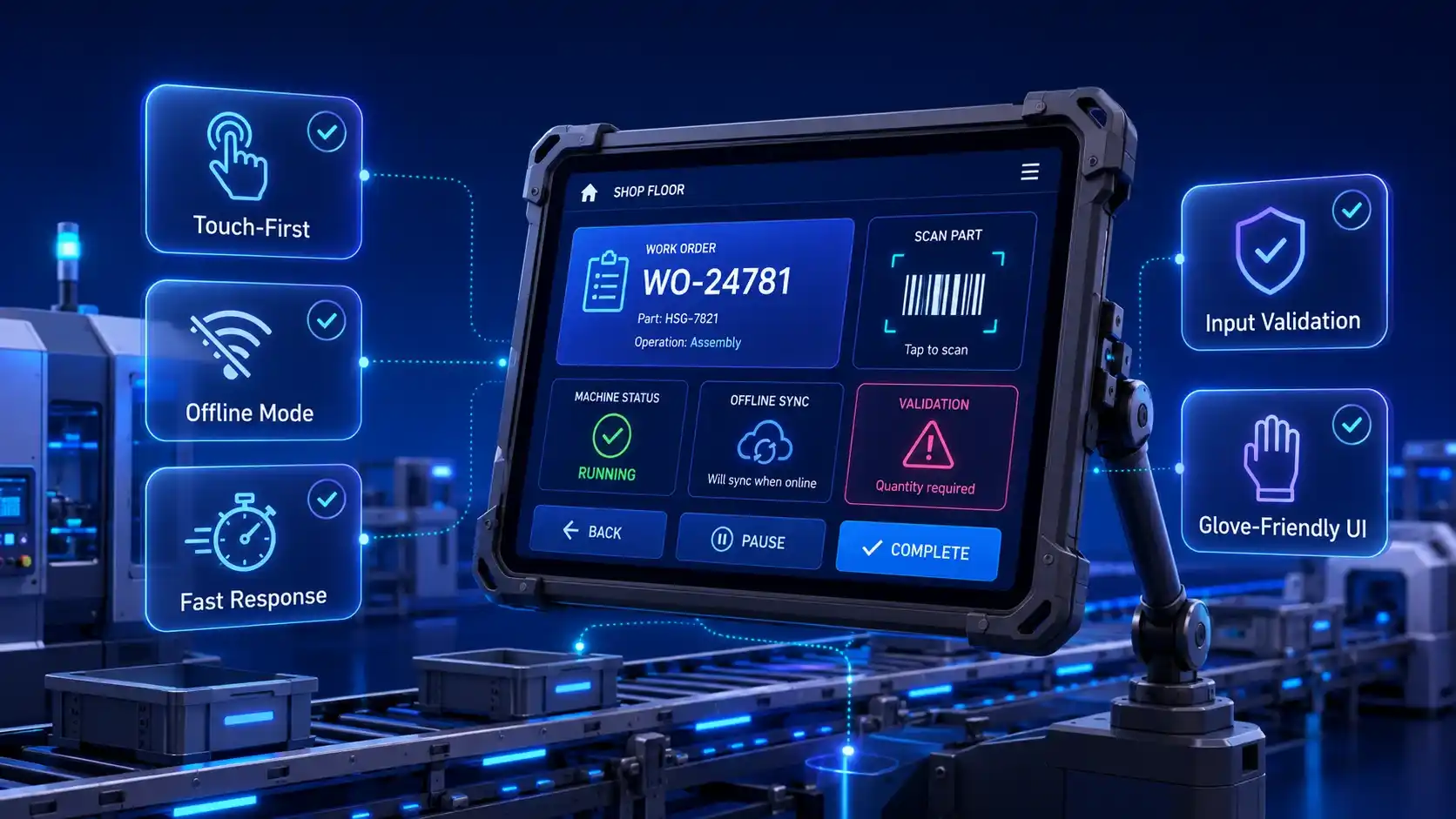
The end users here are wearing gloves, working in high-noise environments, on shifts where troubleshooting an interface is genuinely not an option. The design principles that govern custom web app development don’t translate here. Here’s what you need to plan for:
- Touch-first interfaces on ruggedized hardware.
- Offline capability for dead zones and metal-interference areas.
- Input validation tight enough to prevent bad data at entry — in regulated environments, a batch record typo is a compliance incident.
- Performance that doesn’t make operators wait: three seconds is long enough to lose someone back to pen and paper, and they’re not wrong to make that call.
Deliverable: UX prototype tested with at least three actual floor users running real workflows — not a stakeholder demo.
Step 5: Plan for Compliance and Scalability Before You Write Production Code
In regulated manufacturing, compliance is not a feature — it’s a foundation. FDA 21 CFR Part 11, ISO 13485, AS9100, IATF 16949: these standards dictate how data is stored, who can modify it, and what the system must prevent.
Scalability carries equal weight. A system generating sensor data at typical industrial rates accumulates more in a month than most web platforms see annually. A single-plant architecture that hasn’t accounted for multi-tenancy and horizontal scaling will need structural surgery before plant three goes live.
Deliverable: Compliance matrix mapped to system components, plus a scalability strategy with load assumptions and architectural decisions documented.
Step 6: Deploy, Train, and Build the Maintenance Model
A manufacturing go-live isn’t a web launch. Downtime costs real money per minute, and a botched cutover can halt production.
Run parallel systems before full transition. Practice the rollback plan, not just write it. Schedule go-live outside peak production windows.
On training: in-system help and a superuser network on the floor will outlast any classroom session. Budget for at least 30 days of intensive post-launch support. Then assign a named maintenance owner before launch — the person who picks up when a machine integration goes suddenly silent needs to be identified in advance, not improvised in the moment.
Deliverable: Deployment runbook with rollback criteria, training plan with named superusers, and a signed maintenance SLA with escalation paths and response commitments.
Lean Manufacturing Software Development: What It Means in Practice
Lean manufacturing software development works on two levels.
The first is making waste measurable. Clipboards and whiteboards hide problems; the right software surfaces them in real time. Four tools earn their place on the floor:
- OEE dashboards. Utilization data is only actionable when it’s live and tied to specific machines — not assembled after the shift ends.
- Digital kanban and pull systems. Automatic replenishment triggers, lower WIP, and visible bottlenecks. Paper cards stop working the moment you add a second plant.
- Andon and escalation systems. The right person on the right problem in minutes, not at the next shift meeting.
- Waste capture tools. Cycle times, changeover durations, downtime events — logged continuously, not recalled quarterly.
The second level is running the software project itself lean: ship one module, validate it on the floor, then decide what comes next. The operations that try to build everything at once rarely finish well.
How Long Does Manufacturing Software Development Take?
Here are the typical timeline ranges for each phase:
The sequence that holds up in practice: ship the integration layer and one module first, validate it against real production data, then decide what the next phase warrants. Building everything simultaneously is how budgets break.
| Phase | Timeline |
| Process mapping and discovery |
4–8 weeks Note: Discovery is the phase that pays for itself — compress it and the time doesn’t disappear, it relocates to rework. |
| Architecture and integration design | 4–6 weeks |
| Core build — integration/extension path | 3–6 months |
| Core build — full custom platform |
8–18 months Note: Any quote under six months for a compliance-capable custom system is missing work, not saving time. |
| Compliance validation (FDA, ISO, aerospace) |
+3–6 months
|
| Total: integration project | 6 months minimum |
| Total: full custom, regulated environment | 12-24 months |
Manufacturing Software Development Cost
Here’s what custom manufacturing software development actually costs, broken down by phase.
Note: These ranges reflect North American rates; offshore and hybrid teams run lower — the cost of software development is typically 40–60% less for equivalent output.
|
Phase |
Typical Cost Range |
|
Process mapping and discovery |
$10,000–$30,000 |
|
Architecture and integration design |
$15,000–$40,000 |
|
UI/UX design (shop-floor appropriate) |
$15,000–$50,000 |
|
Core build — integration and extension path |
$50,000–$200,000 |
|
Core build — full custom manufacturing platform |
$200,000–$1,000,000+ |
|
Machine and equipment integration (PLCs, SCADA, sensors) |
$25,000–$100,000+ |
|
Compliance validation (FDA 21 CFR Part 11, ISO 13485, AS9100) |
$20,000–$80,000 |
|
Annual maintenance and support |
20–30% of build cost |
|
Annual infrastructure (cloud hosting, monitoring, backups) |
$5,000–$30,000 |
A few numbers worth noting: the machine integration line item is the most variable in the budget. Legacy equipment with proprietary protocols and vendors who don’t publish their data models is slow and expensive. The compliance validation line surprises most teams who assumed it was covered in the engineering budget. It isn’t — it’s its own body of work.
If you’re trying to scope the right path for your operation, our software development services team walks through these tradeoffs before any commitment is made.
Common Pitfalls in Manufacturing Software Development
Most project failures aren’t technical. They’re decisions — made early, quietly, and with consequences that surface months later.
- Skipping floor observation. Requirements written from a conference room model what people think happens, not what does. Walk the line before you design anything.
- Treating integrations as an afterthought. “The ERP has an API” isn’t a specification — it’s a starting point. Every connection needs a defined data contract, protocol, latency threshold, and failure behavior. Vagueness here becomes a scope change later.
- Building for the approver, not the user. If operators find workarounds on day one, the software has already failed. Test on real devices, in real conditions, with real users before locking in the design.
- Adding compliance on at the end. In regulated environments, audit trails and access controls are structural. Adding them post-build means rebuilding.
- Going live without a rollback plan. A failed cutover in a live facility doesn’t create helpdesk tickets — it stops production.
- Leaving maintenance unassigned. Silent degradation is the most common post-launch failure mode. Name the owner before launch, not after something breaks.
How to Choose a Manufacturing Software Development Company
The difference between a good partner and an expensive lesson usually comes down to five questions.
- Have they gone live — not just demo’d? Ask for deployments running in production for 12+ months. Staging environments don’t teach the lessons that matter.
- Is their compliance knowledge specific? “We’ve done regulated work” means nothing. Ask for the actual audit trail architecture and validation protocol. Vague answers are your answer.
- Can they get past REST APIs? If the conversation never reaches PLCs, SCADA, or OPC-UA, they haven’t done the hard integration work that manufacturing actually demands.
- Have they designed for operators, not stakeholders? Ask to see shop floor interfaces — the ones used by people wearing gloves on a production shift, not the ones shown in sales decks.
- Will they tell you not to build? A partner who steers you toward a platform when that’s the right call is worth more than one who always recommends custom.
When you’re ready to run through these questions with a team that has the answers, our manufacturing software development company has nearly 20 years of production deployments to draw from.
Manufacturing Software Development in Action: Case Studies
Everything above is the framework. Here’s what it looks like when applied to real manufacturing clients.

SketchList 3D
A woodshop owner needed design software built around how woodworkers actually work.
Scopic built a 3D platform from scratch: insert virtual boards, cut to size, position them in a live model, and the software generates layouts, cut lists, and production reports automatically. It’s a clean example of custom development earning its place since the workflow was specific enough that no off-the-shelf platform modeled it well.

SpecPath
Manufacturers’ Agents Association for the Foodservice Industry (MAFSI) had a data visibility problem hiding inside a paperwork problem. Reps were tracking commissions, specification credits, and origination data across regions manually, with no shared system to make sense of it. The information that proved a rep’s value to a manufacturer existed; it just took hours to assemble and was effectively invisible day to day.
Scopic built SpecPath as a web application on .NET, C#, and MS SQL: a secure, searchable central library where both reps and manufacturers can see only the records they have a stake in. What used to be hours of manual reconciliation is now a dashboard. It’s a useful example of a problem that looks like “we need a database” on the surface but is really an access-control and data-visibility problem — the kind of distinction that decides whether custom software actually solves anything.

Lumber Project
Forestry Systems needed a faster, more accurate way to measure lumber inventory than tape measures and manual logs. Scopic built a custom desktop application using the Artec 3D Scanning SDK: the app analyzes a 3D scan of a bundle of lumber’s cut end, lets the user review and adjust the measured widths of individual pieces, and passes that data through to downstream inventory systems. It’s a narrow, specific problem — exactly the kind where a general-purpose tool wouldn’t cut it, and a purpose-built one pays for itself in measurement accuracy alone.
Conclusion
The operations that get this right aren’t the ones with the biggest budgets — they’re the ones that make decisions in the right order. Understand the process before specifying the software. Define what success looks like in numbers before choosing a build path. Assign ownership before launch, not after something breaks.
Get those sequencing decisions right, and the technology becomes the straightforward part.
If you’re working out where to start — build, extend, or integrate — talk to our manufacturing software team. A conversation first, not a contract.
Frequently Asked Questions
What is manufacturing software development?
Manufacturing software development is the process of designing, building, and deploying custom software systems for production environments. It’s distinct from off-the-shelf platform implementations in that the software is built around the manufacturer’s specific processes, not the other way around.
How much does custom manufacturing software development cost?
Custom manufacturing software development costs range from $50,000–$200,000 for an integration and extension project, to $200,000–$1,000,000+ for a full custom manufacturing platform. Machine integration, compliance validation, and ongoing maintenance (20–30% of build cost annually) are the line items most teams underestimate.
How long does it take to build manufacturing software?
Timeline depends heavily on the build path. Integration and extension projects typically run 6–9 months from discovery to go-live. Full custom manufacturing platforms in regulated industries take 12–24 months. Discovery and compliance validation are the phases most commonly under-scheduled.
What is lean manufacturing software development?
Lean manufacturing software development refers to both the tools that make lean processes measurable on the floor and the practice of applying lean principles to the software development process itself — small batch delivery, early operator feedback, and no big-bang launches.
Should I build custom manufacturing software or buy an off-the-shelf platform?
Build when your process is genuinely proprietary and no platform covers it without significant compromise. Buy or extend when your workflows are standard. The integration layer between existing systems often delivers higher ROI faster than building a new platform from scratch.
What integrations does manufacturing software typically need?
Most software development for manufacturing projects require integration with PLCs and SCADA systems on the shop floor (via OPC-UA or proprietary protocols), ERP systems (REST or SOAP APIs), Quality Management Systems, Warehouse Management Systems, and supplier EDI feeds. Every integration point is a project risk — mapping them before development starts is non-negotiable.
How does manufacturing software development differ for regulated industries?
In pharma, medical devices, and aerospace, compliance requirements are architectural decisions, not features. Audit logging, electronic signatures, role-based access control, and formal validation protocols (IQ/OQ/PQ) must be designed into the system from the start.
Do I need a specialist firm for software development for manufacturing, or will any development partner do?
Manufacturing integration work is categorically different from web or enterprise application development. A generalist partner who hasn’t shipped manufacturing software in production will encounter the hard problems for the first time on your project. That’s an expensive place to learn. In software development for manufacturing, specialization in the domain isn’t a nice-to-have.

About Creating Manufacturing Software Development Guide
This guide was authored by Vesselina Lezginov, and reviewed by Alan Omarov, Solutions Architect with experience in leading and delivering complex manufacturing software projects.
Scopic provides quality and informative content, powered by our deep-rooted expertise in software development. Our team of content writers and experts have great knowledge in the latest software technologies, allowing them to break down even the most complex topics in the field. They also know how to tackle topics from a wide range of industries, capture their essence, and deliver valuable content across all digital platforms.