Table of Contents
Listen to article
Think of computer vision as an extra pair of eyes for your retail business. By combining AI with cameras and image recognition, it helps retailers automate tasks, strengthen security, improve inventory management, and optimize store operations.
But successful implementation goes beyond adopting new technology. It requires a clear understanding of the business challenges you want to solve, a structured implementation plan, and the right computer vision solution for your specific use case.
In this guide, we’ll walk through the seven key steps to implementing computer vision in retail, from defining your goals and selecting the right application to developing a solution and measuring results.
What Is Computer Vision in Retail?
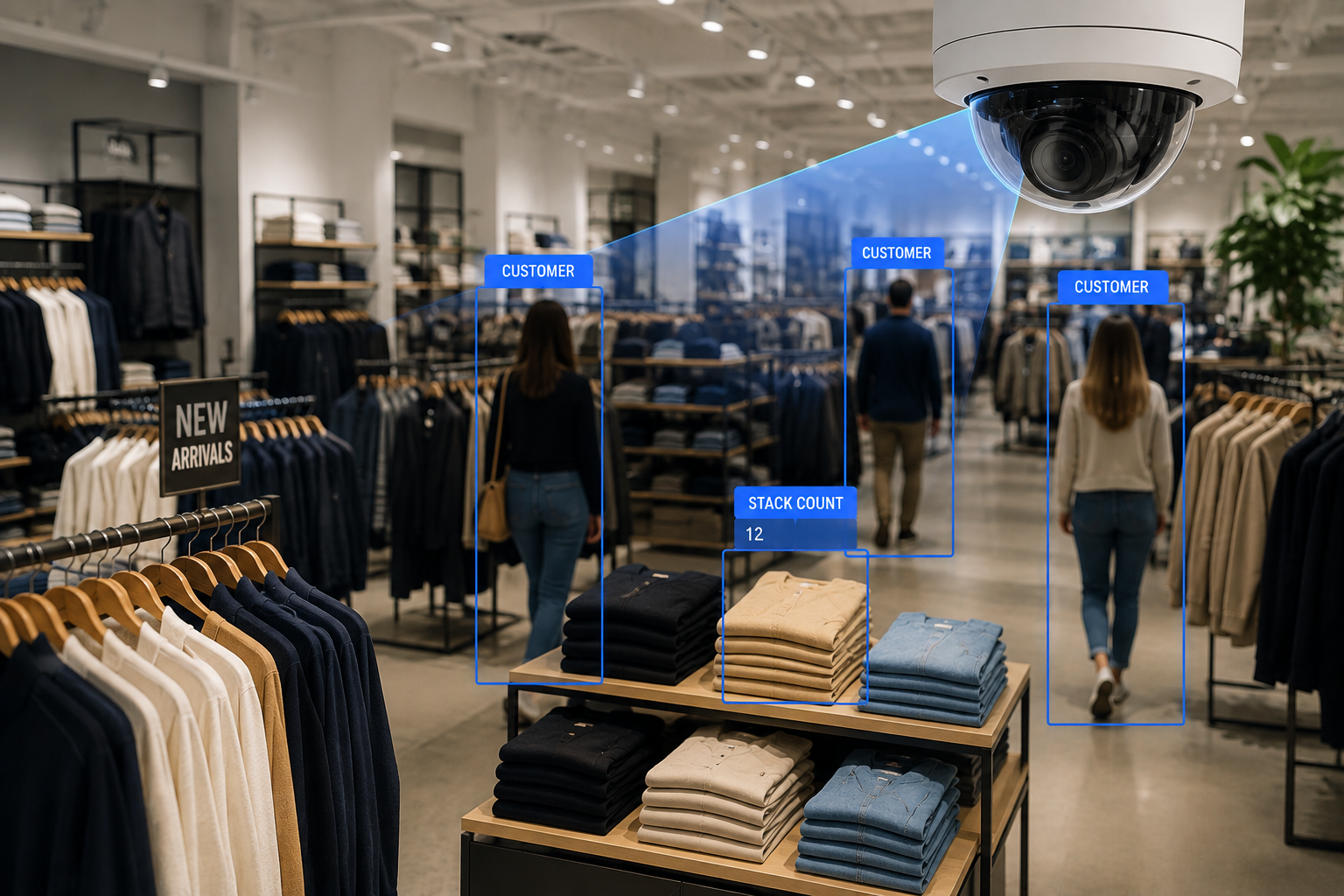
Computer vision in retail is the use of artificial intelligence and cameras to analyze images and video in real time, helping retailers automate tasks, monitor store activity, and make smarter business decisions. It supports everything from inventory management and shelf monitoring to cashierless checkout and customer behavior analytics.
“Similar to human visual perception, the technology’s objective is to replicate how humans see and understand visual information. This field is dedicated to automating and integrating the various processes and representations involved in visual Recognition.”
Source: Fortune Business Insights
Why Computer Vision Is Becoming Essential for Retail Businesses
While computer vision has applications across many industries, it’s making an especially big impact in retail. From keeping shelves stocked to improving the shopping experience, it helps retailers solve everyday challenges more efficiently.
Here are some of the most notable benefits:
- Improves inventory accuracy by automatically tracking stock levels, detecting out-of-stock items, and identifying misplaced products in real time.
- Enhances the customer experience by reducing checkout wait times, keeping products available, and creating a smoother shopping journey.
- Increases operational efficiency by automating repetitive tasks, providing real-time insights, and allowing employees to focus on higher-value work.
- Reduces shrinkage and theft by detecting suspicious activity, monitoring high-risk areas, and identifying inventory discrepancies before they become costly problems.
Popular Computer Vision Applications in Retail
What better way to understand the benefits and capabilities of computer vision than by looking at real computer vision use cases in retail?
Here are some of the most common applications you’ll find across the retail industry.
Inventory Management Automation
One of the biggest reasons computer vision in the retail industry has gained traction is its ability to automate inventory management. Through AI-powered cameras and image recognition, retailers can track stock levels, detect damaged items, and monitor product movement in real time.
Anyone working in retail knows that even small inventory inaccuracies can quickly turn into bigger problems. With real-time visibility into stock levels, computer vision helps retailers stay ahead of those issues.
Shelf Monitoring and Out-of-Stock Detection
Even the best inventory system won’t help if products never make it onto the shelf. Computer vision can continuously monitor shelves, detect when products are running low or out of stock, and automatically notify employees when it’s time to restock.
By catching these issues as they happen, retailers can keep popular products available, improve the shopping experience, and reduce missed sales opportunities.
Cashierless Checkout
Waiting in long checkout lines could soon become a thing of the past. By combining computer vision with AI, retailers can automatically recognize the products customers pick up and charge them without the need for a traditional checkout. Pretty cool, right?
Beyond making shopping more convenient, these systems can also help reduce theft by tracking products throughout the shopping journey and identifying suspicious activity.
Customer Behavior Analytics
Understanding how customers move through a store can help retailers make smarter business decisions. Computer vision can analyze shopping patterns, identify high-traffic areas, measure how long customers spend in different sections, and reveal which displays attract the most attention.
These insights can be used to optimize store layouts, improve product placement, and create a more enjoyable shopping experience while helping retailers make data-driven decisions.
Virtual Try-On Experiences
Virtual try-on technology uses computer vision to analyze a customer’s face or body through a smartphone or in-store camera. It then digitally overlays products such as clothing, eyewear, or makeup, allowing shoppers to see how they’ll look before making a purchase.
This creates a more engaging shopping experience, helps customers make more confident buying decisions, and can even reduce product returns.
7 Steps to Implement Computer Vision in Retail
To get the most out of computer vision, retailers need a structured approach to implementation.

Step 1: Define Your Retail Business Goals
Before choosing a computer vision solution, you first need to identify the business challenges you want to solve.
Having clear business goals helps ensure you’re implementing the solution that best addresses your business needs, rather than simply adopting new technology. It also gives your development partner a better understanding of your priorities and expected outcomes.
In the retail sector, common goals for implementing computer vision include:
- Reduce stockouts
- Improve inventory accuracy
- Speed up checkout
- Reduce labor costs
- Increase customer satisfaction
Step 2: Match Your Business Goals to the Right Computer Vision Solution
Now that you’ve identified your business goals, it’s time to determine which applications of computer vision in retail can help you achieve them. Different solutions are designed to solve different challenges, so choosing the right starting point is key to a successful implementation.
The table below matches common retail business goals to the computer vision solution best suited to address them.
| Business Goal | Recommended Computer Vision Solution |
| Reduce stockouts | Shelf monitoring |
| Improve inventory accuracy | Inventory management automation |
| Reduce checkout lines | Cashierless checkout |
| Improve merchandising | Customer behavior analytics |
| Reduce shrinkage | Loss prevention monitoring |
| Increase customer engagement | Virtual try-on experiences |
Step 3: Assess Your Existing Retail Infrastructure
Before implementing computer vision, take a step back and look at the technology you already have in place. The goal isn’t to start from scratch; it’s to understand what can support your new solution and what might need to be upgraded.
A few key areas to review include:
- Camera Systems: Computer vision relies on high-quality visual data, so start by evaluating your existing cameras. Consider their image quality, placement, coverage, and whether they’ll be able to capture the information your AI models need.
- POS and Inventory Management Systems: Your computer vision solution shouldn’t operate in isolation. Think about how it will connect with your POS, inventory management, or other retail systems to automate workflows and keep data consistent across your business.
- Cloud vs. Edge Computing: Decide where your visual data will be processed. Cloud computing offers flexibility and scalability, while edge computing processes data closer to where it’s collected, making it ideal for applications that require real-time responses.
- Data Storage and Security Requirements: Consider how you’ll store, manage, and protect the visual data your system collects. It‘s also important to make sure your solution aligns with your organization’s privacy, security, and compliance requirements.
Step 4: Prepare Your Retail Data
With your goals, use case, and infrastructure in place, it’s time to get your data ready. Think of this as giving your AI the information it needs to recognize patterns and make accurate decisions. The better the data, the better the results.
Your development partner will guide you through this process, but it often includes:
- Training Data: Collect images or videos that reflect what your system will encounter in the real world, from different products and shelf layouts to varying lighting conditions.
- Data Labeling: If you’re building a custom solution, images may need to be labeled so the AI can learn to recognize products, people, or other objects relevant to your use case.
- Image Quality: Review your dataset to make sure images are clear, consistent, and suitable for training. Blurry or inconsistent images can make it harder for the model to learn.
- Privacy Considerations: Make sure any customer data is handled responsibly and that your data collection practices align with applicable privacy regulations. Depending on your use case, privacy-preserving AI techniques can also help minimize the exposure of sensitive data while still allowing your computer vision system to perform its intended tasks.
Step 5: Develop or Choose Your Computer Vision Solution
It’s now time to build your solution. Depending on your goals, timeline, and budget, this could mean developing a custom computer vision application or using an existing AI platform. If you choose a custom solution, your development partner will guide you through the AI development life cycle, from model development and training to testing and validation.
Decide Between a Custom Solution and an Existing AI Platform
Not every retailer needs to build a computer vision solution from scratch. Many AI platforms already offer capabilities like shelf monitoring, inventory tracking, and customer analytics that can be deployed more quickly, making them a great fit for common retail use cases.
With an off-the-shelf platform, your development partner will first help you select the solution that best fits your business needs. From there, they’ll configure the platform, integrate it with your existing POS, inventory management, and other retail systems, and customize features such as dashboards, alerts, and reporting to support your workflows.
However, if your business has unique workflows, specialized products, or complex integration requirements, bespoke software may offer greater flexibility and long-term value. In this case, your development partner will design the solution architecture, develop the computer vision models and supporting software, build the necessary integrations, and create custom features tailored to your operations.
Train and Test Your AI Models
Once the solution is built or configured, it’s time to train and test the AI model. Your development partner will use your prepared data to teach the system how to recognize products, people, shelves, or other objects relevant to your use case.
They’ll then test the model using real-world scenarios to measure its performance, identify areas for improvement, and fine-tune it until it consistently delivers accurate results.
Validate Performance Before Deployment
Before rolling out your solution across every location, it’s important to make sure it performs as expected in a live retail environment. Your development partner will typically launch a pilot in a single store or department, monitor how the system performs, gather feedback from employees, and make any necessary adjustments.
Once the solution has been validated and meets your performance goals, it can be deployed more broadly with greater confidence.
Step 6: Integrate Computer Vision Into Existing Retail Systems
At this point, your computer vision solution is ready to become part of your day-to-day operations. To get the most value from it, it needs to work alongside the systems your team already uses, not as another disconnected tool.
Your development partner will integrate the solution with the software that’s already part of your retail operations. For example, they might connect it to your inventory management system so stock levels update automatically when shelves are running low or integrate it with your POS system to combine sales data with customer behavior insights.
Step 7: Launch a Pilot and Measure Results
Before fully launching your computer vision solution, it’s a good idea to start with a pilot.
Testing the solution in a specific area of your business, such as a department, checkout lane, warehouse, or a single store, gives you the opportunity to see how it performs in a real-world environment, gather feedback from employees, and make any final adjustments before expanding its use.
Your development partner will also help you define the right metrics for measuring success, such as inventory accuracy, shelf availability, and customer satisfaction. Tracking these results helps you measure ROI, identify opportunities for improvement, and determine when you’re ready to roll the solution out more broadly.
Ready to take the next step? At Scopic, we offer AI development services tailored to your unique business needs. Our team can help you design, develop, and implement a computer vision solution that aligns with your goals.
Common Challenges When Implementing Computer Vision in Retail
Like any new technology, computer vision in retail comes with its own set of challenges. Fortunately, most can be addressed with proper planning and the right development partner.
- Insufficient Image Data: Not having enough images to train the model can limit its accuracy and effectiveness. Collecting sufficient, representative image data early can help create a stronger foundation for model training.
- Poor Image Quality: Blurry images, inconsistent lighting, or poorly positioned cameras can reduce the accuracy of AI models. Reviewing your camera setup early in the implementation process can help prevent these issues.
- Integration with Legacy Systems: Many retailers rely on older POS, inventory, or ERP systems that weren’t designed to work with AI. Top digital transformation companies can build the integrations needed to keep data flowing seamlessly between systems.
- Privacy and Compliance: Computer vision solutions often capture customer and employee data, making privacy a key consideration. It’s important to establish clear data handling practices and comply with applicable privacy regulations.
- Scaling Across Locations: Expanding from a pilot to multiple stores or departments requires consistent hardware, reliable integrations, and ongoing monitoring to ensure the solution performs as expected.
- Employee Adoption and Training: Employees should understand how the technology supports their work rather than replaces it. Providing training and involving staff early in the implementation process can improve adoption and long-term success.
Is Your Retail Business Ready for Computer Vision?
If you’re considering the latest computer vision applications in retail, it’s worth taking a step back to assess your AI readiness before implementation. Having the right technology is important, but so is having clear goals, reliable data, and a plan for measuring success.
Ask yourself the following questions:
- Have you identified the business problem you want to solve?
- Do you have the visual data needed to train and support your AI model?
- Can your existing systems integrate with a computer vision solution?
- Have you identified a high-impact use case to pilot first?
- Do you have KPIs in place to measure success and ROI?
The more of these questions you can answer “yes” to, the better prepared you’ll be for a successful implementation. If there are still a few gaps, addressing them before development can save time and reduce challenges later on.
Final Thoughts
The future of computer vision in retail isn’t just about smarter technology; it’s about creating smarter businesses. From improving inventory accuracy and streamlining operations to enhancing the customer experience, computer vision gives retailers the tools to make faster, more informed decisions.
The key is to approach implementation strategically. Start with a problem worth solving, build on a strong foundation, and continue refining your solution as your business grows.
With the right plan and the right technology partner, even a small pilot can evolve into a solution that delivers lasting business value.
Whether you’re exploring your first AI initiative or expanding an existing one, Scopic’s machine learning development services can help you build a custom solution that aligns with your business goals and delivers long-term value.
FAQs About Computer Vision in Retail
Why is computer vision important for retail businesses?
Computer vision helps retailers automate repetitive tasks, improve inventory accuracy, enhance the customer experience, reduce shrinkage, and make faster, data-driven decisions using real-time visual insights.
What are the most common computer vision applications in retail?
Common computer vision applications in retail include inventory management, shelf monitoring, cashierless checkout, customer behavior analytics, loss prevention, store layout optimization, and virtual try-on experiences.
How does computer vision improve inventory management?
Computer vision continuously monitors inventory using cameras and AI, helping retailers detect out-of-stock items, identify misplaced products, automate stock tracking, and reduce manual inventory checks.
How do retail AI automation tools integrate computer vision?
Retail AI automation tools integrate computer vision by connecting it with systems such as POS, inventory management, ERP, and warehouse management software.

About Computer Vision in Retail Guide
This guide was authored by Baily Ramsey, and reviewed by Mladen Lazic, Chief Technology Officer at Scopic.
Scopic provides quality and informative content, powered by our deep-rooted expertise in software development. Our team of content writers and experts have great knowledge in the latest software technologies, allowing them to break down even the most complex topics in the field. They also know how to tackle topics from a wide range of industries, capture their essence, and deliver valuable content across all digital platforms.