Table of Contents
Listen to article – This audio is generated by AI
Parts of this article were artificially generated or manipulated using AI tools.
ChatGPT can now support apps that go beyond conversational responses by connecting to external systems and providing interactive experiences within ChatGPT.
But building one often involves more than companies expect. It isn’t simply a matter of connecting an API to ChatGPT; developers must consider the Apps SDK, MCP, UI, backend systems, authentication, data flows, security, testing, and publishing.
We’re not going to give you general recommendations about why businesses can benefit from apps in ChatGPT. Instead, this guide takes a practical look at ChatGPT app development, covering everything from architecture and requirements to development, testing, and publishing.
Throughout this guide, we’ll use ZoomRadar as a real-world example of ChatGPT app development. Scopic developed its ChatGPT app to connect real-time weather data with an interactive map experience inside ChatGPT.
What is a ChatGPT app?
A ChatGPT app is an interactive experience that runs within ChatGPT and connects the conversation to external tools, data, or services. Unlike GPTs, which primarily customize ChatGPT’s behavior, apps can integrate external functionality and interactive UI components directly into the conversation.
Define Your ChatGPT App Requirements
Before you even start the build process, there are a number of factors to consider. These decisions should be clearly defined, as they guide your development process.
- Use case: Ask yourself, what is the goal of this app? What are you trying to accomplish? Consider who will use it, what they need to do within ChatGPT, and what functionality is required to support that experience.
- External tools and data: Identify the external APIs, databases, platforms, or other data sources your app needs to access. You should also determine what information the app needs to retrieve or update and whether the required APIs and integrations are available.
- Permissions: Define what information and actions users can access through the app. Consider whether different users require different permission levels and which actions, particularly those that create, update, or delete data, require additional authorization.
- Host-compatible UI needs: Determine whether conversation alone is enough or whether users would benefit from interactive components within ChatGPT. For instance, ZoomRadar required an interactive weather map that allowed users to visualize weather conditions directly within the ChatGPT experience.
- Backend endpoints: Determine which functionality will be handled by your backend and which endpoints the app needs to interact with. This includes considering how requests are processed, how data moves between systems, and how your backend will expose the capabilities the app needs.
- Maintenance ownership: Decide who will be responsible for maintaining the app after launch. Ownership may include the MCP server, backend services, APIs, authentication, UI components, security, and updates required as dependencies or ChatGPT requirements change.
With these requirements defined, you can better assess the scope of your ChatGPT app and the expertise required to build it. An app that relies on custom UI, multiple external systems, authentication, and complex backend logic will require different development capabilities than a simpler experience with a limited set of tools.
ChatGPT App Architecture
It’s impossible to talk about ChatGPT app development without discussing the architecture. A ChatGPT app typically involves several interconnected layers that determine how ChatGPT communicates with your tools, displays information to users, accesses external data, and executes actions.
These can include the ChatGPT host and distribution layer, MCP tools and resources, interactive UI, authentication, backend services, external data sources, and deployment infrastructure. The exact architecture will depend on what your app needs to accomplish and the systems it needs to connect to.
Where the Apps SDK, MCP, and Plugin Package Fit
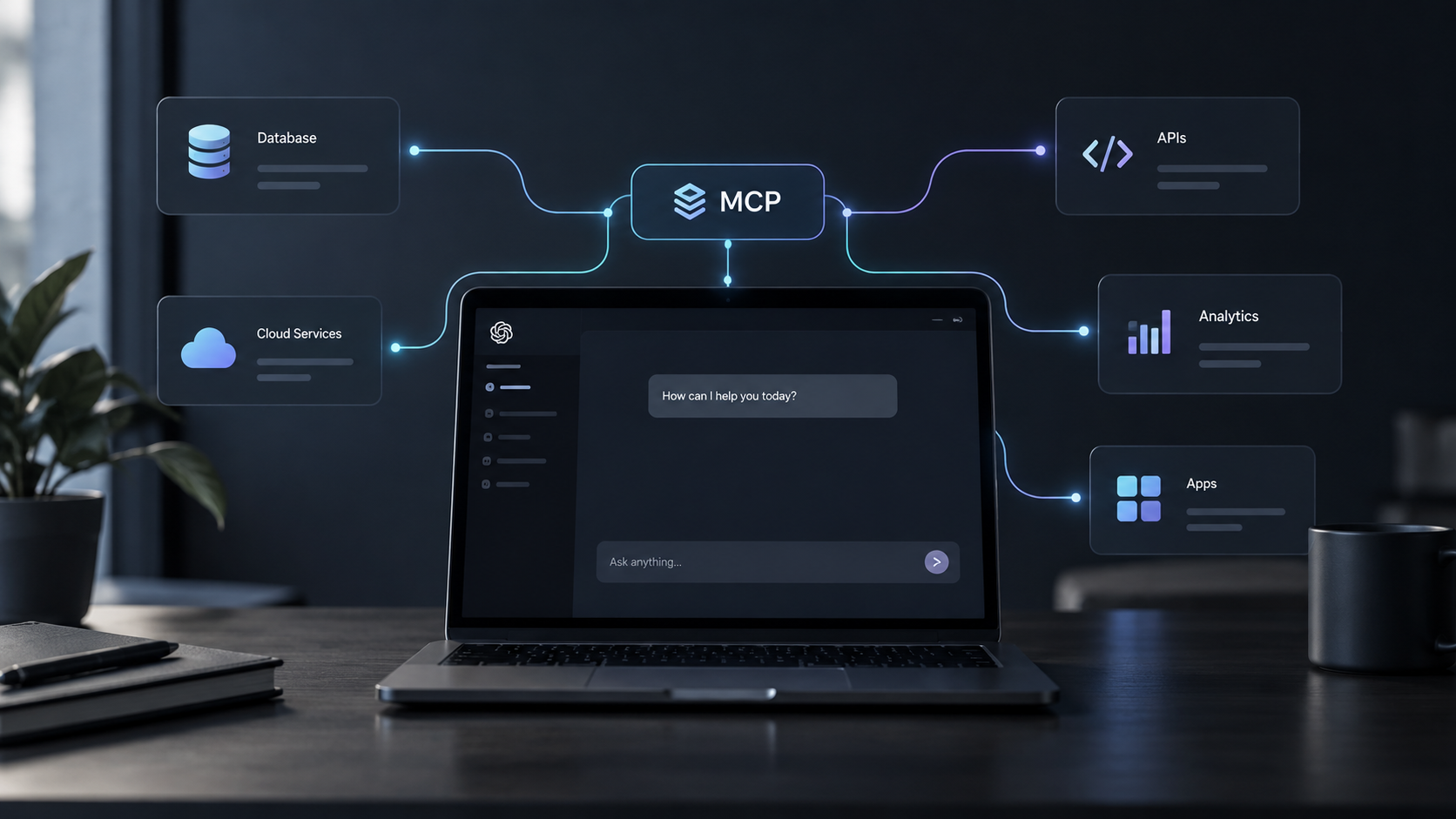
The Apps SDK provides the framework for building interactive app experiences within ChatGPT, while the Model Context Protocol (MCP) provides the underlying structure for connecting ChatGPT to external tools and data. MCP tools define the actions your app can perform, while resources can provide the data or UI content needed to support those interactions.
For apps with an interactive interface, MCP connects tools to UI resources that the ChatGPT host can render within the conversation. This allows the model, your external systems, and the interface the user sees to work together rather than operating as separate experiences.
The plugin package sits at the packaging and distribution layer rather than replacing the Apps SDK or MCP. It brings together the information and assets required to package your app for ChatGPT and prepare it for distribution. OpenAI provides separate guidance on how to package a plugin and the broader plugin development process.
MCP itself extends beyond ChatGPT app development. If you want to understand the protocol, server architecture, tools, resources, and implementation in greater depth, check out our MCP Server guide.
Designing the Interactive UI
Not every interaction needs a visual interface. Developers should determine where conversation is sufficient and where an interactive component adds real value.
That said, forms can simplify structured input, while maps and visualizations can make complex information easier to understand.
When designing the UI, consider:
- Component choice: Select forms, maps, lists, buttons, or other components based on what the user needs to accomplish.
- State and tool results: Define how the UI responds to user interactions and displays information returned by tools.
- Accessibility and responsiveness: Make sure components are accessible and work across supported screen sizes.
- Latency and failure states: Account for loading times, errors, unavailable services, and clear recovery paths.
With MCP Apps, tools can connect to UI resources that the host renders as interactive components, allowing tool results and user interactions to work together within the app.
Take our work with ZoomRadar, for example. Its ChatGPT app required an interactive weather map because presenting weather information visually was an important part of the user experience. This meant the UI was not simply an added design element; it was a requirement that influenced how the app was structured.
Authentication, Backend, and Data Flows
Most production ChatGPT apps need to securely connect the ChatGPT experience to user accounts, backend services, APIs, and external data sources. This requires developers to map how data moves between systems and where authentication and authorization are required.
For ZoomRadar, this included connecting the ChatGPT experience to real-time weather data so users could access current information through the app.
That said, this varies depending on the business. Key considerations include:
- Account state and permissions: Define when users need to authenticate and what information or actions they can access.
- Read/write boundaries: Distinguish between retrieving information and actions that modify records, submit data, make bookings, or otherwise change an external system.
- API availability and data freshness: Determine when data should be retrieved or refreshed and how the app should respond when an external API is unavailable or returns outdated information.
- Recovery paths: Plan for expired authentication, failed requests, unavailable data, and other errors so users have a clear way to continue.
How to Build a ChatGPT App
With the above information clear, it’s now time to look at the key steps involved in ChatGPT app development. Here’s what you should expect:
Step 1: Define the User Job
Start by defining exactly what the user should be able to accomplish through your ChatGPT app. Rather than beginning with features or technology, focus on the user’s goal and what a successful interaction should look like.
You should be able to answer questions such as:
- What does the user want to accomplish?
- What will they ask or provide to start the interaction?
- What information or actions does the app need to provide?
- What external systems or data are needed to complete the task?
- What does a successful outcome look like?
Answering these questions gives your development team a clear target before making more detailed technical decisions.
Step 2: Model Tools and Permissions
Next, define the tools and actions your app needs to complete the user job. Each tool should have a clear purpose, with permissions matched to the level of access it requires.
For example, read-only actions should be separated from actions that create, update, or delete data, and sensitive operations may require authentication or explicit user confirmation. Following the principle of least privilege helps ensure each tool has only the access necessary to perform its function.
Step 3: Build the MCP Layer and Interactive UI
With your tools defined, you can begin building the ChatGPT app and the MCP layer that connects ChatGPT to your app’s capabilities and data. This involves implementing the tools and resources needed to support the interactions mapped out in the previous steps.
At the same time, build any interactive UI components required for the experience and connect them to the appropriate tool results. The MCP layer and UI should work together, ensuring that the data returned by tools can be reliably displayed and used within the interface.
In ZoomRadar, natural-language requests could control parameters such as location, zoom, and map layers, translating conversational input into structured interactions with the existing product frontend.
Step 4: Connect Authentication, Backend Services, and Data
Once the MCP layer and UI are in place, integrate the app with the backend services, APIs, and data sources identified during planning. Configure authentication where required and connect each tool to the appropriate systems so requests, actions, and results can move reliably through the app.
This doesn’t always mean building a new product from scratch. With ZoomRadar, for example, we extended the existing frontend to support parameters passed through the ChatGPT experience, allowing the app to build on the product’s existing functionality.
Test these connections as you build to verify that account state, permissions, and data remain consistent throughout the interaction.
Step 5: Secure and Test the App
Before publishing, test the app across both normal and failure scenarios. Security and privacy should be built into the development process, then validated through focused testing.
Key areas to review include:
- Data minimization: Only collect, process, and expose the data required for the app to function.
- Sandboxing and isolation: Keep tool execution and external interactions appropriately contained.
- Malformed or unexpected inputs: Confirm the app handles invalid requests without exposing data or breaking the experience.
- Authorization failures: Test what happens when users attempt actions they do not have permission to perform.
- Auditability: Maintain enough visibility into important actions and failures to support debugging and oversight.
- Recovery states: Make sure users receive clear feedback and a path forward when authentication, tools, APIs, or other dependencies fail.
Testing should also confirm that tool outputs, UI states, permissions, and backend responses remain consistent across the full user flow.
Step 6: Package, Publish, and Maintain the App
Once development and testing are complete, prepare the app for distribution. OpenAI’s plugin quickstart provides guidance for getting started with the packaging process. This includes packaging the app with the required metadata and supporting assets, such as descriptions, icons, and screenshots where applicable, and submitting it for review.
For teams learning how to build a ChatGPT plugin, understanding these packaging and publishing requirements is an important part of preparing for launch.
Since OpenAI migrated app discovery from the App Directory to the Plugins Directory on July 9, 2026, the Plugins Directory is now the primary place to discover apps through plugin listings, which can include one or more apps alongside other capabilities. Your publishing approach should therefore account for both the app itself and how it is packaged and presented for discovery.
After launch, continue monitoring the app and maintaining its APIs, authentication, MCP implementation, UI, metadata, and other dependencies as requirements and platform requirements evolve.
ChatGPT App Development Cost and Timeline Drivers
There is no single cost or timeline for ChatGPT app development. The resources required depend on the complexity of the experience, the systems it connects to, and the technical and security requirements involved.
Some of the main factors that affect development scope include:
| Factor | How It Affects Development |
| UI complexity | Custom interactive components, complex states, and specialized visualizations require additional design, development, and testing. |
| Tools and actions | More tools, particularly those that perform actions rather than simply retrieve information, increase implementation and testing requirements. |
| Authentication | Account-specific experiences and multiple permission levels add authentication and authorization work. |
| APIs and data sources | The number, availability, quality, and complexity of external integrations can significantly affect development effort. |
| Compliance and security | Apps handling sensitive or regulated data may require additional security controls, documentation, and testing. |
| Testing | More complex tools, UI states, integrations, and failure scenarios increase the scope of testing. |
| Publishing | Packaging, submission requirements, review, and any changes required before approval should be factored into the project plan. |
| Maintenance | Ongoing updates may be needed as APIs, data sources, app functionality, or platform requirements change. |
Defining these factors during the requirements stage gives you a more reliable basis for estimating the project than applying a generic development cost or timeline to every ChatGPT app.
Want an accurate estimate for your project? Contact our team.
Common ChatGPT App Development Mistakes
Even with the right technology in place, certain development decisions can make a ChatGPT app harder to use, secure, or maintain. Here are some common mistakes and how to avoid them:
| Common Mistake | How to Avoid It |
| Starting with features before defining the use case | Define what users need to accomplish first, then choose the tools and functionality required to support that goal. |
| Adding UI where conversation would work better | Use interactive components only when they make the experience easier to understand or complete. |
| Giving tools excessive permissions | Follow the principle of least privilege and give each tool only the access required for its function. |
| Overlooking failure states | Plan clear recovery paths for expired authentication, unavailable APIs, malformed inputs, and failed actions. |
| Treating security as a final check | Incorporate security and privacy requirements into architecture, permissions, data flows, development, and testing. |
| Ignoring ongoing maintenance | Plan for updates to APIs, authentication, data sources, UI components, and platform requirements after launch. |
Build In-House or Hire a ChatGPT App Development Partner?
Whether you build in-house or work with an external development partner depends largely on your team’s existing technical capabilities and the complexity of the app. Before deciding, assess whether your internal team has experience with:
- MCP implementation and tool/resource design
- Interactive UI development within ChatGPT
- Backend and API integration
- Authentication, security, and permissions
- Deployment and infrastructure
- Product UX for conversational and interactive experiences
- Packaging, publishing, and ongoing maintenance
If your team already has these capabilities, an in-house build may be practical. If there are significant gaps, working with an experienced ChatGPT plugin developer or app development partner can provide the specialized expertise needed for ChatGPT plugin development and the broader development lifecycle.
At Scopic, we understand more than the ChatGPT-specific layer. We also connect the app to your broader technology stack, design the user experience, address security requirements, and support the product after launch.
Conclusion
Successful ChatGPT app development requires more than connecting an external tool to ChatGPT. From MCP and interactive UI to authentication, backend services, security, testing, and publishing, each layer needs to work together to create a reliable user experience.
Whether you’re starting with a new idea or looking to connect an existing product to ChatGPT, having the right technical foundation can make the development process smoother and help you avoid costly rework.
At Scopic, we combine AI, software development, API integration, and product expertise to build solutions around your specific requirements. Explore our ChatGPT integration services to see how we can help you plan, build, and integrate your ChatGPT app.
FAQs
How do apps in ChatGPT work?
Apps connect ChatGPT with external tools, data, and services, allowing users to access information, perform actions, and interact with UI components directly within a conversation.
What is the difference between a ChatGPT app, plugin, custom GPT, and connector?
A ChatGPT app provides functionality within ChatGPT, a plugin packages capabilities for distribution, a custom GPT is a configured version of ChatGPT, and a connector is earlier terminology for connecting ChatGPT to external services. When comparing ChatGPT plugins vs MCP, plugins relate to packaging and distribution, while MCP is the protocol used to connect AI applications with external capabilities.
What is an MCP app?
An MCP app is an interactive application that uses the Model Context Protocol to connect an AI host with external tools and data while supporting UI components when needed.
Do ChatGPT apps require an MCP server?
Custom ChatGPT apps use MCP servers to expose tools and data to ChatGPT. When comparing Apps SDK vs MCP, MCP provides the protocol for connecting these capabilities, while the Apps SDK provides the framework for building the ChatGPT app experience.
How do you publish a ChatGPT app?
Developers package and test the app, prepare the required metadata and supporting assets, and submit it for review before it can be made available for discovery.

About ChatGPT App Development Guide
This guide was authored by Baily Ramsey, and reviewed by Viet-Anh Nguyen, Machine Learning Lead at Scopic.
Scopic provides quality and informative content, powered by our deep-rooted expertise in software development. Our team of content writers and experts have great knowledge in the latest software technologies, allowing them to break down even the most complex topics in the field. They also know how to tackle topics from a wide range of industries, capture their essence, and deliver valuable content across all digital platforms.