Table of Contents
Listen to article
There’s been some debate about progressive web apps (PWAs) and whether they offer enough value to justify choosing them over native app development.
Our take? It depends on the use case.
When built correctly and applied to the right product, PWAs can be an excellent solution for a wide range of applications. Take Pinterest, for example. After launching its PWA, the company reported a 60% increase in core engagements.
However, results like these don’t happen by chance. Achieving meaningful business outcomes requires reliable development, careful planning, and an approach tailored to the needs of the industry and end users.
In this guide, we’ll break down the key steps involved in building progressive web apps, along with the costs, common challenges, and more.
What’s a Progressive Web App, Actually?
When it comes to technical requirements, a PWA is essentially a website built around three key elements.
It starts with HTTPS, which keeps data secure and is required for many PWA features. It also includes a web app manifest, a small JSON file that tells the browser things like the app’s name, icons, theme color, and how it should appear when launched. Finally, it uses a service worker, which is a JavaScript file that runs in the background and can handle caching, offline functionality, and, on supported platforms, features like push notifications.
But we have to put special emphasis on the progressive part.
These apps are considered progressive because they work as regular websites for everyone while gradually unlocking app-like features as browser and device capabilities allow.
Growing internet and smartphone penetration, along with increasing demand for better user experiences, are helping drive adoption across industries.
Why Build a Progressive Web App in 2026 (And When Not To)
Some companies like to ignore the downsides of building progressive web apps. And while we’re supporters of this type of app, we also know it doesn’t fit every use case.
That’s why we’re breaking down the key considerations behind the “why build progressive web apps” debate, including when a PWA makes sense and when it doesn’t.
You should consider a PWA if:
You want one codebase across devices. With a PWA, you can ship one web app that works across Android, iOS, desktop, and other browser-capable devices without maintaining separate codebases for each platform.
You want fewer app store hurdles. PWAs don’t rely on traditional app store approval processes, so updates and hotfixes can often be pushed faster.
You want easier user acquisition. A PWA URL is shareable, indexable, and linkable. Users don’t have to commit to downloading an app just to try it. They can simply click, explore, and decide from there.
You want a smaller install footprint. Starbucks’ PWA was 99.84% smaller than its iOS app, which made it easier to access on lower-storage devices and slower connections. This matters, especially in emerging markets and on budget-friendly Android devices.
You should consider another solution if:
App store presence is part of your strategy. If discovery through the App Store or Google Play is important to your growth plan, a pure PWA may leave opportunities on the table. You can wrap a PWA with tools like Capacitor or PWABuilder, but at that point, you’re adding another layer of complexity.
Your product needs deep device integration. Features like advanced Bluetooth access, AR/VR, advanced camera control, intensive background processing, or complex hardware integrations are still better suited to native apps. If your product depends on these, a PWA probably isn’t the right call.
You need a fully polished iOS experience. iOS support for PWAs is better than it used to be, but support is still not as seamless as native apps. The install flow is less intuitive, and some APIs remain limited or inconsistent across platforms.
The key is understanding your long-term requirements before development begins. Software product consulting helps you determine whether a PWA can meet your goals or if a native solution will provide greater value over time.
How to Build a Progressive Web App
Knowing how to build progressive web apps can make the difference between launching a successful web app and struggling to achieve your business goals.
From determining whether a PWA is the right fit for your product to deployment and performance measurement, here are the six key steps you should know about.
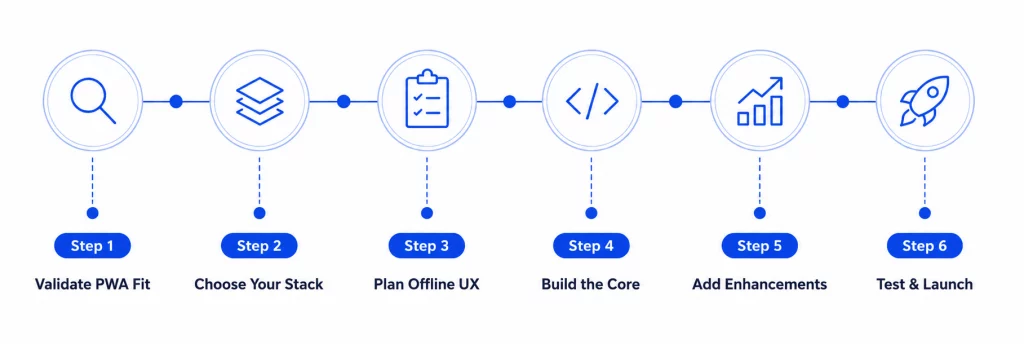
Step 1: Confirm a PWA Is Actually Right for This Product
The first step in any development project should be asking a simple question: Is this the right solution for my business?
Before writing a single line of code, consider these three questions:
- Does most of your traffic come from the web (search, social media, email, etc.)?
- Can your core features work within the capabilities of modern web browsers?
- Are you comfortable with iOS users typically installing PWAs at lower rates than Android users?
In general, native apps tend to deliver higher engagement among users who install them, but acquiring those users is often more expensive. PWAs, on the other hand, reduce friction by allowing users to access your app instantly through the web, though install rates are typically lower. The key is weighing these trade-offs against your business goals, target audience, and budget.
If you want the benefits of a PWA but still need app store visibility, consider solutions such as Capacitor, PWABuilder, or Trusted Web Activities (for Android). It’s best to make this decision early, rather than trying to add it later in the development process.
Step 2: Pick the Stack – (Framework, Service Worker Tooling, and Hosting)
Once you’ve decided a PWA is the right fit, it’s time to choose the technology stack that will power it.
First, you’ll need a development framework. Popular options include React, Vue, Angular, and Svelte. All four are capable of supporting production-ready PWAs, so the decision usually comes down to your team’s experience and the needs of the project rather than differences in PWA functionality. If you’re building progressive web apps with React, frameworks like Next.js are a common choice.
Next, you’ll need tools to support key PWA features such as offline access, caching, and performance optimization. Many development teams rely on solutions like Workbox because they simplify implementation and reduce maintenance challenges.
You’ll also need a hosting platform that supports secure HTTPS connections and reliable deployment. Popular options include Vercel, Netlify, Cloudflare Pages, and AWS Amplify.
Step 3: Define the Offline UX Strategy Before You Build It
What offline features do your users actually need?
Rather than trying to make every feature available offline, focus on the ones that will have the biggest impact on the user experience.
For instance, articles, saved items, dashboards, and previously viewed content may be valuable offline, while complex actions like multi-step forms and checkout processes can often wait until the user is back online.
You’ll also need to decide how different types of content should be cached. Static assets and images can be stored locally for faster loading, while frequently updated content may need to refresh whenever a connection is available. The goal is to balance performance with data freshness.
The offline design is also key. A simple “You’re offline” message isn’t much of a user experience. Users should know what content is available, what actions they can still take, and whether anything will automatically sync once they reconnect.
Step 4: Build the Core – Manifest, Service Worker, Responsive Shell
Now it’s time to build the foundation of your PWA.
Start with the web app manifest. This file tells browsers how your app should look and behave when installed. Make sure your icons are properly configured, define your app’s display mode, and set your theme colors correctly. Small mistakes here can create problems during the installation process.
Next comes the service worker, which powers many of the features that make PWAs unique. This is what enables capabilities like offline access, caching, and faster load times. It’s important to plan your caching strategy from the beginning so updates can be delivered smoothly as your app evolves.
You’ll also need a responsive app shell that works seamlessly across devices. Real users will access your PWA on different devices, screen sizes, and network conditions, so testing in real-world environments is essential.
Step 5: Add the Progressive Enhancements
The next step? Adding progressive enhancements to make the app feel more advanced.
Start with install prompts. Don’t show them the second someone lands on your site. Instead, wait until users have shown real intent, such as returning more than once, completing a key action, or saving an item. A prompt that appears too early can feel intrusive and may hurt engagement.
The same applies to push notifications. Instead of requesting permission on page load, ask when users have a clear reason to say yes, such as after they save an item, place an order, or opt into updates. If users deny permission, many won’t return later to change that setting.
Other features, such as background sync, Web Share, and app badges, should be added based on real user value, not just because they’re available. Each enhancement adds another layer to maintain, so it should support a clear purpose.
Pro tip: Don’t overlook iOS compatibility. Test push notification flows on supported iOS versions, verify the “Add to Home Screen” experience, and ensure that splash screens, icons, and status bar styles appear as intended.
Step 6: Test, Deploy, Measure
Before launch, test on real devices, not just browser emulators. Tools can help catch issues, but nothing replaces testing on actual iPhones, Android devices, and a variety of network conditions.
Next, monitor performance. Tools like Google’s Lighthouse can help identify performance issues, but real user data tells the real story. Pay close attention to Core Web Vitals and other metrics that impact the user experience.
When it’s time to deploy, remember that PWA updates aren’t always instant. Because of caching and service workers, users may not see the latest version right away, so it’s important to have a clear update strategy in place.
Finally, measure whether the PWA is actually delivering value. Look at metrics like install rates, return visits, push notification opt-ins, engagement, and offline usage. After all, just because a feature exists doesn’t mean people are using it.
How Long Does It Take to Build a Progressive Web App?
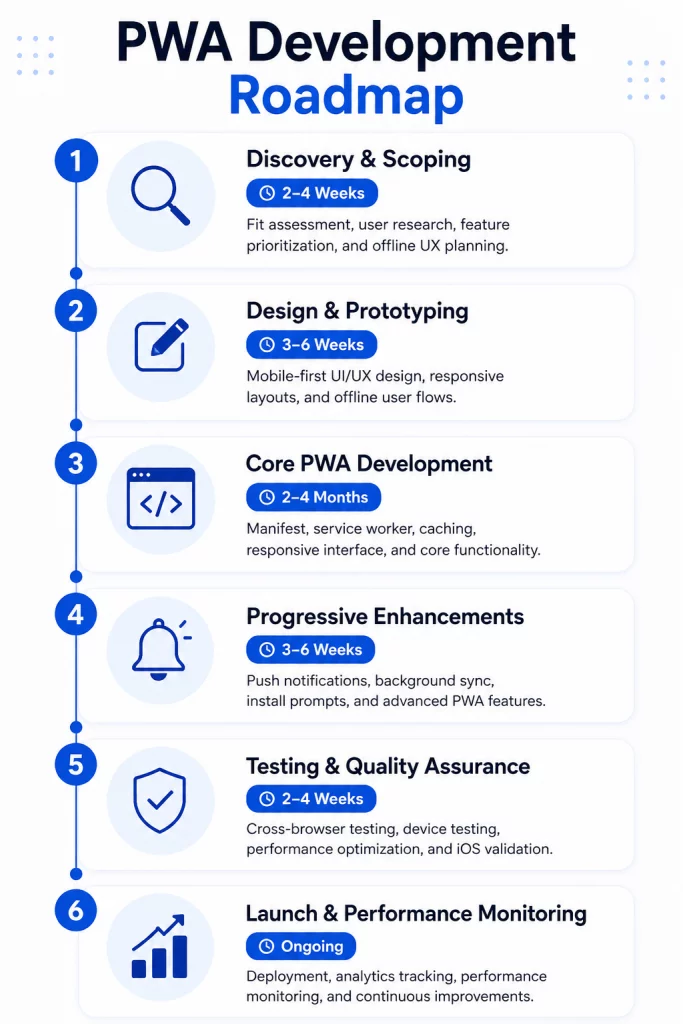
Building progressive web apps typically takes 4 to 6 months for a moderately complex project, though timelines can vary depending on features, integrations, and overall complexity.
To give you a better idea of how that time is distributed across the development process, take a look at the timeline below.
Cost of Building a Progressive Web App
The cost of building a progressive web app starts at around $20,000 for simpler projects, while custom PWAs typically range from $50,000 to $200,000+ depending on their complexity.
According to Microsoft Edge, “PWAs have a much lower cross-platform development cost than compiled apps that require a specific, separate codebase for each platform, such as Android, iOS, and each desktop operating system.”
Based on typical North American development rates, here’s how those costs are generally distributed across the project lifecycle:
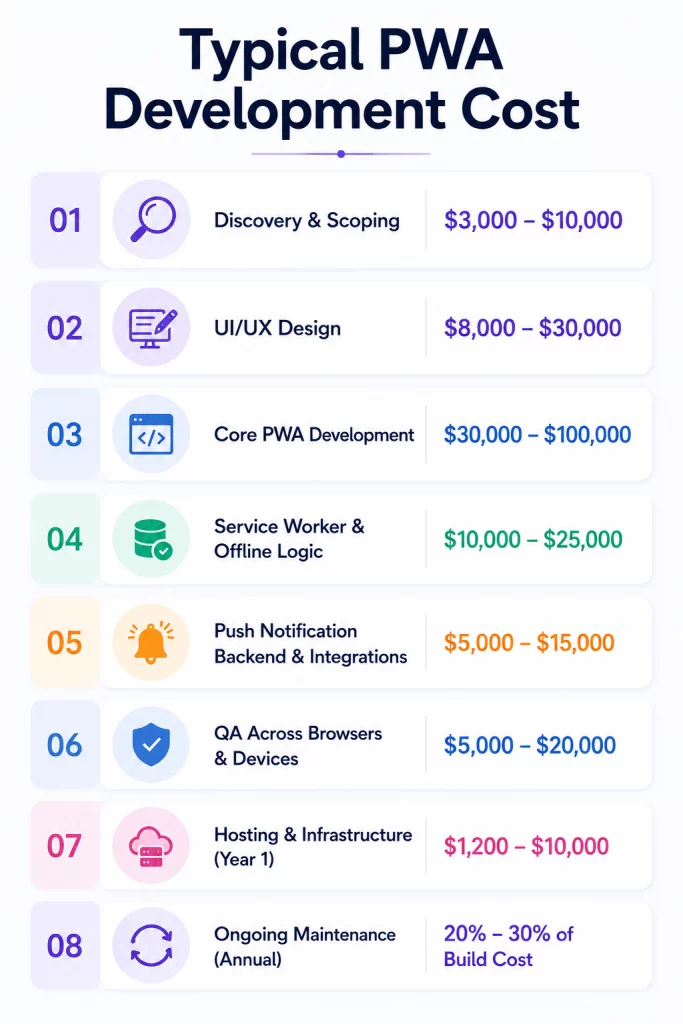
Looking for a more accurate estimate? Our software development services can help you determine the scope and cost of your project.
Common Pitfalls When Building a Progressive Web App
As a company that specializes in custom web application development, it’s our responsibility to point out some of the most common mistakes teams make when building PWAs.
Here are six pitfalls we see time and time again, and how you can avoid them.
- Treating PWA development as a checklist. Passing a PWA audit doesn’t automatically mean you’re delivering a great user experience. Technical requirements matter, but so does testing how users actually interact with the app, especially when offline.
- Trying to make everything work offline. Not every feature needs offline functionality. Focus on user journeys that provide the most value when connectivity is limited instead of trying to support every possible scenario.
- Showing install and notification prompts too early. Users are more likely to accept permissions when they understand the benefit. Introduce prompts after meaningful actions rather than on the first visit.
- Ignoring iOS-specific requirements. Installation flows, push notifications, standalone mode behavior, and storage limitations can differ significantly from Android. Test these experiences early in the development process.
- Neglecting your service worker update strategy. Because service workers control caching and offline functionality, failing to manage updates properly can result in users seeing outdated content long after a new version is released.
- Measuring downloads instead of usage. Install numbers only tell part of the story. Return visits, offline usage, push notification engagement, and overall user activity provide a better picture of whether your PWA is delivering value.
How to Choose a PWA Development Partner
Your development partner can have a major impact on the success of your app. Beyond writing code, they should help define key features, guide technical decisions, and ensure the final solution aligns with your business goals.
Here’s a quick checklist to help you choose the right partner:
- They have proven experience. Don’t just take their word for it. Request portfolios, case studies, or production URLs that you can test yourself. If they claim PWA expertise, you should be able to see it in action.
- They have real opinions and use them to guide you. A good partner doesn’t simply agree with every idea. They should be able to explain the pros and cons of different approaches, whether that’s choosing a technology stack, defining offline functionality, or selecting a caching strategy.
- They understand iOS-specific limitations. PWAs can behave differently on iOS than on Android. Your development team should be familiar with iOS installation flows, push notification requirements, storage limitations, and other platform-specific considerations.
- They prioritize performance. Speed and responsiveness are critical to the success of a PWA. Ask how they measure performance and what standards they use to ensure users receive a fast, reliable experience.
- They offer post-launch support. PWAs require ongoing maintenance, updates, and optimization. The right partner focuses on long-term success, not just getting the app launched.
Conclusion and Key Takeaways
Building progressive web apps can be an excellent choice for many businesses, but it’s important to evaluate your specific goals, audience, and feature requirements before deciding whether a PWA is the right solution.
A successful PWA requires more than just adding app-like functionality to a website. Companies need a clear offline UX strategy, thorough iOS testing, a thoughtful approach to permissions and notifications, and a reliable process for managing service worker updates over time. While some organizations have the resources to handle this in-house, many choose to partner with an experienced development company.
At Scopic, we help businesses evaluate, design, build, and maintain custom PWAs that align with their long-term goals. From strategy and UX design to development, testing, and post-launch support, our web development services can guide you through every stage of the process.
Ready to discuss your project? Contact our team today.
FAQs about Building Progressive Web Apps
What is a progressive web app, and how is it different from a normal website?
A progressive web app is a website that uses modern browser capabilities to deliver an app-like experience. Unlike a traditional website, a PWA can be installed on a user’s device, support offline functionality, send push notifications, and load faster through caching technologies.
How long does it take to build a progressive web app?
Building progressive web apps typically takes 4 to 6 months for a moderately complex project, though timelines can vary depending on features, integrations, and overall complexity.
How much does it cost to build a progressive web app?
The cost of building a progressive web app can start at around $20,000 for a simple project and exceed $200,000 for a highly customized solution. The final cost depends on factors such as design complexity, offline functionality, integrations, testing requirements, and ongoing maintenance needs.
Can I build a progressive web app with React?
Yes. React is one of the most popular frameworks for building progressive web apps. Many development teams use React alongside frameworks such as Next.js to create fast, scalable PWAs that support offline functionality, installation, and other app-like features.
Do progressive web apps work on iOS?
Yes, progressive web apps work on iOS devices. However, some features behave differently compared to Android. While Apple has improved PWA support over time, businesses should still test installation flows, push notifications, and other platform-specific functionality to ensure a consistent user experience.
Is a PWA better than a native app?
Neither option is “better.” PWAs are often ideal for businesses that prioritize accessibility, lower development costs, and cross-platform compatibility. Native apps are generally better suited for products that require deep device integration, advanced hardware access, or app store visibility as part of their growth strategy.
Do progressive web apps work offline?
Yes, PWAs can work offline when configured correctly. Using service workers and caching strategies, developers can make certain content and features available without an internet connection. However, not every feature needs to function offline, and the offline experience should be carefully planned during development.
Why build a progressive web app instead of a native one?
Businesses may choose PWAs because they can reach users across multiple devices with a single codebase. PWAs are easier to access, don’t require app store downloads, and can reduce development and maintenance costs. For many products, they provide the right balance of functionality, performance, and accessibility.

About Building Progressive Web Apps Guide
This guide was authored by Baily Ramsey.
Scopic provides quality and informative content, powered by our deep-rooted expertise in software development. Our team of content writers and experts have great knowledge in the latest software technologies, allowing them to break down even the most complex topics in the field. They also know how to tackle topics from a wide range of industries, capture their essence, and deliver valuable content across all digital platforms.